





Latest Version
1.4.1
October 11, 2024
Play mini golf on watch
Games
iOS
54.1 MB
0
Free
Report a Problem
More About Mini Golf - Watch Game
Ultimate Guide to Playing Games on Your Apple Watch and iPhone
Are you ready to elevate your gaming experience on your Apple Watch and iPhone? This guide will walk you through the essential steps to enjoy gaming on these devices, ensuring you maximize your fun and competition. Whether you're a seasoned player or a newcomer, you'll find valuable tips and tricks to enhance your gameplay.
Getting Started with Apple Watch Gaming
Playing games on your Apple Watch is a unique experience that combines convenience with fun. To begin, follow these simple steps:
Using the Digital Crown
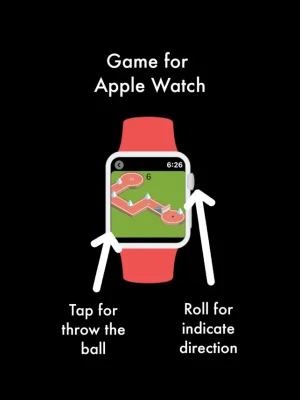
To navigate and mark your direction in the game, simply move the Digital Crown. This intuitive control allows you to aim accurately before making your move. Once you're ready to throw the ball, just tap the screen. This straightforward method makes gaming on the Apple Watch both engaging and easy to master.
Playing on Your iPhone or iPad
If you prefer a larger screen, the iPhone and iPad offer a fantastic gaming experience. Here’s how to play:
Swipe to Aim and Power Up
On your iPhone or iPad, you can swipe your finger across the screen to set your direction and power for the throw. Once you feel confident in your aim, simply release your finger to throw the ball. This tactile interaction enhances your control and makes the game more immersive.
Explore 25 Exciting Circuits
One of the highlights of gaming on these devices is the variety of circuits available. With 25 unique circuits to explore, each offers a different challenge. As you play, you can track your progress and see how you stack up against others.
Compete for High Scores
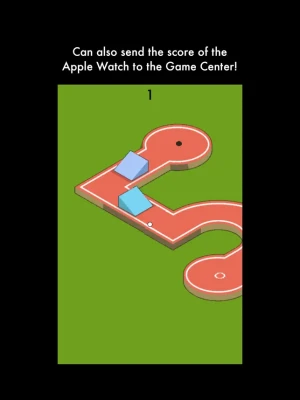
Each circuit features a High Score leaderboard, integrated with Game Center, allowing you to see who has achieved the best score. This competitive element adds excitement and encourages you to improve your skills. Don’t forget, there’s also a dedicated high score leaderboard for the Apple Watch, so you can showcase your achievements across devices.
Submitting Your Apple Watch Score
Want to see how you rank among your friends? Submitting your score from the Apple Watch is a breeze. Follow these steps:
Link Your Devices
First, ensure that your iPhone and Apple Watch are linked. This connection is crucial for score submission and tracking your performance.
Play and Submit Your Score
While playing on your Apple Watch, keep the companion app open on your iPhone. When you’re ready to submit your score, press the "Send Score" button on your Apple Watch. A screen will appear on your iPhone displaying your score, ready to be sent to the leaderboard.
Become the Best on Apple Watch!
With these tips, you can now enjoy gaming on your Apple Watch and iPhone to the fullest. Compete with friends, track your scores, and strive to be the best. The thrill of gaming is just a tap away, so get started and see how you rank!
Whether you’re aiming for high scores or just having fun, the combination of the Apple Watch and iPhone provides a seamless gaming experience. Happy gaming!
Rate the App
User Reviews














Popular Apps










Editor's Choice









