
Latest Version
5.6
December 18, 2024
Jeffrey Gaines
Games
iOS
116.2 MB
0
Free
Report a Problem
More About Mini Golf 3D: Classic
Mastering Mini Golf: A Comprehensive Interface Tutorial
Welcome to the ultimate guide for navigating the interface of your favorite mini golf game! Whether you're a seasoned player or a newcomer, understanding the controls is essential for enhancing your gameplay experience. This tutorial will walk you through the key features of the interface, ensuring you can focus on sinking those holes-in-one!
Adjusting Your Aim with Precision
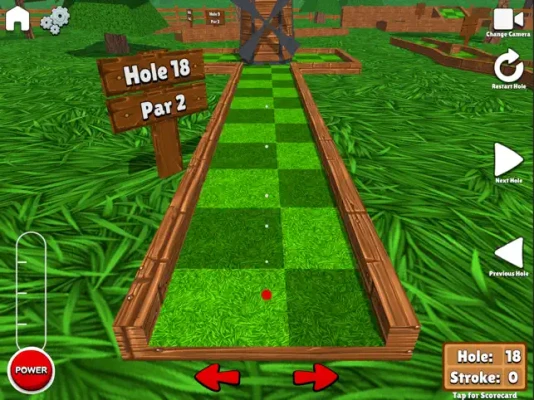
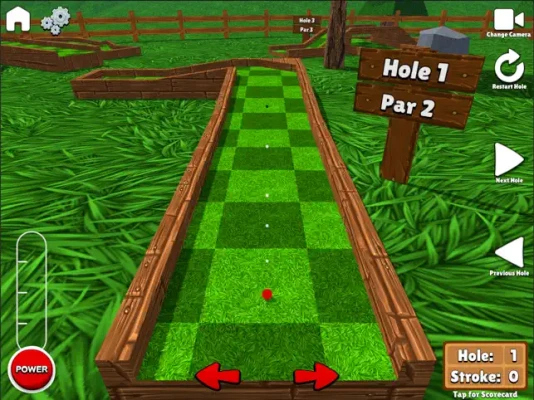
To achieve the perfect shot, you need to master the aiming controls. Simply tap or hold the left and right arrows on your screen to adjust your aim. This intuitive feature allows you to fine-tune your direction, ensuring that you can navigate tricky obstacles and hit your target with accuracy.
Power Meter: Control Your Shot Strength
Understanding the power meter is crucial for successful shots. To begin, tap the power button once to activate the meter. Watch as the power gauge fills up, then tap the button again to stop it at your desired strength. Timing is everything; too much power can send your ball flying off course, while too little may leave you short of the hole.
Exploring Different Camera Views
Enhance your gameplay by utilizing the various camera perspectives available. By pressing the camera button located in the top right corner, you can cycle through different views. This feature allows you to assess the course from multiple angles, helping you plan your shots more effectively and strategize your next move.
Keeping Track of Your Progress: The Scorecard
Monitoring your performance is key to improving your skills. The scorecard provides a comprehensive overview of your game. To access it, simply press the score displayed in the bottom right corner of the screen. This action will open or close the scorecard, allowing you to review your scores and track your progress throughout the game.
Tips for Success in Mini Golf
Now that you’re familiar with the interface, here are some additional tips to elevate your mini golf game:
- Practice Makes Perfect: Spend time in practice mode to get a feel for the controls and the physics of the game.
- Learn the Courses: Familiarize yourself with each course layout to identify potential challenges and plan your shots accordingly.
- Experiment with Angles: Don’t be afraid to try different angles and power levels to see what works best for each hole.
- Stay Calm Under Pressure: Keep your composure, especially during challenging holes. A steady hand leads to better shots.
Conclusion: Elevate Your Mini Golf Experience
By mastering the interface and utilizing the tips provided, you can significantly enhance your mini golf experience. Whether you’re playing Mini Golf 3D Classic or any other free mini golf game, these strategies will help you improve your skills and enjoy the game to its fullest. So grab your virtual putter, adjust your aim, and get ready to conquer the course!
Rate the App
User Reviews















Popular Apps










Editor's Choice









