Latest Version
January 30, 2026
Mad_Apps
Communication
Android
0
$1.99
com.madapps.madcontacts
Report a Problem
More About Mad Contacts Widget Pro
Ultimate Guide to Customizable Contact Widgets for Android
In today's fast-paced digital world, staying connected is more important than ever. Customizable contact widgets for Android devices offer a seamless way to manage your contacts and enhance your communication experience. This article explores the features and benefits of these widgets, helping you make the most of your Android home screen.
Versatile Widget Sizes and Layouts
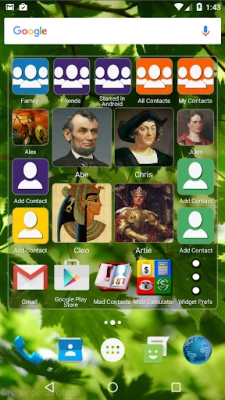
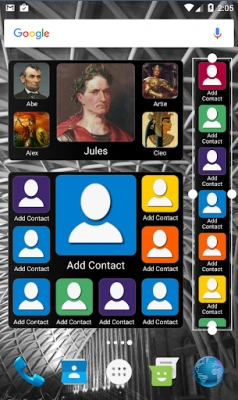
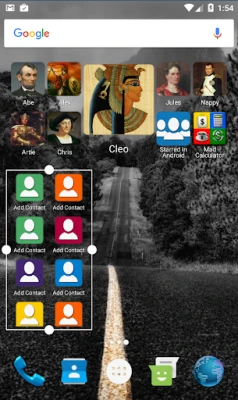
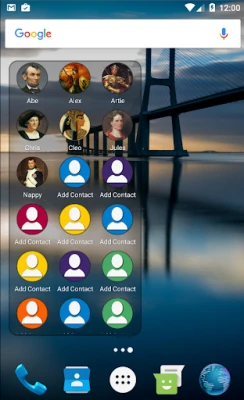
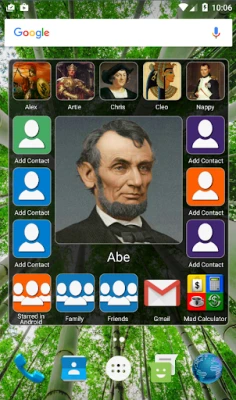
One of the standout features of customizable contact widgets is the variety of sizes and layouts available. Users can choose from multiple widget sizes, ranging from compact 1x1 to expansive 8x6, making it easy to fit your widget into any screen space. With over ten tailored layouts, you can select options that feature both small and large contact pictures, ensuring that your most important contacts are always visible.
Quick Actions for Effortless Communication
With quick action buttons, reaching out to your contacts has never been easier. Users can set up single-click actions for calling, texting, emailing, or messaging via WhatsApp and Viber. This feature allows you to add a contact multiple times, each with a different quick action, streamlining your communication process.
Scrollable Layouts with Customizable Photo Sizes
Scrollable layouts enhance user experience by allowing you to choose from ten different contact photo sizes. Whether you prefer a compact look or a more spacious layout, these options cater to your aesthetic preferences. Additionally, you can select different shapes for contact photos, including square, rounded square, or round, adding a personal touch to your widget.
App Shortcuts for Enhanced Functionality
Customizable contact widgets do more than just display contacts; they also allow you to add shortcuts to any app on your phone. By resizing your widget to fill the screen, you can create a scrolling home screen that features both your contacts and your favorite apps, making navigation effortless.
Organize Your Contacts with Ease
Efficiently managing your contacts is crucial for effective communication. With customizable contact widgets, you can fill your widget with specific contact groups, such as favorites, friends, or family. Sort these groups alphabetically or by the most recent interactions, ensuring that you can quickly find the contacts you need.
Independent Sorting for Multiple Contact Groups
For users with extensive contact lists, the ability to add shortcuts to multiple contact groups and sort them independently is invaluable. This feature allows for a more organized approach to managing your contacts, making it easier to access the people you communicate with most frequently.
Edit Contact Groups Directly from Your Widget
With the Mad Contact Groups feature, users can edit their contact groups directly from the widget. This functionality ensures that your contact list remains up-to-date without the need to navigate through multiple menus. Additionally, group photos set in Mad Contact Groups will sync seamlessly with the Mad Contact Widget, providing a cohesive look.
Comprehensive Support for Messaging Apps
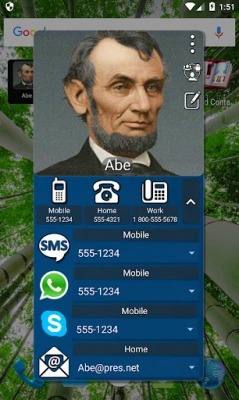
Customizable contact widgets support a variety of messaging platforms, including Skype, WhatsApp, and Viber. Users can choose to show or hide buttons for calls, SMS, Skype, WhatsApp, Viber, and email in the widget preferences, tailoring the widget to their specific communication needs.
Personalize Your Widget's Appearance
Customization extends beyond functionality; users can personalize the appearance of their widgets as well. Choose any color for the text, border, and background of your widget, with background transparency options ranging from 0% to 100%. This level of customization allows you to create a widget that perfectly matches your home screen aesthetic.
Convenient Access to Contact Information
Customizable contact widgets keep your most-used contact information at your fingertips. The widget retains the last selected phone number, SMS number, WhatsApp number, Viber number, and email address for all your contacts, making it easy to reach out without searching through your contact list.
Quick Access with Large Icons
Designed for efficiency, the contact screen features large phone icons at the top, allowing you to quickly call your desired number. This user-friendly design ensures that you can connect with your contacts without any hassle.
Tablet Compatibility for Broader Use
Customizable contact widgets are also compatible with tablets, provided you have telephony services and a SIM card for calling or SMS functionality. This versatility ensures that you can manage your contacts effectively, regardless of the device you are using.
How to Add the Widget to Your Home Screen
Adding a customizable contact widget to your home screen is simple. For Android 5 and above, long-press the background and select widgets. For Android 4, navigate to your apps screen and choose the widgets tab at the top. This straightforward process allows you to enhance your home screen in just a few taps.
Contact Us for Support
If you have any questions or encounter any issues, feel free to reach out to us. We are here to help you make the most of your customizable contact widgets. You can contact us at madapps4android@gmail.com or visit our Facebook page for promotions and updates on our apps.
In conclusion, customizable contact widgets for Android devices offer a powerful way to enhance your communication experience. With versatile layouts, quick actions, and extensive customization options, these widgets are designed to meet the needs of modern users. Start optimizing your home screen today!
Rate the App
User Reviews















Popular Apps










Editor's Choice









