

Latest Version
March 17, 2026
Mad_Apps
Communication
Android
0
Free
com.madapps.madcontactsads
Report a Problem
More About Mad Contacts Widget
Ultimate Guide to Customizable Contact Widgets for Your Android Device
In today's fast-paced digital world, staying connected with friends, family, and colleagues is essential. One of the most effective ways to streamline your communication is by utilizing customizable contact widgets on your Android device. This article explores the features and benefits of these widgets, helping you enhance your home screen experience.
Versatile Widget Sizes and Layouts
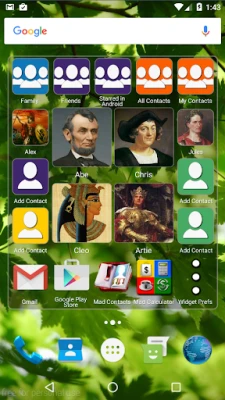
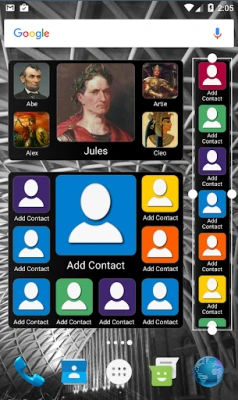
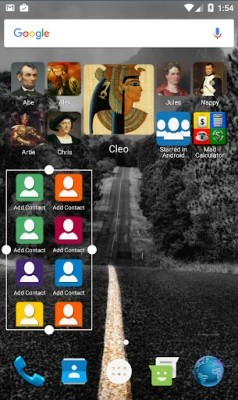
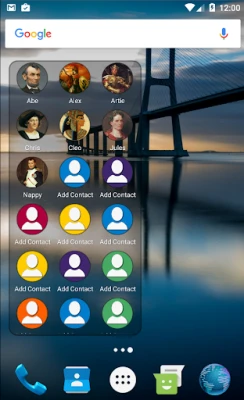
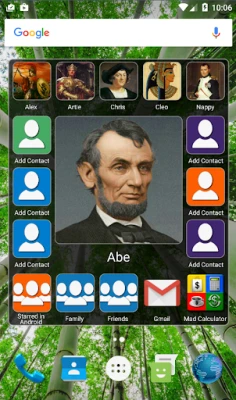
Choose from a variety of widget sizes and over ten tailored layouts to suit your preferences. Whether you prefer small or large contact pictures, the options are plentiful. For those who desire flexibility, a fully resizable widget is available, allowing dimensions from 1x1 to 8x6 on larger devices. You can manage anywhere from 2 to 999 contacts effortlessly!
Quick Actions for Instant Connectivity
With quick action buttons, reaching your contacts has never been easier. A single click connects you directly to your chosen contact, saving you time and effort. This feature is particularly useful for busy individuals who need to communicate swiftly.
Scrollable Layouts with Customizable Contact Photos
Enjoy scrollable layouts that offer ten different contact photo sizes. You can select from various shapes, including square, rounded square, or round, to match your aesthetic preferences. This level of customization ensures that your widget not only functions well but also looks great on your home screen.
Integrate Shortcuts for Enhanced Functionality
Maximize your widget's potential by adding shortcuts to any apps on your phone. This feature allows you to create a scrolling home screen that includes both your favorite contacts and essential applications, making it easier to access everything you need in one place.
Organize Your Contacts with Ease
Fill your widget with specific contact groups, such as favorites, friends, or family, and sort them alphabetically or by the most recent interactions. This organization helps you find the right person quickly, enhancing your overall communication experience.
Independent Sorting for Multiple Contact Groups
Add shortcuts to multiple contact groups and sort them independently. This feature allows for greater flexibility in managing your contacts, ensuring that you can access the right group without confusion.
Edit Contact Groups Directly from Your Widget
With the Mad Contact Groups feature, you can edit your contact groups directly from the widget. This seamless integration allows for quick updates and changes, keeping your contact list organized and up-to-date.
Sync Group Photos Effortlessly
Group photos set in Mad Contact Groups will automatically sync with the Mad Contact Widget. This ensures that your contact visuals remain consistent across your device, enhancing your user experience.
Support for Popular Communication Apps
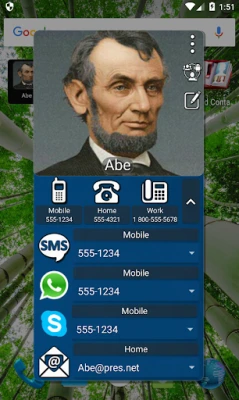
The widget supports popular communication platforms such as Skype, WhatsApp, and Viber. You can easily show or hide call, SMS, Skype, WhatsApp, Viber, and email buttons by adjusting the widget preferences. This feature allows you to customize your communication options based on your needs.
Customizable Aesthetics for Your Widget
Personalize your widget by selecting any color for the text, border, and background. The widget background transparency can be adjusted from 0% to 100%, allowing for a fully transparent background if desired (available in the paid version). This level of customization ensures that your widget complements your home screen design.
Keep Track of Contact Information
The widget retains the last selected phone number, SMS number, Skype number, WhatsApp number, Viber number, and email address for all your contacts. This feature simplifies communication by allowing you to quickly access the most relevant contact information.
Tablet Compatibility
This widget is compatible with tablets, provided you have telephony services and a SIM card for making calls or sending SMS. Enjoy the same level of functionality and customization on your larger devices.
How to Add the Widget to Your Home Screen
To add the widget to your home screen on Android 5 and above, simply long-press the background and select widgets. For Android 4 users, navigate to your apps screen and choose the widgets tab at the top. This straightforward process allows you to enhance your home screen quickly.
Free Version with Ads
Note that this is the free ad-supported version of the widget. While it includes some banner ads, it offers a fantastic way to experience the features without any cost. However, customization options, such as color adjustments, are limited in this version.
Contact Us for Support
If you have any questions or encounter any issues, please reach out to us. We are here to help you make the most of your widget experience!
Email: madapps4android@gmail.com
Follow us on Facebook for promotions and updates: Mad Apps Facebook Page
Enhance your Android experience today with customizable contact widgets that keep you connected and organized!
Rate the App
User Reviews















Popular Apps










Editor's Choice









