

Latest Version
Version
10.38
10.38
Update
September 28, 2026
September 28, 2026
Developer
TechMitten LLC
TechMitten LLC
Categories
Tools
Tools
Platforms
Android
Android
Downloads
0
0
License
Free
Free
Package Name
com.lmsa.app
com.lmsa.app
Report
Report a Problem
Report a Problem
More About LMSA for LM Studio & Ollama
LMSA – Private AI Chat App: Local LLM, Voice Chat, Ollama, LM Studio & OpenRouter for Android
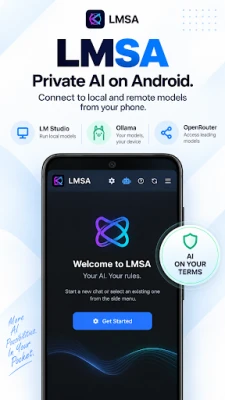
Turn your Android phone or tablet into a powerful, private AI assistant. LMSA is a local LLM chat app and voice assistant that connects to on-device AI servers like LM Studio and Ollama, or cloud models via OpenRouter — so you can chat or talk with the world's best AI chatbots privately, securely, and completely on your terms.
Run DeepSeek, Llama 3, Mistral, Phi, Qwen, Claude, or Gemini — LMSA is the fastest, cleanest, and most private way to use AI on Android, whether you want a fully offline AI chatbot or instant access to cloud LLMs.
🔒 PRIVATE AI CHAT & VOICE ASSISTANT — YOU ARE IN CONTROL
• On-Device Encryption: Your local chat database is fully encrypted on your device for total privacy.
• Privacy First: No message tracking, ever. All chats are stored locally on your device.
• Local-First AI: Conversations stay on your device and local network — true offline AI.
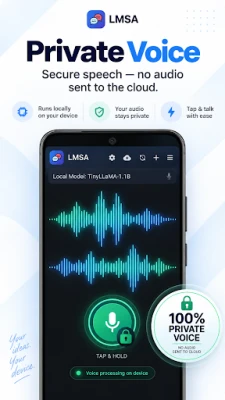
• Private Voice Chat: Talk to your AI and hear it reply, with every expressive voice included for free. Speech recognition and text-to-speech run entirely on-device, so your voice audio is never uploaded or stored remotely — with local models or OpenRouter.
• Direct Cloud Access: OpenRouter requests go straight to the provider — no middleman servers.
• Biometric Lock: Secure your AI chats with fingerprint or face unlock.
🆓 FREE FEATURES INCLUDE:
• Multilingual Interface: Fully localized with full support for Spanish, Russian, Simplified Chinese, and German.
• Unlimited Chat: No daily limits on core conversations with your local or cloud LLM.
• Local & Cloud Backends: Connect easily to Ollama, LM Studio, or OpenRouter.
• Custom Endpoint Support: Connect directly to any compatible AI server.
• Core Web Search: 2 live web searches per day for up-to-date answers.
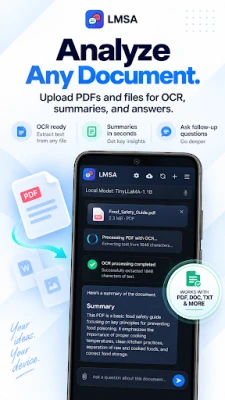
• File Attachments & Text-to-Speech: Feed documents locally and listen to AI responses.
• Full Voice Chat: Speak to any connected LLM and hear it respond, with all natural voices unlocked and processed on-device — free for every user.
• Auto Discovery: Scan your local network to find your AI server automatically.
👑 LMSA PREMIUM (ONE-TIME LIFETIME LICENSE, NO SUBSCRIPTION)
🎨 Unlimited AI Image Generation: Use the /image prefix directly in chat.
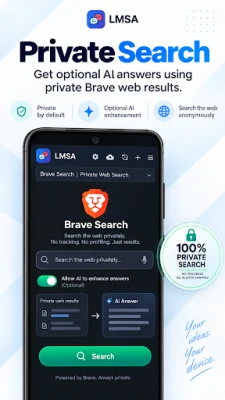
🌐 Unlimited Brave Web Search: Real-time news and up-to-date information.
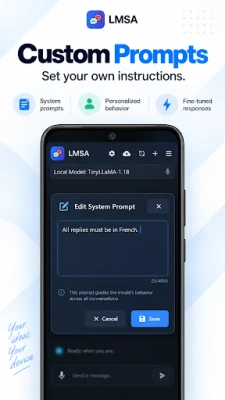
🎛️ Full Parameter & Context Control: Custom system prompts, adjustable max tokens.
🚀 Save Custom Endpoints: Switch between multiple AI server profiles instantly.
👥 Templates & Personas: Build and chat with custom AI characters.
📥 Import/Export Chats: Back up and move your local conversation history.
🔌 True Offline Mode: Run completely offline with local models on your trusted network.
🚫 Ad-Free Experience & Premium Support: Priority email assistance, zero distractions.
🤖 COMPATIBLE WITH LEADING LLMs
• Full support for GGUF models on LM Studio (PC/Mac).
• Full support for Ollama servers and compatible open-source models.
• Instant access to 100+ cloud LLMs via OpenRouter with your API key.
• Thinking Mode: See the full reasoning chain for models like DeepSeek-R1.
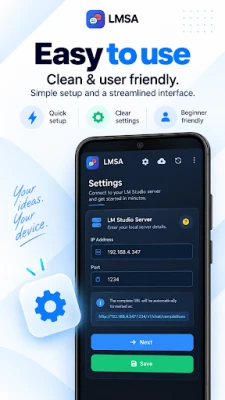
🛠️ EASY SETUP IN MINUTES
• Local AI (LM Studio / Ollama):
• Install LM Studio or Ollama on your PC or Mac.
• Load a model and start the local server.
• Connect your phone to the same Wi-Fi network.
• Enter the server IP and port in LMSA — start chatting.
• Cloud AI (OpenRouter):
• Get an OpenRouter API key at openrouter.ai.
• Enter your key in LMSA settings and start chatting instantly.
🧑💻 PERFECT FOR:
• AI enthusiasts experimenting with local language models
• Privacy-focused users who refuse to send data to big tech
• Developers, researchers, and power users building custom AI workflows
📋 REQUIREMENTS:
Android 6.0 or higher
LM Studio/Ollama on PC/Mac (same Wi-Fi) OR an OpenRouter API key
⚠️ Notice: LMSA is an independent app, not affiliated with LM Studio, Ollama, or OpenRouter.
Run DeepSeek, Llama 3, Mistral, Phi, Qwen, Claude, or Gemini — LMSA is the fastest, cleanest, and most private way to use AI on Android, whether you want a fully offline AI chatbot or instant access to cloud LLMs.
🔒 PRIVATE AI CHAT & VOICE ASSISTANT — YOU ARE IN CONTROL
• On-Device Encryption: Your local chat database is fully encrypted on your device for total privacy.
• Privacy First: No message tracking, ever. All chats are stored locally on your device.
• Local-First AI: Conversations stay on your device and local network — true offline AI.
• Private Voice Chat: Talk to your AI and hear it reply, with every expressive voice included for free. Speech recognition and text-to-speech run entirely on-device, so your voice audio is never uploaded or stored remotely — with local models or OpenRouter.
• Direct Cloud Access: OpenRouter requests go straight to the provider — no middleman servers.
• Biometric Lock: Secure your AI chats with fingerprint or face unlock.
🆓 FREE FEATURES INCLUDE:
• Multilingual Interface: Fully localized with full support for Spanish, Russian, Simplified Chinese, and German.
• Unlimited Chat: No daily limits on core conversations with your local or cloud LLM.
• Local & Cloud Backends: Connect easily to Ollama, LM Studio, or OpenRouter.
• Custom Endpoint Support: Connect directly to any compatible AI server.
• Core Web Search: 2 live web searches per day for up-to-date answers.
• File Attachments & Text-to-Speech: Feed documents locally and listen to AI responses.
• Full Voice Chat: Speak to any connected LLM and hear it respond, with all natural voices unlocked and processed on-device — free for every user.
• Auto Discovery: Scan your local network to find your AI server automatically.
👑 LMSA PREMIUM (ONE-TIME LIFETIME LICENSE, NO SUBSCRIPTION)
🎨 Unlimited AI Image Generation: Use the /image prefix directly in chat.
🌐 Unlimited Brave Web Search: Real-time news and up-to-date information.
🎛️ Full Parameter & Context Control: Custom system prompts, adjustable max tokens.
🚀 Save Custom Endpoints: Switch between multiple AI server profiles instantly.
👥 Templates & Personas: Build and chat with custom AI characters.
📥 Import/Export Chats: Back up and move your local conversation history.
🔌 True Offline Mode: Run completely offline with local models on your trusted network.
🚫 Ad-Free Experience & Premium Support: Priority email assistance, zero distractions.
🤖 COMPATIBLE WITH LEADING LLMs
• Full support for GGUF models on LM Studio (PC/Mac).
• Full support for Ollama servers and compatible open-source models.
• Instant access to 100+ cloud LLMs via OpenRouter with your API key.
• Thinking Mode: See the full reasoning chain for models like DeepSeek-R1.
🛠️ EASY SETUP IN MINUTES
• Local AI (LM Studio / Ollama):
• Install LM Studio or Ollama on your PC or Mac.
• Load a model and start the local server.
• Connect your phone to the same Wi-Fi network.
• Enter the server IP and port in LMSA — start chatting.
• Cloud AI (OpenRouter):
• Get an OpenRouter API key at openrouter.ai.
• Enter your key in LMSA settings and start chatting instantly.
🧑💻 PERFECT FOR:
• AI enthusiasts experimenting with local language models
• Privacy-focused users who refuse to send data to big tech
• Developers, researchers, and power users building custom AI workflows
📋 REQUIREMENTS:
Android 6.0 or higher
LM Studio/Ollama on PC/Mac (same Wi-Fi) OR an OpenRouter API key
⚠️ Notice: LMSA is an independent app, not affiliated with LM Studio, Ollama, or OpenRouter.
Rate the App
Add Comment & Review
User Reviews
Based on 0 reviews
No reviews added yet.
Comments will not be approved to be posted if they are SPAM, abusive, off-topic, use profanity, contain a personal attack, or promote hate of any kind.












More »

Popular Apps

Nova BrowserJef Studios

Throne WishlistThrone.com

Dark Web Browser : OrNETStronger Apps

LINE: Calls & MessagesLINE (LY Corporation)

XENO; Plan, AutoSave & InvestXENO Investment

Rogue SlimeQuest Seeker Games

Дядя Ваня VPNKONDAKOV

PrivacyWallPrivacyWall

Roman empire games - AoD RomeRoboBot Studio

Robinhood WalletRobinhood
More »
Editor's Choice

Grim Soul: Dark Survival RPGBrickworks Games Ltd

Craft of Survival - Gladiators101XP LIMITED

Last Shelter: SurvivalLong Tech Network Limited

Dawn of Zombies: Survival GameRoyal Ark

Merge Survival : WastelandStickyHands Inc.

AoD Vikings: Valhalla GameRoboBot Studio

Viking Clan: RagnarokKano Games

Vikings: War of ClansPlarium LLC

Asphalt 9: LegendsGameloft SE

Modern Tanks: War Tank GamesXDEVS LTD