


Latest Version
1.43
January 05, 2026
Kotak Mahindra Bank Ltd.
Finance
Android
0
Free
com.kotak.bank.mobile
Report a Problem
More About Kotak Bank
Why You Should Choose the Kotak Mobile Banking App for Your Financial Needs
In today's fast-paced digital world, managing your finances efficiently is crucial. The Kotak Mobile Banking App stands out as a comprehensive solution for all your banking needs. With its user-friendly interface and a plethora of features, this app is designed to simplify your financial management. Here’s why you should consider using the Kotak Mobile Banking App.
All-in-One Dashboard for Seamless Banking
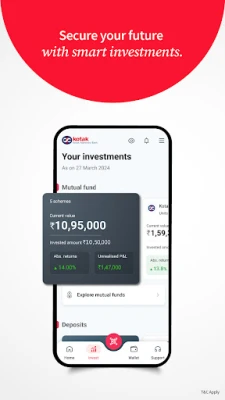
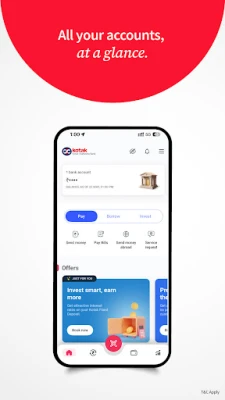
The Kotak Mobile Banking App offers an all-in-one dashboard that allows you to access all your Kotak Bank accounts, cards, deposits, investments, debts, and transactions in one convenient location. Enjoy real-time updates on your financial activities, automate your bill payments, track your EMIs, and easily download bank statements. This feature ensures that you have a complete overview of your financial health at your fingertips.
Smart Card Wallet for Enhanced Control
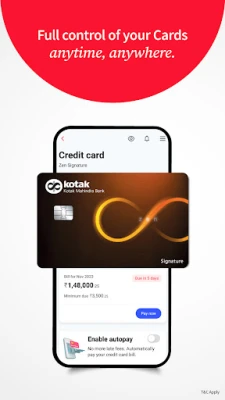
Managing your credit and debit cards has never been easier with the Smart Card Wallet feature. This functionality allows you to set transaction limits, generate PINs, lock or unlock your cards, and track your reward points—all from within the app. Additionally, you can convert large purchases into EMIs and receive in-app reminders for upcoming bill payments, ensuring you never miss a due date.
Fast & Secure UPI Payments
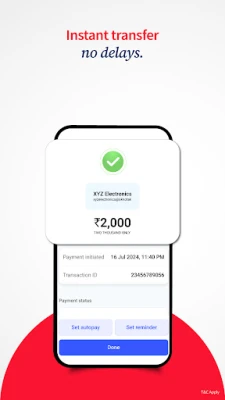
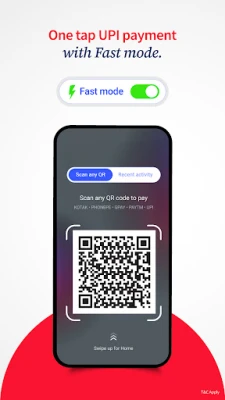
Experience the convenience of fast and secure UPI payments with the Kotak Mobile Banking App. Utilize the Fast Mode for instant transactions and fund transfers using QR codes or mobile numbers. The app supports NEFT, IMPS, and RTGS for high-value transfers, making it a versatile tool for all your payment needs.
Invest with Confidence
Take charge of your investments by opening a 3-in-1 demat account through the app. This feature allows you to save, spend, and invest effortlessly. Manage your Systematic Investment Plans (SIPs), invest in top-performing mutual funds, and activate ActivMoney to automatically sweep surplus funds into fixed deposits directly from your savings account. Monitor your wealth through a unified investment dashboard that keeps you informed about your financial growth.
Effortless Borrowing Options
Discover pre-approved loans tailored to your financial profile with the Kotak Mobile Banking App. Keep track of your loan details, including amount, balance, interest rates, and EMIs. Access essential documents like repayment schedules and interest certificates directly from the app, making borrowing a hassle-free experience.
Advanced Security Features
Your security is a top priority with the Kotak Mobile Banking App. Benefit from multi-layer encryption and biometric login options to keep your financial information safe. Use in-app OTPs for secure logins and transactions. If you encounter any issues, you can raise disputes and receive 24/7 support directly from the app, ensuring peace of mind while banking online.
Frequently Asked Questions (FAQs)
How do I open a Kotak Savings Account on the app?
To open a Kotak Savings Account, download the app, enter your mobile number, and tap on “Open Savings Account.” You will need your PAN, Aadhaar, and a quick video KYC to begin your onboarding process.
How can I make UPI payments?
Link your Kotak account to UPI, set your PIN, and start transacting. For quick payments, enable Fast Mode to enjoy one-tap transfers for amounts below ₹2000.
What is ActivMoney?
ActivMoney is a smart feature that automatically transfers funds exceeding a predefined threshold from your savings account into a fixed deposit, earning you higher interest. The best part? You can access your money anytime without breaking the FD.
How do I check my balance or get statements?
Check your account balance in real-time with an overview on your homepage. Tap on the balance to access all your account details, transactions, and download custom statements.
Can I transfer funds without adding a beneficiary?
Yes! Use the ‘Pay Your Contact’ feature to send money instantly using just a mobile number, UPI IDs, or QR codes—no beneficiary setup required.
Can I apply for credit cards or loans through the app?
Absolutely! You can apply for Kotak Credit Cards and pre-approved loans instantly through the app with minimal documentation and quick approval.
Getting Started with the Kotak Mobile Banking App
If you are an existing Kotak Net Banking or Mobile Banking user, simply download the app and log in using your Customer Relationship Number (CRN) and MPIN. New users can sign up using their active mobile number registered with Kotak Bank.
Download the Kotak Bank App – The Best Banking App in India
Join over 8 million users across India who trust Kotak Mahindra Bank for secure, smart, and seamless mobile banking. Experience the future of online banking, UPI payments, and personal finance—all in one app.
For support, call: 1860 266 2666
Disclosure: By downloading the Kotak Bank App, you consent to the Terms & Conditions and Privacy Policy of Kotak Mahindra Bank. For details, visit: Kotak Terms & Conditions.
Rate the App
User Reviews















Popular Apps










Editor's Choice









