
Latest Version
1.10-pre
August 18, 2024
Philipp Crocoll (Croco Apps)
Tools
Android
1
Free
keepass2android.keepass2android
Report a Problem
More About Keepass2Android Password Safe
Unlocking Security: The Ultimate Password Management App
In today's digital age, managing passwords securely is more crucial than ever. With the rise of cyber threats, having a reliable password management app can make all the difference. This article delves into the standout features of a top-tier password management application that ensures your sensitive information remains protected while offering convenience and ease of use.
Secure Password Storage
One of the most significant advantages of this app is its ability to store all your passwords in a securely encrypted vault. This means that your sensitive information is protected from unauthorized access, ensuring that only you can retrieve your passwords. The app employs advanced encryption techniques to safeguard your data, making it a trustworthy choice for anyone concerned about online security.
Compatibility with KeePass
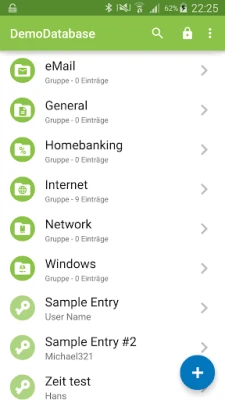
This password management app is compatible with various versions of KeePass, including v1 and v2, as well as KeePassXC, MiniKeePass, and numerous other KeePass ports. This compatibility allows users to seamlessly integrate their existing password databases into the app, making the transition smooth and hassle-free.
QuickUnlock Feature
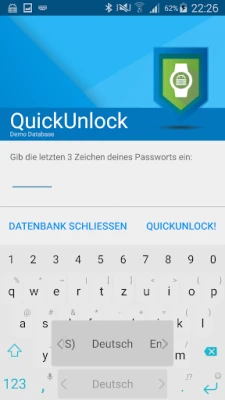
The QuickUnlock feature enhances user experience by allowing you to unlock your database with your full password just once. After the initial unlock, you can re-access your vault by typing only a few characters or using your fingerprint. This feature not only saves time but also adds an extra layer of convenience for users who frequently access their passwords.
Cloud Synchronization Options
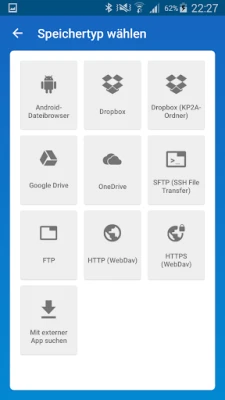
For those who require access to their passwords across multiple devices, the app offers robust cloud synchronization options. You can synchronize your vault using popular cloud services such as Dropbox, Google Drive, SFTP, WebDAV, and more. If you prefer to keep your data offline, the "Keepass2Android Offline" option is available for users who do not need cloud features.
AutoFill Service for Seamless Access
The app includes an AutoFill service and an integrated soft keyboard, allowing you to safely and easily input your passwords into websites and applications. This feature streamlines the login process, reducing the hassle of manually entering passwords while maintaining security.
Advanced Security Features
Beyond basic password management, this app boasts a range of advanced features designed to enhance security and usability. It supports various encryption algorithms, including AES, ChaCha20, and TwoFish, ensuring that your data remains secure. Additionally, the app offers support for several TOTP (Time-based One-Time Password) variants, enabling two-factor authentication for added protection.
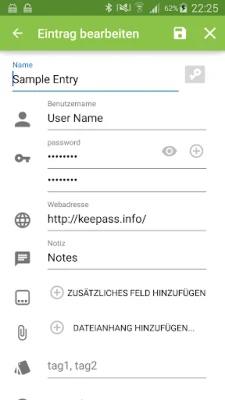
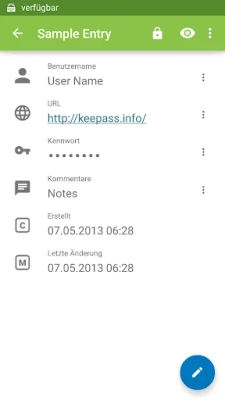
For users who prioritize hardware security, the app allows unlocking with a Yubikey, providing an extra layer of security. Other advanced features include customizable entry templates, child databases for sharing passwords securely, and much more, making it a comprehensive solution for password management.
Free and Open-Source
One of the most appealing aspects of this password management app is that it is free and open-source. This means that users can access the source code, contribute to its development, and ensure that their data is handled transparently. The open-source nature of the app fosters a community of users and developers who continuously work to improve its features and security.
Feedback and Community Support
Users are encouraged to report bugs and suggest features through the app's GitHub page. This platform allows for direct communication between users and developers, ensuring that the app evolves to meet the needs of its community.
Comprehensive Documentation
For those looking to maximize their use of the app, comprehensive documentation is available. This resource provides detailed information on how to use the app effectively, troubleshoot common issues, and explore its many features.
Understanding Required Permissions
Transparency is key when it comes to app permissions. Users can find an explanation regarding the required permissions on the app's privacy policy page. This ensures that users are fully informed about what data the app accesses and how it is used, reinforcing trust in the application.
Conclusion
In conclusion, this password management app stands out as a reliable and secure solution for anyone looking to manage their passwords effectively. With its robust features, compatibility with KeePass, and commitment to user privacy, it is an excellent choice for both individuals and businesses. By choosing this app, you can take control of your online security and enjoy peace of mind knowing that your passwords are safe and easily accessible.
Rate the App
User Reviews















Popular Apps










Editor's Choice









