

Latest Version
1.4.19
January 11, 2026
charlieyzj
Tools
Android
0
Free
com.supvan.katasymbol
Report a Problem
More About Katasymbol
Unlocking the Power of Label Printing: A Comprehensive Guide
In today's fast-paced world, efficient organization is key to productivity. One of the most effective tools for maintaining order is a reliable label printing application. This article delves into the essential features and functionalities of a top-tier label printing app, highlighting its user-friendly design and robust capabilities.
Understanding Permissions: MANAGE_EXTERNAL_STORAGE
To enhance user experience, the application requires the MANAGE_EXTERNAL_STORAGE permission. This permission allows the app to temporarily save preview images printed by users directly to their mobile device storage. Once saved, users can easily choose to upload these images to their preferred cloud storage solutions. This feature is particularly beneficial for users who wish to revisit previously edited content, ensuring that all modifications are easily accessible.
Seamless Excel File Importation
Another critical functionality of the application is its ability to import Excel files. Users can effortlessly retrieve Excel documents from their mobile storage and import them into the app. This feature is essential for generating data that users wish to print, streamlining the process of label creation. The app even transforms the user's print preview into a video format, allowing for a comprehensive review before finalizing the print job.
User-Friendly and Multifunctional
This label printing application stands out for its ease of use and multifunctionality. Users can enjoy a seamless experience without the need for account registration. All information is securely stored in local files, ensuring privacy and safety. The app empowers users to customize labels according to their preferences, offering a variety of templates suitable for different contexts.
Rich Selection of Templates
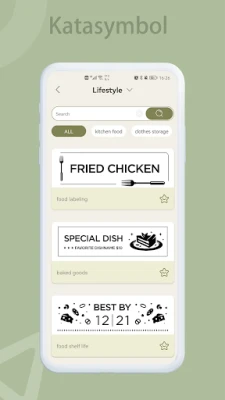
The application boasts an extensive library of templates, catering to a wide range of application scenarios. Whether you need labels for home organization, office use, or special events, the app has you covered. With one-click editing and printing capabilities, users can create and print labels quickly and conveniently, making it an ideal solution for busy individuals.
Multi-Functional Editing Tools
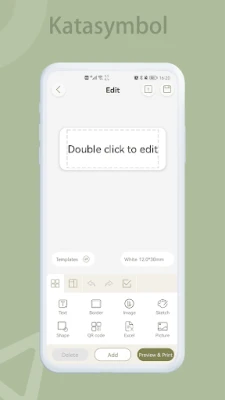
Editing labels is a breeze with the app's comprehensive set of tools. Users can type text, add dates and times, insert frames, images, sketches, icons, and shapes, and even import data from Excel. The app supports various editing functions, including object rotation, moving, copying, pasting, and deleting. This versatility caters to diverse editing needs, allowing users to create labels that truly reflect their style and requirements.
Diverse Design Choices for Creative Freedom
Creativity knows no bounds with the app's diverse design options. Users can choose from a wide array of fonts, frames, icons, and shapes to craft unique labels. The app is regularly updated with new additions, ensuring that users always have access to the latest design trends and tools.
Convenient Bluetooth Connectivity
Connecting to the label printer is effortless, thanks to the app's Bluetooth functionality. The smart recognition feature identifies label materials automatically, simplifying the setup process. Users can connect, edit, and print with ease, making label creation a hassle-free experience.
Memo Functionality for Enhanced Organization
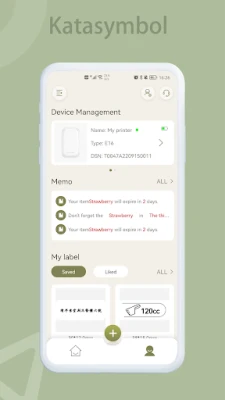
The app also includes a memo feature, allowing users to create labels for reminders and organization. This functionality helps users track and mark their belongings, alleviating concerns about misplaced items. Additionally, users can set reminders for expiration dates and other important events, further enhancing their organizational capabilities.
Conclusion: Elevate Your Label Printing Experience
In conclusion, this label printing application offers a powerful combination of user-friendly features, multifunctional editing tools, and creative design options. With its robust capabilities, users can efficiently manage their labeling needs, ensuring that organization is always within reach. Whether for personal or professional use, this app is an invaluable tool for anyone looking to streamline their labeling process.
Rate the App
User Reviews















Popular Apps










Editor's Choice









