

Latest Version
26.2.1
July 09, 2026
IQ Fiber
Tools
Android
0
Free
com.iqfiber.smarthome
Report a Problem
More About IQ Fiber Smart WiFi
Transform Your Smart Home Experience with IQ Fiber Smart WiFi
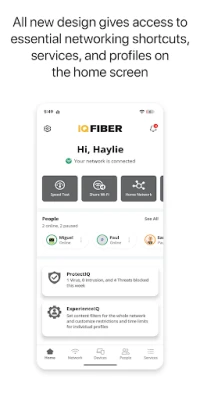
In today's digital age, a reliable and efficient WiFi network is essential for managing your smart home devices. With IQ Fiber Smart WiFi, you can take full control of your home network, ensuring seamless connectivity and enhanced performance. This article explores the features and benefits of IQ Fiber Smart WiFi, empowering you to optimize your smart home experience.
Prioritize Your Devices for Optimal Performance
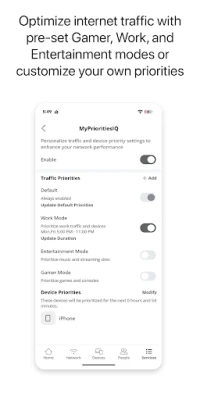
One of the standout features of IQ Fiber Smart WiFi is the ability to assign priority to specific devices on your network. Whether you’re streaming movies, playing online games, or working from home, you can ensure that your most important devices receive the bandwidth they need. This prioritization helps eliminate lag and buffering, providing a smoother experience for all users.
Implement Robust Parental Controls
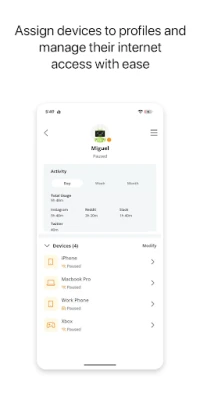
Keeping your family safe online is a top priority for many homeowners. With IQ Fiber Smart WiFi, you can easily implement parental controls that allow you to manage your children's internet access. Set time limits, block inappropriate content, and monitor online activity to create a safer browsing environment. These features give you peace of mind while allowing your kids to enjoy the benefits of the internet.
Create Custom Guest Networks
Hosting friends and family? With IQ Fiber Smart WiFi, you can create dedicated guest networks that keep your main network secure. This feature allows visitors to connect to the internet without accessing your personal devices or sensitive information. You can customize guest network settings, including bandwidth limits and access duration, ensuring a safe and enjoyable experience for your guests.
Monitor Network Usage with Ease
Understanding how your network is being used is crucial for optimizing performance. IQ Fiber Smart WiFi provides comprehensive insights into network usage, allowing you to see which devices are consuming the most bandwidth. This information helps you make informed decisions about device prioritization and network management, ensuring that your smart home operates at peak efficiency.
Perform Speed Tests for Optimal Connectivity
Regularly testing your internet speed is essential for maintaining a high-performance network. IQ Fiber Smart WiFi includes built-in speed test functionality, enabling you to check your connection speed at any time. By monitoring your speeds, you can identify potential issues and take corrective action, ensuring that your smart home devices always have the connectivity they need.
Manage Your SSID for Enhanced Security
Your SSID (Service Set Identifier) is the name of your WiFi network, and managing it effectively is key to maintaining security. With IQ Fiber Smart WiFi, you can easily change your SSID to something unique and memorable, making it harder for unauthorized users to access your network. Additionally, you can hide your SSID from public view, further enhancing your network's security.
Conclusion: Elevate Your Smart Home Experience
In conclusion, IQ Fiber Smart WiFi offers a comprehensive solution for managing your smart home network. With features like device prioritization, parental controls, guest networks, and detailed usage monitoring, you can create a seamless and secure online environment. Take control of your smart home experience today and enjoy the benefits of a reliable and efficient WiFi network.
Rate the App
User Reviews















Popular Apps










Editor's Choice









