
Latest Version
May 02, 2026
shuttletechnologies
Tools
Android
0
Free
com.netspeed.monitor.lite.android
Report a Problem
More About Internet Speed Meter Lite
Monitor Your Internet Speed in Real Time: A Comprehensive Guide
In today's digital age, understanding your internet speed and data usage is crucial for optimizing your online experience. With the right tools, you can effortlessly monitor your internet speed in real time and track app-wise data consumption through a user-friendly interface. This article delves into the essential features of an effective internet speed monitoring application, ensuring you stay informed and in control of your network usage.
Key Features of an Internet Speed Monitoring App
Live Speed Indicator
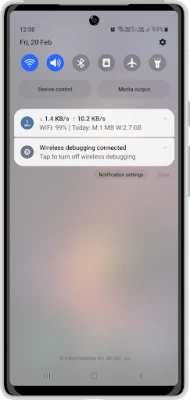
One of the standout features of a reliable internet speed monitoring app is the live speed indicator. This tool displays your real-time download and upload speeds directly in the status bar and notification panel. With this feature, you can instantly gauge your connection performance without needing to navigate away from your current tasks.
Comprehensive Speed Test
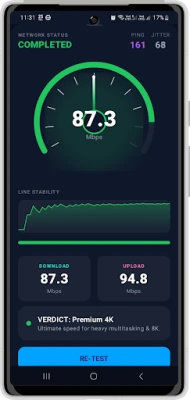
To truly understand your internet connection, a comprehensive speed test is essential. This feature measures various aspects of your connection, including:
- Download Speed: The rate at which data is transferred from the internet to your device.
- Upload Speed: The speed at which data is sent from your device to the internet.
- Ping: The response time of your connection, indicating how quickly your device can communicate with a server.
- Jitter: The variability in ping over time, which can affect the quality of streaming and gaming experiences.
App Usage Tracking
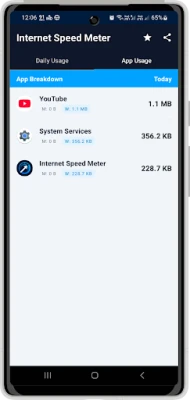
Understanding how much data each application consumes is vital for effective data management. The app usage tracking feature allows you to view data consumption by individual apps installed on your device. This insight helps you make informed decisions about your mobile and WiFi usage, ensuring you stay within your data limits.
Data Usage Statistics
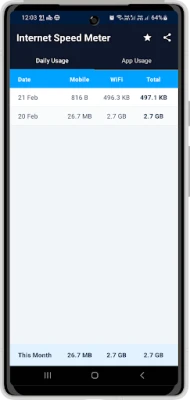
Keeping track of your data consumption is made easy with data usage statistics. This feature provides daily and monthly summaries of your mobile and WiFi usage, presented in simple charts. By visualizing your data consumption, you can identify trends and adjust your habits accordingly.
Multi-Language Support
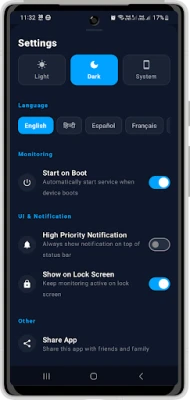
To cater to a diverse user base, many internet speed monitoring apps offer multi-language support. This ensures that users can access the app in their preferred language, enhancing usability and accessibility. Common languages include English and Hindi, among others.
Privacy & Permissions Disclosure
When using any application, privacy is a significant concern. A trustworthy internet speed monitoring app prioritizes user privacy by clearly disclosing its permissions. For instance, to enable the app usage feature, the app requires Usage Access Permission. This permission is solely used to display app-wise data usage statistics on your device, ensuring that all data processing occurs locally. Importantly, the app does not collect, store, or share your app usage data.
Other Necessary Permissions
In addition to usage access, the app may request other permissions necessary for its functionality, including:
- Network Monitoring: To track your internet connection effectively.
- Speed Testing Functionality: To conduct accurate speed tests.
- Foreground Service for Live Speed Display: To ensure real-time updates on your speed indicator.
Why Choose an Internet Speed Meter Lite?
Internet Speed Meter Lite is an excellent choice for users seeking to monitor their network usage with transparency and control. Its intuitive interface and robust features empower you to stay informed about your internet performance and data consumption. By utilizing this app, you can enhance your online experience, ensuring that you make the most of your internet connection.
Conclusion
In conclusion, monitoring your internet speed and data usage is essential for optimizing your online activities. With features like a live speed indicator, comprehensive speed tests, app usage tracking, and detailed data statistics, you can take control of your internet experience. Choose an app that prioritizes your privacy and offers multi-language support to ensure a seamless experience. Start monitoring your internet speed today and enjoy a more efficient online experience!
Rate the App
User Reviews















Popular Apps










Editor's Choice









