

Latest Version
1.8
July 28, 2026
Cezar Popescu
Tools
Android
1
Free
com.devicesentry
Report a Problem
More About Hardware Info: Device Sentry
Unlock Your Android's Potential with Device Sentry: The Ultimate Performance Monitoring Tool
In today's fast-paced digital world, understanding your Android device's performance is crucial, whether you're a developer, gamer, or simply a tech enthusiast. Device Sentry offers a comprehensive solution to analyze your device's performance, hardware health, and security status, all wrapped in a sleek Material 3 interface. This article delves into the key features of Device Sentry, showcasing how it can enhance your Android experience.
Real-Time System Monitoring
Device Sentry provides real-time system monitoring that allows users to keep a close eye on their device's performance metrics. With this feature, you can:
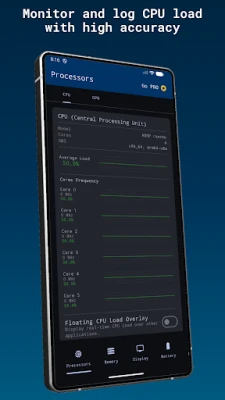
- Monitor CPU usage and GPU performance
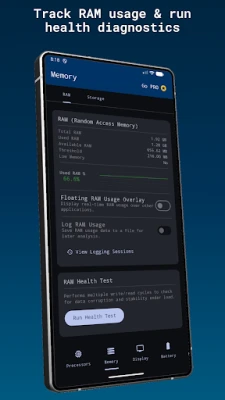
- Track RAM usage and storage activity
- Analyze network traffic in real time
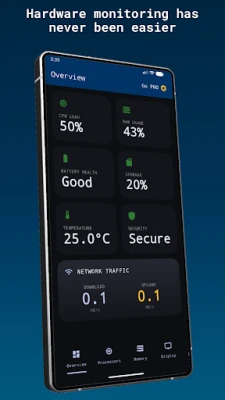
The application presents live CPU frequencies, memory consumption, and hardware statistics through fast and responsive dashboards, ensuring you have the most up-to-date information at your fingertips.
Comprehensive Hardware Information
Device Sentry grants access to detailed hardware information and device specifications, including:
- CPU and chipset details
- GPU specifications
- RAM and storage configurations
- Screen resolution and display metrics
- Android version and build information
- Thermal and temperature sensors
- Battery technology and status
This wealth of information empowers users to understand their device's capabilities and limitations better.
Advanced Hardware Health Tests
With Device Sentry, you can run advanced diagnostics and stress tests on critical components such as:
- CPU
- GPU
- RAM
- Storage
These tests help detect hardware instability, thermal throttling, and memory issues before they impact your gaming, multitasking, or productivity, ensuring a smooth user experience.
In-Depth Battery Analytics
Understanding your device's battery health is essential for optimal performance. Device Sentry offers advanced battery analytics that allow you to:
- Monitor battery health, voltage, and temperature
- Track charging speed and battery technology
- View battery charge cycle counts and advanced statistics on supported devices
This feature ensures you are always aware of your battery's condition, helping you manage power consumption effectively.
Network Diagnostics Made Easy
Device Sentry simplifies network diagnostics by providing detailed information about your Wi-Fi and cellular connections, including:
- Upload and download speeds
- Ping latency
- Local IP configuration
- Adapter information
- Connection status
With this information, you can troubleshoot connectivity issues and optimize your network performance.
Camera and Sensor Insights
Device Sentry also offers comprehensive diagnostics for your device's camera and sensors. Users can access:
Camera Diagnostics
- Lens specifications
- Aperture details
- ISO ranges
- Focal lengths
Sensor Monitoring
- Accelerometer
- Gyroscope
- Magnetometer
- Pressure sensor
- Proximity sensor
- Real-time sensor data
This feature allows users to ensure their device's camera and sensors are functioning optimally.
Robust Android Security Scan
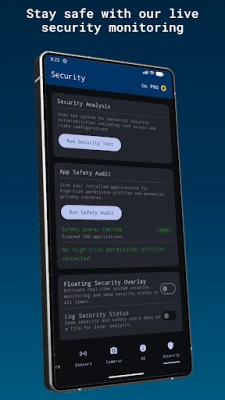
Security is paramount in today's digital landscape. Device Sentry includes a thorough Android security scan that checks essential settings such as:
- Root detection
- SELinux status
- ADB status
- Developer Options
- Device security configuration
Additionally, it performs an in-depth safety audit of all installed applications, ensuring your device remains secure.
Floating Overlays and Widgets for Quick Access
Device Sentry enhances user experience with floating overlays and widgets. You can:
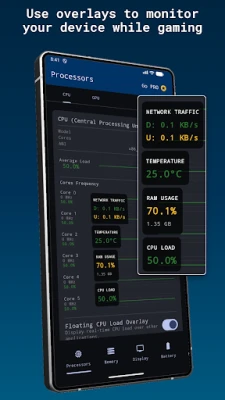
- Display CPU, RAM, and network statistics over other apps or games
- Add home screen widgets for quick battery and storage monitoring
This feature allows for seamless multitasking and quick access to vital information without interrupting your workflow.
System Logging and Session Analysis
Device Sentry enables users to record their device's performance over time, providing valuable insights through:
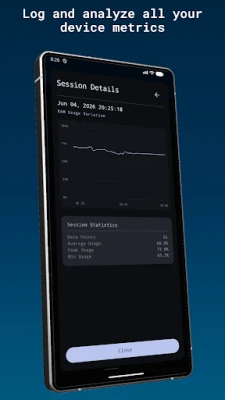
- Logging Sessions: Record performance data for CPU, RAM, network, temperature, and security.
- Detailed Analytics: Each session includes a dedicated "Session Details" screen with enhanced, high-precision graphs.
This functionality is perfect for users who want to analyze performance trends and make informed decisions about their device usage.
Device Sentry Pro: Professional Reporting
For those seeking a more in-depth analysis, Device Sentry Pro allows users to generate professional, detailed PDF reports of their logging sessions. These reports include:
- Summary statistics
- High-resolution variation graphs
- Raw data tables
These comprehensive reports are ideal for troubleshooting or performance benchmarking, providing users with the information they need to optimize their devices.
Privacy First: Your Data Stays Secure
Device Sentry prioritizes user privacy by processing all data locally on your Android device. No personal information, hardware statistics, or monitoring data is collected, stored, or transmitted to external servers. This commitment to privacy ensures that your data remains secure while you monitor your device's performance.
Rate the App
User Reviews















Popular Apps










Editor's Choice









