



Latest Version
7.0
January 29, 2026
Handcent
Communication
Android
0
Free
com.handcent.sms.skin.mosttech
Report a Problem
More About Handcent NextSMS Skin HighTech
Maximize Your Android Experience with Handcent Services and App2SD
In the ever-evolving world of mobile applications, optimizing your device's performance is crucial. Handcent Services offers a seamless way to enhance your messaging experience, while the App2SD plugin provides an efficient solution for managing your app storage. This article will guide you through the features of Handcent Services and how to effectively use App2SD to free up space on your Android device.
Enhance Your Messaging with Handcent Services
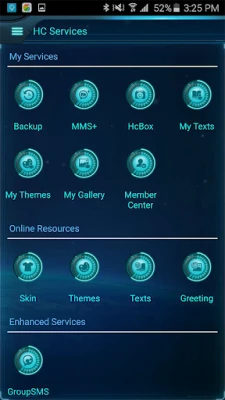
Handcent Services is designed to elevate your messaging capabilities. By navigating through the app, you can easily customize your messaging experience to suit your preferences. Here’s how to get started:
- Open the navigation drawer within the Handcent app.
- Select Handcent Services from the menu.
- Browse through the available options and select the features you wish to apply.
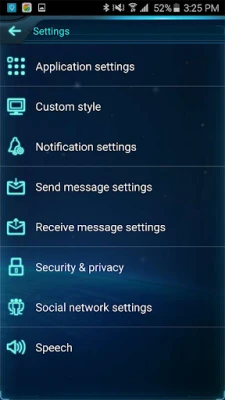
Once you’ve made your selections, enjoy a personalized messaging experience that caters to your needs. Handcent Services allows you to tailor notifications, themes, and more, ensuring that your messaging is not only functional but also enjoyable.
Understanding App2SD: A Storage Solution
As apps continue to grow in size and complexity, managing storage on your Android device becomes increasingly important. The App2SD plugin is a powerful tool that allows you to move applications from your device’s internal storage to an SD card, freeing up valuable space. Here’s how to utilize this feature:
- Install the App2SD plugin from the Google Play Store.
- Access your device’s System Settings.
- Navigate to Application Manager.
- Select the app you wish to move.
- Tap on Move to Storage Card to transfer the app to your SD card.
This simple process not only helps in decluttering your device but also enhances its overall performance. By offloading apps to your SD card, you can ensure that your device runs smoothly, even with a multitude of applications installed.
Benefits of Using Handcent Services and App2SD Together
Combining the functionalities of Handcent Services and App2SD can significantly improve your Android experience. Here are some key benefits:
- Improved Performance: By moving less frequently used apps to your SD card, you can enhance the speed and responsiveness of your device.
- Customizable Messaging: Handcent Services allows you to personalize your messaging, making it more enjoyable and efficient.
- Space Management: With App2SD, you can easily manage your storage, ensuring that you always have enough space for new apps and updates.
Conclusion: Optimize Your Android Device Today
In conclusion, utilizing Handcent Services alongside the App2SD plugin can transform your Android experience. By customizing your messaging and efficiently managing your app storage, you can enjoy a smoother, more personalized mobile experience. Don’t wait—start optimizing your device today and unlock its full potential!
Rate the App
User Reviews















Popular Apps










Editor's Choice









