

Latest Version
2025.10.167
May 31, 2026
Mathlab Apps, LLC
Education
Android
0
Free
us.mathlab.android
Report a Problem
More About Graphing Calculator + Math
Unlock the Power of Mathematics with Our Advanced Calculator App
In today's fast-paced world, having a reliable and versatile calculator at your fingertips is essential. Whether you're a student, a professional, or simply someone who enjoys solving mathematical problems, our advanced calculator app offers a plethora of features to meet your needs. While the free version requires an internet connection and includes ads, upgrading to the PRO version unlocks a world of possibilities. Let's explore the incredible functionalities that make our calculator app a must-have tool for anyone dealing with numbers.
Scientific Calculator Features
Our scientific calculator is designed to handle a wide range of mathematical operations with ease. Here are some of its key features:
- Roots and Exponents: Easily calculate square roots, cube roots, and higher roots by holding the √ key. Use the x^ key for exponentiation, such as x^2.
- Logarithmic Functions: Compute natural logarithms with ln(), common logarithms with log(), and logarithms of any base using log[base]().
- Trigonometric Functions: Access essential trigonometric functions like sin(π/2) and cos(30°) for your calculations.
- Hyperbolic Functions: Utilize hyperbolic functions such as sinh, cosh, and tanh by holding the "e" key to switch modes.
- Inverse Functions: Quickly find inverse functions by holding the direct function key.
- Complex Number Support: All functions support complex arguments, making it easy to work with complex numbers.
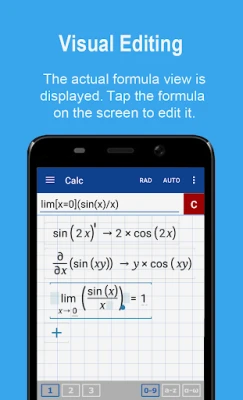
- Derivatives: Calculate derivatives effortlessly, for example, sin(x)' = cos(x) by holding the x^ key.
- Scientific Notation: Enable scientific and engineering notation in the menu for precise calculations.
- Percent Mode: Switch to percent mode for quick percentage calculations.
- Number Systems: Work with binary, octal, and hexadecimal numbers, such as 0b1010, 0o123, and 0xABC.
- History Management: Save and load your calculation history for future reference.
Graphing Calculator Capabilities
Visualizing mathematical functions is crucial for understanding complex concepts. Our graphing calculator offers a variety of features:
- Multiple Function Graphing: Graph multiple functions simultaneously for comparative analysis.
- Implicit Functions: Graph implicit functions up to the second degree, such as ellipses (2x² + 3y² = 1).
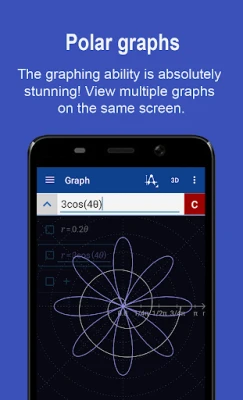
- Polar and Parametric Graphs: Create polar graphs (e.g., r = cos(2θ)) and parametric functions by entering each on a new line (e.g., x = cos(t), y = sin(t)).
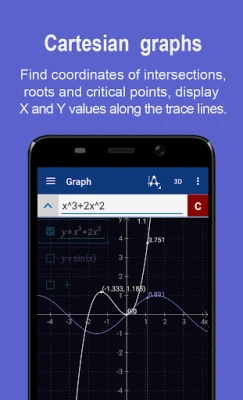
- Function Analysis: Identify function roots, critical points, and graph intersections.
- Interactive Features: Trace function values and slopes, scroll with a slide gesture, and zoom with a pinch gesture.
- Fullscreen Mode: Enjoy fullscreen graphs with the PRO version.
- Function Tables: Generate function tables and save them as CSV files.
- 3D Graphing: Create stunning 3D graphs available in the PRO version.
Fraction Calculator Functionality
Working with fractions has never been easier. Our fraction calculator allows you to:
- Simple and Complex Fractions: Perform operations on simple and complex fractions, such as 1/2 + 1/3 = 5/6.
- Mixed Numbers: Enter mixed numbers using a space (e.g., 3 1/2).
- Parentheses for Clarity: Use parentheses to ensure accurate calculations, such as (1 + 2)/(3 + 4) = 3/7.
Algebra Calculator Features
Our algebra calculator simplifies solving equations and inequalities:
- Linear Equations: Solve linear equations like x + 1 = 2, resulting in x = 1.
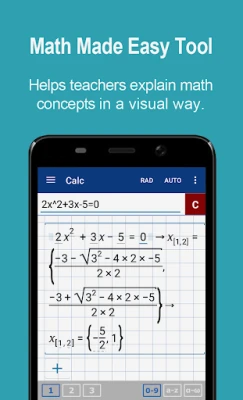
- Quadratic Equations: Find roots of quadratic equations, such as x² - 1 = 0, yielding x = -1 and x = 1.
- Higher Polynomials: Approximate roots of higher-degree polynomials.
- Systems of Equations: Solve systems of linear equations by writing one equation per line (e.g., x1 + x2 = 1, x1 - x2 = 2).
- Polynomial Operations: Perform polynomial long division, expansion, and factoring.
- Inequalities: Solve linear and quadratic inequalities with ease.
Probability and Statistics Tools
Analyze data effectively with our probability and statistics features:
- Factorial Functions: Access factorial functions by holding the n! key and enter commas by double-tapping the dot.
- Combinations and Permutations: Calculate combinations (nCr(5,2) = 10) and permutations (nPr(5,2) = 20).
- Statistical Analysis: Work with sample data, calculate sums, averages, medians, variances, and standard deviations.
- Correlation and Covariance: Determine covariance and correlation between datasets.
Matrix Calculator Features
Our matrix calculator is perfect for advanced mathematical operations:
- Matrix Arithmetic: Perform arithmetic operations on matrices and vectors.
- Vector Operations: Calculate vector cross products, dot products (hold *), and norms.
- Matrix Functions: Compute determinants, inverses, transposes, and traces of matrices.
Library of Constants and Functions
Enhance your calculations with
Rate the App
User Reviews















Popular Apps










Editor's Choice









