Latest Version
April 09, 2026
Agile Works B.V.
Tools
Android
0
Free
com.agileworks.customremote
Report a Problem
More About Google TV & Android TV Remote
Transform Your TV Experience with the Ultimate Custom Remote App
In today's fast-paced digital world, having a seamless and personalized TV experience is essential. With the Custom Remote App, you can take control of your Google TV and Android TV like never before. This innovative app offers a range of features designed to enhance your viewing experience, making it easier and more enjoyable. Let’s dive into what makes this app a must-have for every TV enthusiast.
Free to Try: Experience the Features
The Custom Remote App offers a free trial that allows you to explore its capabilities without any commitment. You can connect and save one device, giving you access to 15 remote clicks. After that, a one-time purchase unlocks unlimited use, ensuring you get the most out of your app experience.
Full Remote Control: All Buttons at Your Fingertips
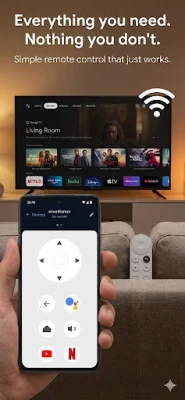
With the app, you can control your TV completely over Wi-Fi. This includes:
- D-pad Navigation: Effortlessly navigate through menus and options.
- Volume Control: Adjust the sound to your preference with ease.
- Play/Pause Functionality: Control your media playback seamlessly.
Quick Access to Your Favorite Apps
One of the standout features of the Custom Remote App is its app shortcuts. You can access popular streaming services like Netflix, YouTube, and Disney+ with just one tap. This feature saves you time and enhances your viewing experience, allowing you to dive straight into your favorite content.
Pro Version: Unlock Advanced Features with a One-Time Purchase
For those looking to elevate their TV control experience, the Pro version of the app is available for a one-time purchase, eliminating the need for a subscription. Here’s what you can expect:
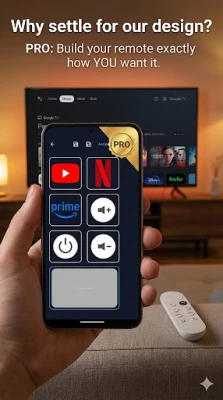
Custom Remote Builder: Tailor Your Layout
The app features a custom remote builder that allows you to drag and drop buttons, creating multiple layouts that suit your style. You can save and switch between different configurations, ensuring that your remote is always tailored to your needs.
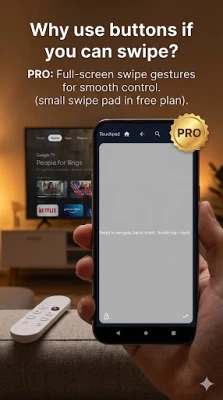
Swipe Pad Functionality: Enhanced Navigation
Navigate your TV effortlessly with the swipe pad feature. You can swipe up, down, left, or right, tap for OK, and double-tap to go back. This intuitive design makes it easier to control your TV without fumbling through buttons.
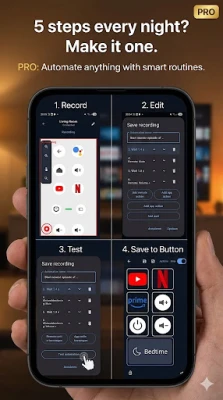
Automations: Simplify Your Routines
With the automations feature, you can create routines for various activities such as bedtime, news updates, or movie nights. Set multiple steps in one tap, allowing you to streamline your viewing experience. You can record or build these routines step-by-step, making it easier to enjoy your favorite activities.
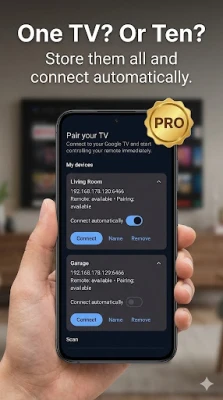
Unlimited Device Support: Control Multiple TVs
The app supports unlimited devices, each with its own unique layout and automation settings. Switching between devices is quick and easy, making it perfect for households with multiple TVs.
Export and Share Layouts: Flexibility at Your Fingertips
Need to back up your custom layouts or move them to a new phone? The Custom Remote App allows you to export and share your layouts effortlessly, ensuring that your personalized settings are always accessible.
Full-Screen Remote: Maximum Button Size
For those who prefer a larger interface, the app offers a full-screen remote option. This feature maximizes button size, making it easier to navigate and control your TV without straining your eyes.
Why Choose the Custom Remote App?
The Custom Remote App stands out as a comprehensive solution for all your Google TV and Android TV needs. With its custom builder, automation features, and quick pairing capabilities, it offers a unique blend of functionality and personalization. Plus, there’s no need for an account, and your data remains secure on your Wi-Fi network.
Perfect for Every TV Enthusiast
This app is ideal for anyone who:
- Misplaces their remote frequently.
- Has multiple TVs in their home.
- Wants custom layouts for different viewing experiences.
- Desires to set daily routines for convenience.
Download the Custom Remote App Today!
Don’t miss out on the opportunity to enhance your TV viewing experience. Download the Custom Remote App today and build the perfect remote that fits your lifestyle. With its user-friendly interface and powerful features, you’ll wonder how you ever managed without it!
Rate the App
User Reviews















Popular Apps










Editor's Choice









