

Latest Version
October 29, 2025
Google LLC
Communication
Android
0
Free
com.google.android.apps.wear.companion
Report a Problem
More About Google Pixel Watch
Unlock the Full Potential of Your Google Pixel Watch: A Comprehensive Guide
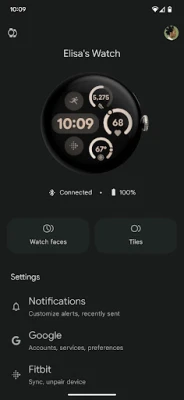
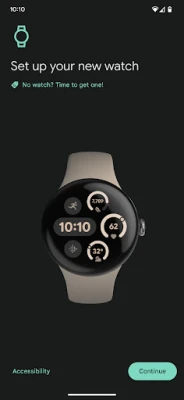
The Google Pixel Watch app is a powerful tool that enhances your smartwatch experience. With a variety of features designed to personalize and optimize your device, you can truly make the most of your Pixel Watch. This article will explore the key functionalities of the Google Pixel Watch app, ensuring you can navigate and utilize its capabilities effectively.
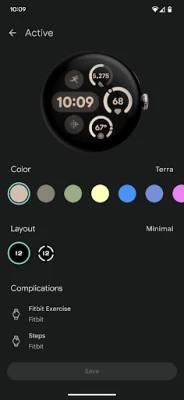
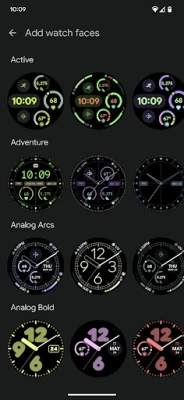
1. Personalize Your Watchfaces
One of the standout features of the Google Pixel Watch app is the ability to customize watchfaces. Whether you prefer a classic analog look or a modern digital display, the app offers a wide range of options. You can choose from pre-installed designs or create your own, allowing you to express your personal style. Adjust colors, complications, and layouts to suit your preferences, making your watch not just a tool, but a fashion statement.
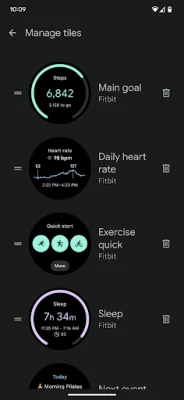
2. Efficient Tile Management
Managing tiles on your Google Pixel Watch is essential for quick access to your favorite features. The app allows you to manage tiles effortlessly. You can add, remove, or rearrange tiles to prioritize the information you need at a glance. This customization ensures that your most-used functions are always just a swipe away, enhancing your overall user experience.
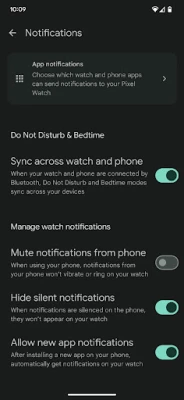
3. Tailor Alerts and Notifications
Stay informed without feeling overwhelmed by notifications. The Google Pixel Watch app enables you to customize alerts and notifications according to your preferences. Choose which apps can send notifications to your watch, and set specific alert tones or vibrations. This feature helps you maintain focus while ensuring you never miss important updates.
4. Manage Google Apps and Accounts
Seamlessly integrate your Google services with your smartwatch. The app allows you to manage Google apps and accounts directly from your Pixel Watch. Sync your calendar, emails, and reminders, ensuring that you have all your essential information at your fingertips. This integration enhances productivity and keeps you organized throughout the day.
5. Install and Manage Apps
Expand the functionality of your Google Pixel Watch by installing and managing apps. The app provides access to a variety of compatible applications that can enhance your watch's capabilities. From fitness tracking to music streaming, you can find apps that suit your lifestyle. Easily install, update, or remove apps to keep your watch running smoothly.
6. Set Up Mobile Carrier (Selected Regions Only)
For users in select countries, the Google Pixel Watch app allows you to set up your mobile carrier. This feature enables you to use your watch independently of your smartphone, making it a convenient option for those on the go. For detailed information on supported carriers and countries, visit g.co/pixelwatch/networkinfo.
7. Manage Privacy Settings
Your privacy is paramount, and the Google Pixel Watch app provides tools to manage privacy settings effectively. Control what data is shared and with whom, ensuring that your personal information remains secure. Regularly review these settings to maintain your privacy and enhance your peace of mind.
8. Join the Google Pixel Watch Community
If you have questions or need support, the Google Pixel Watch Community is an excellent resource. Connect with other users, share tips, and find solutions to common issues. Visit the community at Google Pixel Watch Community for assistance and to enhance your experience.
9. Availability of Google Pixel Watch
The Google Pixel Watch is currently available in various countries and regions, including:
- United States
- Australia
- Austria
- Belgium
- Canada
- Czechia
- Denmark
- Estonia
- Finland
- France
- Germany
- Hungary
- India
- Ireland
- Italy
- Japan
- Latvia
- Lithuania
- Malaysia
- Netherlands
- Norway
- Poland
- Portugal
- Romania
- Singapore
- Slovakia
- Slovenia
- Spain
- Sweden
- Switzerland
- Taiwan
- United Kingdom
In conclusion, the Google Pixel Watch app is a versatile tool that enhances your smartwatch experience. By utilizing its features, you can customize your watch, manage notifications, and integrate your Google services seamlessly. Explore the app today to unlock the full potential of your Google Pixel Watch!
Rate the App
User Reviews















Popular Apps










Editor's Choice









