

Latest Version
May 22, 2026
Web3 Gamers
Tools
Android
0
Free
gigaverse.tracker
Report a Problem
More About Gigaverse Tracker
Unlock Your Potential with Gigaverse Tracker: The Ultimate Tool for Gamers
In the ever-evolving world of gaming, having the right tools can make all the difference. Gigaverse Tracker stands out as a powerful application tailored specifically for players of the Gigaverse game. This innovative tool not only enhances your gaming experience but also empowers you to manage your assets and monitor your progress seamlessly.
What is Gigaverse Tracker?
Gigaverse Tracker is a comprehensive application designed to cater to the needs of Gigaverse gamers. Its intuitive interface allows users to navigate effortlessly, ensuring that both novice and experienced players can utilize its features without any hassle. Whether you’re looking to optimize your gameplay or keep track of your in-game assets, this app has you covered.
Key Features of Gigaverse Tracker
Gigaverse Tracker is packed with essential features that enhance your gaming experience. Here are some of the standout functionalities:
1. Asset Management
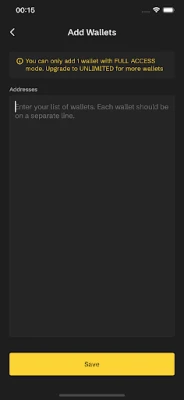
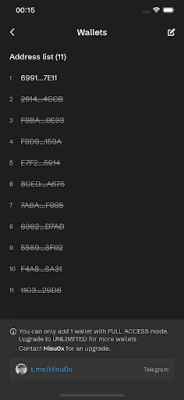
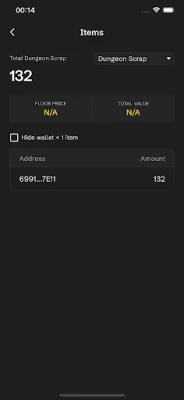
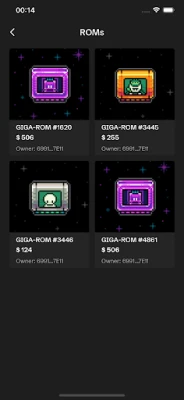
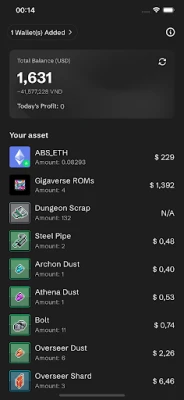
One of the primary features of Gigaverse Tracker is its robust asset management system. Players can easily view, organize, and manage their in-game assets, ensuring that they make informed decisions during gameplay. This feature helps you keep track of your resources, making it easier to strategize and plan your next moves.
2. Progress Tracking
Tracking your progress is crucial in any game, and Gigaverse Tracker excels in this area. The app provides detailed insights into your achievements, allowing you to monitor your growth and identify areas for improvement. With real-time updates, you can stay informed about your performance and set new goals to enhance your gaming journey.
3. User-Friendly Interface
The design of Gigaverse Tracker prioritizes user experience. Its clean and intuitive layout ensures that players can access all features without confusion. Whether you’re a seasoned gamer or just starting, the app’s straightforward navigation makes it easy to find what you need quickly.
4. Customizable Notifications
Stay ahead of the game with customizable notifications. Gigaverse Tracker allows you to set alerts for important events, such as asset changes or progress milestones. This feature ensures that you never miss a critical update, keeping you engaged and informed throughout your gaming experience.
Why Choose Gigaverse Tracker?
With numerous applications available for gamers, you might wonder why Gigaverse Tracker is the right choice for you. Here are several compelling reasons:
1. Tailored for Gigaverse
Unlike generic gaming apps, Gigaverse Tracker is specifically designed for the Gigaverse game. This specialization means that all features are relevant and beneficial to your gameplay, providing a more focused and effective tool for managing your gaming experience.
2. Continuous Updates
The developers behind Gigaverse Tracker are committed to enhancing the app continually. Regular updates ensure that you have access to the latest features and improvements, keeping the app aligned with the evolving dynamics of the Gigaverse game.
3. Community Support
Joining the Gigaverse Tracker community means you’re never alone in your gaming journey. The app fosters a supportive environment where players can share tips, strategies, and experiences. This sense of community enhances your overall gaming experience and provides valuable insights from fellow players.
How to Get Started with Gigaverse Tracker
Getting started with Gigaverse Tracker is a breeze. Follow these simple steps to enhance your gaming experience:
1. Download the App
Visit the official website or your device’s app store to download Gigaverse Tracker. The app is compatible with various platforms, ensuring accessibility for all players.
2. Create an Account
Once downloaded, create your account by providing the necessary information. This step is crucial for personalizing your experience and accessing all features.
3. Explore the Features
Take some time to familiarize yourself with the app’s features. Explore asset management, progress tracking, and notification settings to maximize your gaming efficiency.
4. Engage with the Community
Join forums and discussion groups related to Gigaverse Tracker. Engaging with other players can provide you with valuable insights and strategies to enhance your gameplay.
Conclusion
In the competitive landscape of gaming, having the right tools can significantly impact your success. Gigaverse Tracker offers a unique blend of features designed specifically for Gigaverse players, making it an indispensable tool for anyone looking to elevate their gaming experience. With its user-friendly interface, robust asset management, and community support, Gigaverse Tracker is your key to unlocking your full potential in the game. Don’t miss out on the opportunity to enhance your gameplay—download Gigaverse Tracker today and take your gaming to the next level!
Rate the App
User Reviews















Popular Apps










Editor's Choice









