

Latest Version
1.4.5
August 03, 2025
Face play Photo Editor & Maker
Tools
Android
0
Free
com.xvideostudio.gifguru
Report a Problem
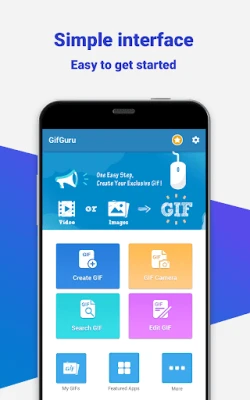
More About GIF maker GIF camera - GifGuru
Create Stunning GIFs with Your Own Pictures: A Comprehensive Guide
In the digital age, GIFs have become a popular medium for expression, humor, and creativity. Whether you want to share a funny moment, create an animated image, or simply showcase your photography skills, making GIFs from your own pictures is easier than ever. This guide will walk you through the process of creating captivating GIFs, from using your own images to editing videos, all while ensuring your creations stand out on social media.
Transform Your Pictures into Engaging GIFs
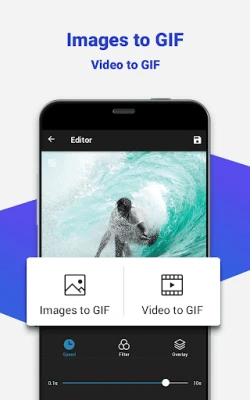
Creating a GIF from multiple images allows you to tell a story or capture a moment in a dynamic way. Here’s how to get started:
- Convert Multiple Pictures: Combine several images into one GIF to create a seamless animation. This feature is perfect for showcasing a series of events or a progression of moments.
- Aspect Ratio Settings: Adjust the aspect ratio to 'auto' or 'square' to ensure your GIF looks great on social media platforms. A well-formatted GIF will attract more viewers and engagement.
- Control GIF Speed: Customize the speed of your GIF to add humor or drama. Whether you want a fast-paced clip or a slow-motion effect, you have the power to create the perfect animation.
Add Text and Style to Your GIFs
Enhance your GIFs by adding text and various styles:
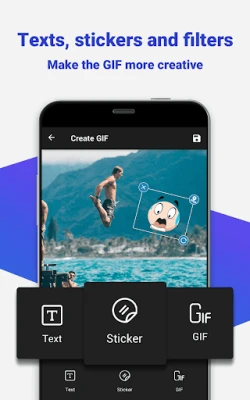
- Text Overlays: Incorporate catchy phrases or captions to give context to your GIF. Choose from a variety of fonts, colors, and styles to match your theme.
- Filters and Effects: Apply stunning filters like Polaroid, Sepia, or Vignette to give your GIFs a unique look. Adjust brightness and white balance to enhance the overall quality.
- Funny Stickers: Use trendy sticker packs to add a playful touch to your GIFs. Stickers can make your animations more relatable and entertaining.
Convert Videos into GIFs Effortlessly
Transforming videos into GIFs is a breeze with user-friendly editing tools:
- Video Editing Tools: Cut, crop, and trim your videos before converting them into GIFs. This allows you to focus on the most exciting parts of your footage.
- Collage Creation: Combine multiple video clips into a single GIF for a more dynamic presentation. This feature is perfect for highlights or montages.
- Fast Exporting: Export your GIFs quickly without compromising quality. This ensures that your creations are ready to share in no time, saving space and battery on your device.
Utilize the GIF Camera for Instant Creations
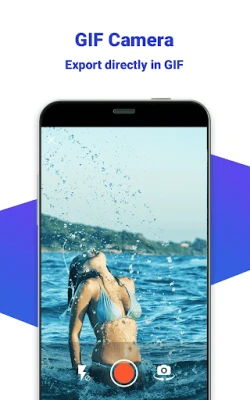
The GIF camera feature allows you to create GIFs directly with high-definition quality:
- Direct Export: Capture moments in real-time and export them as GIFs instantly. This feature is perfect for spontaneous events or fun gatherings.
- GIF Management: Save and manage all your created GIFs in one place. Easily access and view your animations whenever you want.
- High-Speed Creation: Make GIFs quickly without sacrificing quality. Share your creations on social media platforms to engage with your audience.
Edit Your GIFs with Precision
Editing your GIFs can elevate them to the next level:
- Gallery Integration: Import GIFs from your gallery to edit and enhance them. This allows for greater creativity and personalization.
- Custom Adjustments: Cut, crop, and flip images with a custom aspect ratio to fit your vision. Quick edits like rotating, resizing, and trimming are just a few clicks away.
- Speed Control: Play your GIFs forwards or backwards, and create fast or slow-motion effects to add drama or humor.
- Export Options: Enjoy fast and stable exports in various resolutions, ensuring your GIFs look great on any platform.
- Enhancements: Add effects, subtitles, and trending stickers to make your GIFs more engaging and shareable.
- Format Conversion: Convert images and videos from formats like PNG, JPEG, JPG, MP4, MPEG, FLV, and 3GP into GIFs seamlessly.
Get Started Today!
Creating GIFs from your own pictures and videos has never been easier. With the right tools and a bit of creativity, you can produce stunning animations that capture attention and convey your message effectively. Whether for personal use or social media sharing, the possibilities are endless. Start experimenting with your images and videos today, and watch your creativity come to life!
For any feedback or inquiries, feel free to reach out at gifguru_support@enjoy-mobi.com.
Rate the App
User Reviews















Popular Apps










Editor's Choice









