


Latest Version
5.8
May 31, 2026
Keteke LLC
Tools
Android
0
Free
com.anansemedia.ghanakey
Report a Problem
More About GhanaKey - Keyboard for Ghana
Resolving Ghanakey Update Issues: A Comprehensive Guide
The Ghanakey app, designed to facilitate typing in Ghana's 11 government-supported languages, has recently encountered update issues with versions 4.8 and 4.9. Users have reported that the update process does not automatically direct them to the phone's settings to enable Ghanakey. This article provides a step-by-step guide to resolve this issue and highlights the app's impressive features.
How to Enable Ghanakey on Your Device
If you find that Ghanakey is not appearing in your keyboard options after the update, follow these simple steps:
- Open your phone's Settings.
- Navigate to General Management.
- Select Keyboard List and Default (on Samsung devices).
- Locate Ghanakey in the list and enable it.
Once enabled, Ghanakey will become selectable in your keyboard options, allowing you to proceed with the setup and set it as your default keyboard.
Features of Ghanakey
Ghanakey is not just a keyboard; it is a versatile tool that enhances your typing experience. Here are some of its standout features:
Customizable Keyboard Themes
Ghanakey allows users to select from various keyboard themes, making typing visually appealing. Check out the customization options in this video tutorial.
Diverse Emoji Skin Color Variations
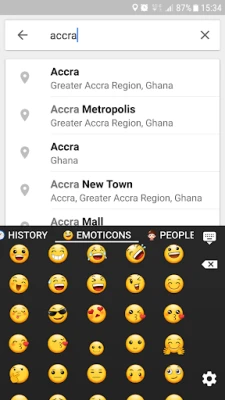
Express yourself with different skin color variations of people emojis. Learn how to customize your emoji experience by watching this video guide.
One-Handed Typing Mode
For those who prefer typing with one thumb, Ghanakey offers a feature to rearrange all keys to one side. Discover how to set this up in this video demonstration.
Adjustable Keyboard Height
Users can modify the keyboard's height to suit their preferences. To do this, go to Settings > Keyboard Themes, tap the three dots in the upper right corner, and select Tweaks. Adjust the keys' height factor for both portrait and landscape modes by entering a value less than 1, such as 0.9.
Enhanced Typing Features
- Sending Images as Stickers: Easily send images as stickers to enhance your conversations.
- Glide Typing: Type effortlessly by gliding your finger across the keyboard.
- Power Saving Mode: Optimize battery usage while typing.
- Word Suggestions: Adjust the aggressiveness of word suggestions in the settings.
- Next Word Prediction: Benefit from intelligent predictions for your next word.
- Editable Abbreviation Dictionary: Save time by adding frequently used sentences as abbreviations.
- Smart Suggestions: Ghanakey learns your typing habits and offers personalized suggestions over time.
- Guided Setup: A user-friendly setup process to get you started quickly.
- Smiley Keyboard: Access a variety of smileys to express your emotions.
Permissions for Enhanced Functionality
Ghanakey requires certain permissions to function optimally:
- Read Contacts: This permission allows the app to suggest contact names while typing.
- Read-Write SD Card: This enables the app to save and restore your personalized dictionary.
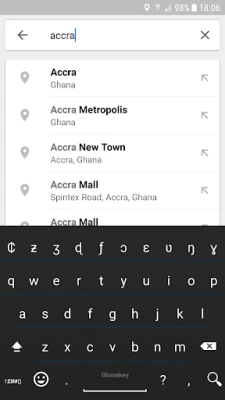
Access to Ghanaian Characters
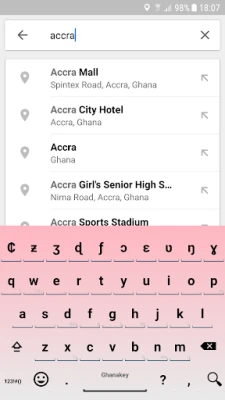
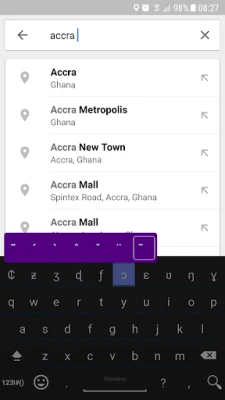
Ghanakey provides access to a wide range of Ghanaian characters. By long-pressing a key, users can easily access these characters, enhancing their typing experience.
Stretch Gesture for Two-Thumb Writing
For those who prefer typing with both thumbs, Ghanakey includes a stretch gesture feature that simplifies the process. Watch the video to see how it works.
Known Issues with Ghanakey
It is important to note that users with Android 4.2 may experience limitations, as most Ghanaian characters, including capital letters, are not supported. This issue has been resolved in Android 4.3 and later versions.
Conclusion
Ghanakey is a powerful tool for anyone looking to type in Ghana's diverse languages. By following the steps outlined above, users can easily enable the keyboard and take full advantage of its features. Whether you are customizing your keyboard theme or utilizing advanced typing features, Ghanakey enhances your communication experience. Stay updated with the latest versions to enjoy a seamless typing journey!
Rate the App
User Reviews















Popular Apps










Editor's Choice









