



Latest Version
2026.23.2
June 11, 2026
Vipps MobilePay AS
Finance
Android
0
Free
com.vippsmobilepay.getpaid
Report a Problem
More About Get paid
Unlocking the Power of Vipps MobilePay: Key Features and Getting Started
In today's fast-paced digital economy, having a reliable payment solution is essential for businesses of all sizes. Vipps MobilePay stands out as a powerful tool that simplifies transactions and enhances customer experience. This article delves into the key features of Vipps MobilePay, what’s coming soon, and how to get started with this innovative payment platform.
Key Features of Vipps MobilePay
1. Daily Totals: Monitor Your Sales Effortlessly
With Vipps MobilePay, you can easily view today’s total sales directly within the app. This feature allows business owners to keep track of their daily performance at a glance, ensuring that you stay informed about your financial health without the need for complex reports.
2. Comprehensive Transaction Overview
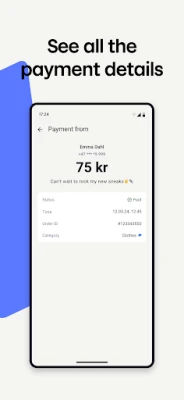
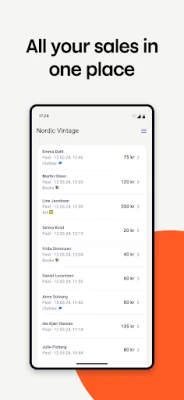
Accessing a full transaction overview is crucial for effective financial management. Vipps MobilePay provides a detailed view of all transactions across various sales points. This transparency helps you analyze sales trends, identify peak times, and make informed decisions to optimize your business operations.
3. Seamless Switching Between Sales Units
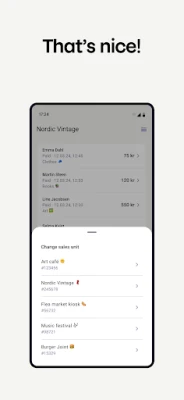
Flexibility is key in today’s retail environment. Vipps MobilePay allows you to easily toggle between different sales units, whether you operate multiple locations or different types of sales channels. This feature ensures that you can manage your sales efficiently, regardless of where they occur.
4. Instant Payment Requests with QR Codes
Requesting payments has never been easier. With Vipps MobilePay, you can instantly request payments using fixed-amount QR codes. This feature not only speeds up the payment process but also enhances the customer experience by providing a quick and convenient way to complete transactions.
Exciting Features Coming Soon
Payment Notifications: Stay Updated in Real-Time
In the near future, Vipps MobilePay will introduce payment notifications, allowing you to receive instant alerts for every payment made. This feature will keep you informed and help you manage your cash flow more effectively, ensuring that you never miss a transaction.
Getting Started with Vipps MobilePay
1. Register Your Business
The first step to harnessing the power of Vipps MobilePay is to register your business. This process is straightforward and ensures that you can start accepting payments quickly and efficiently.
2. Choose Your Payment Solutions
Once registered, you can sign up for either the Open Amount or Shopping Basket solutions, depending on your business needs. These options provide flexibility in how you manage transactions and cater to your customers' preferences.
3. Obtain Your Activation Code
After signing up, you will need to get an activation code from the business portal provided by your administrator. This code is essential for activating your account and accessing all the features Vipps MobilePay has to offer.
4. Learn More and Get Support
For additional information and support, visit vippsmobilepay.com. The website offers comprehensive resources to help you navigate the platform and maximize its potential for your business.
Conclusion
Vipps MobilePay is revolutionizing the way businesses handle transactions. With its user-friendly features, real-time updates, and seamless integration, it is an invaluable tool for any modern business. By understanding its key features and how to get started, you can enhance your payment processes and improve customer satisfaction. Don’t miss out on the opportunity to elevate your business with Vipps MobilePay!
Rate the App
User Reviews















Popular Apps










Editor's Choice









