

Latest Version
2.0.6
March 15, 2026
Karta Studio
Tools
Android
0
Free
com.karta.tools.autoclickerfree
Report a Problem
More About Game master - Auto Clicker
Unlocking the Power of No Root Auto Clicker: A Comprehensive Guide
In the world of mobile applications, efficiency and convenience are paramount. One tool that has gained significant traction among users is the No Root Auto Clicker. This powerful application allows users to automate clicks and swipes without the need for rooting their devices. In this article, we will explore the features, benefits, and settings of the No Root Auto Clicker, ensuring you can maximize its potential.
Effortless Gesture Recording
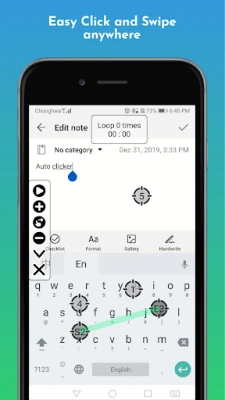
The No Root Auto Clicker simplifies the process of recording gestures. With just a press of the [Record] button, users can easily capture their desired actions. This feature is particularly useful for repetitive tasks, allowing you to automate actions that would otherwise be time-consuming.
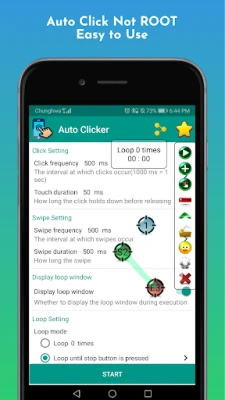
Customizable Click and Swipe Frequency Settings
One of the standout features of the No Root Auto Clicker is its flexibility in click and swipe frequency settings. Users can:
- Adjust the click duration to meet specific requirements.
- Set both long press and short press durations freely.
- Toggle the visibility of touch points at any time.
- Modify the click frequency with ease.
- Quickly change the click frequency with a single tap.
This level of customization ensures that users can tailor their experience to fit their unique needs, enhancing productivity and efficiency.
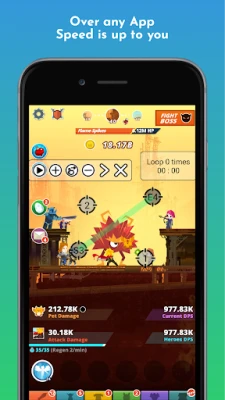
Loop Mode for Continuous Action
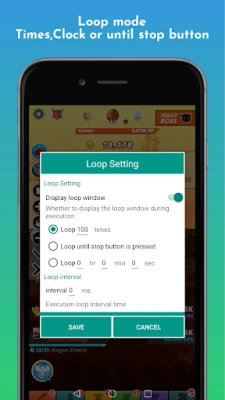
The No Root Auto Clicker also features a robust loop mode, allowing users to automate actions continuously. You can set:
- The number of loop repetitions.
- Continuous looping until the stop button is pressed.
- Looping for a specified duration.
This feature is ideal for tasks that require repeated actions, such as farming in games or automating clicks in applications.
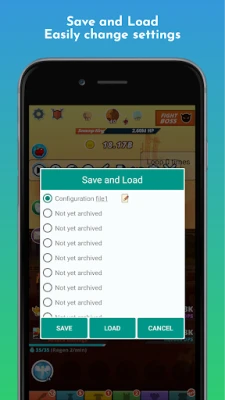
Save and Load Settings for Convenience
Getting started with the No Root Auto Clicker is a breeze, thanks to its save and load settings feature. Users can easily save their configurations and load them whenever needed, streamlining the process of setting up automated tasks.
Anti-Detection Settings for Enhanced Security
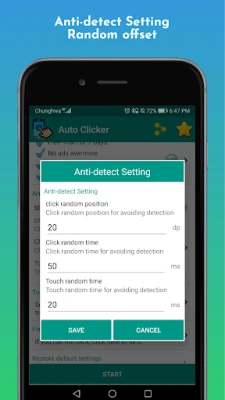
To ensure a seamless experience, the No Root Auto Clicker includes anti-detection settings. This feature helps users avoid detection by game companies by:
- Preventing clicks on the same coordinates repeatedly.
- Implementing small random displacements to clicks.
These measures enhance user security and reduce the risk of being flagged for automation, allowing for a worry-free experience.
Toolbar Customization Options
The No Root Auto Clicker offers extensive toolbar customization options. Users can:
- Select their preferred toolbar theme.
- Rearrange button order or hide unwanted features.
- Choose between a vertical or horizontal toolbar layout.
This level of customization ensures that users can create a workspace that suits their preferences, making the application even more user-friendly.
Understanding Accessibility Service Requirements
To utilize the full capabilities of the No Root Auto Clicker, users must grant permission to access accessibility services. This is essential for enabling core functions such as clicking and swiping. Here are some key points to consider:
- Why use this service? The Accessibility API is crucial for executing actions like clicking and swiping effectively.
- Do we collect private data? Rest assured, the No Root Auto Clicker does not collect any private data through this service.
Enjoy the Benefits of No Root Auto Clicker
By utilizing the No Root Auto Clicker, users can significantly enhance their productivity and streamline repetitive tasks. Whether you're a gamer looking to automate actions or someone seeking to simplify daily mobile tasks, this application offers a wealth of features designed to meet your needs.
If you encounter any issues while using the No Root Auto Clicker, assistance is just an email away. Reach out to developerkarta@gmail.com for support.
For those interested in contributing to translations or further enhancing the application, your help is always welcome. Enjoy the seamless experience that the No Root Auto Clicker provides!
Rate the App
User Reviews















Popular Apps










Editor's Choice









