

Latest Version
2.2.05.24020141N
December 31, 2025
Samsung Electronics Co., Ltd.
Tools
Android
0
Free
com.samsung.android.geargplugin
Report a Problem
More About Galaxy Watch Plugin
Essential Guide to Galaxy Wearable Application Permissions
The Galaxy Wearable Application is a crucial tool for maximizing the functionality of your Galaxy Watch. Before diving into its features, ensure that you have the application installed on your device. This guide will walk you through the necessary permissions required for optimal performance, especially for Android 6.0 users.
Installing the Galaxy Wearable Application
To begin using your Galaxy Watch, you must first install the Galaxy Wearable Application. This app serves as the bridge between your smartphone and smartwatch, enabling seamless communication and functionality. Once installed, you need to configure the necessary permissions to unlock the app's full potential.
Granting Permissions for Optimal Functionality
For users operating on Android 6.0, it is essential to allow permissions for the Galaxy Wearable Application. Follow these steps to enable the required permissions:
- Open your device's Settings.
- Navigate to Apps.
- Select Galaxy Watch Plugin.
- Tap on Permissions and enable the necessary access.
Understanding Required Permissions
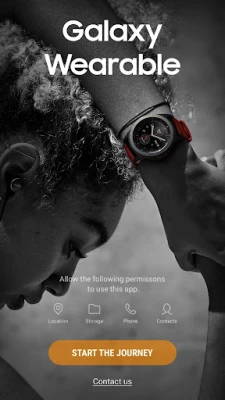
The Galaxy Wearable Application requires several permissions to function effectively. Here’s a breakdown of the required permissions and their purposes:
- Location: This permission allows the app to search for nearby devices via Bluetooth, ensuring your watch connects seamlessly.
- Storage: Required for transmitting and receiving files stored on your watch, enhancing your experience with media and data management.
- Telephone: This permission checks your device's unique identification information, which is crucial for updating apps and installing plugins.
- Contacts: Necessary for services that link with your Samsung account, providing a more personalized experience.
- Calendar: Synchronizes your schedule with the watch, keeping you organized and on track.
- SMS: Enables synchronization of SMS messages with your watch, allowing you to stay connected without reaching for your phone.
- Call Logs: Synchronizes call logs with your watch, ensuring you never miss important calls.
Optional Permissions for Enhanced Features
In addition to the required permissions, the Galaxy Wearable Application offers optional permissions that can enhance your user experience:
- Camera: This permission allows you to scan QR codes to activate the watch's SIM card, specifically for eSIM support models. Enabling this feature can simplify the setup process for mobile connectivity.
Conclusion: Maximizing Your Galaxy Watch Experience
By ensuring that you have the Galaxy Wearable Application installed and the necessary permissions granted, you can fully leverage the capabilities of your Galaxy Watch. From syncing your calendar to managing calls and messages, these permissions are vital for a seamless experience. Take the time to configure your settings correctly, and enjoy the full range of features that your Galaxy Watch has to offer.
Stay connected, organized, and in control with your Galaxy Wearable Application, and make the most of your smartwatch experience!
Rate the App
User Reviews















Popular Apps










Editor's Choice









