

Latest Version
December 30, 2025
Frontline Financial Credit Union Limited
Finance
Android
0
Free
com.frontlinecu.mobileapp
Report a Problem
More About Frontline Credit Union
Essential Permissions for Optimal App Functionality
When you install a new application, it typically requests permission to access various functions on your device. Understanding these permissions is crucial for maximizing the app's capabilities while ensuring your privacy and security. Below, we explore the key permissions commonly requested by apps and their significance.
Location Services: Finding What You Need
One of the primary permissions an app may request is access to location services. This feature enables the application to utilize your device's GPS functionality, allowing it to pinpoint your current location. By granting this permission, you can effortlessly find the nearest branch or ATM, enhancing your overall user experience.
For instance, if you are using a banking app, location services can help you locate the closest financial institution or cash withdrawal point. This not only saves time but also ensures that you have access to essential services when you need them most.
Camera Access: Simplifying Transactions
Another common permission is access to the camera. This allows the app to utilize your device's camera for various functions, such as taking pictures of checks. By enabling camera access, you can streamline processes like depositing checks directly through the app, eliminating the need for physical visits to the bank.
With this feature, users can simply snap a photo of their check, and the app will guide them through the deposit process. This not only saves time but also enhances convenience, making banking more accessible than ever.
Contacts Access: Effortless Transactions with INTERAC® e-Transfer
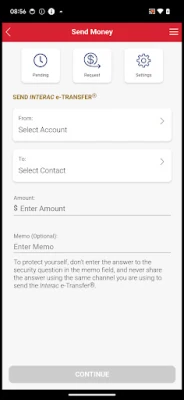
Many apps also request permission to access your contacts. This feature is particularly useful for creating new INTERAC® e-Transfer recipients. By selecting contacts directly from your device, you can quickly and easily send money to friends or family without the hassle of manually entering their information.
Granting contacts access simplifies the process of managing your transactions, allowing you to focus on what matters most—connecting with your loved ones and handling your finances efficiently.
Understanding Permissions: A Balance of Functionality and Privacy
While these permissions enhance the functionality of your app, it is essential to consider your privacy. Always review the permissions requested by an app and ensure that you are comfortable with the level of access it requires. Most reputable applications will provide clear explanations for why they need specific permissions, helping you make informed decisions.
In summary, understanding the permissions requested by your apps can significantly enhance your user experience. By allowing access to location services, camera, and contacts, you can unlock a range of features that simplify your daily tasks and improve your overall efficiency.
Conclusion: Empowering Your App Experience
In conclusion, the permissions requested by applications are designed to enhance functionality and provide a seamless user experience. By understanding and managing these permissions, you can enjoy the full benefits of your apps while maintaining control over your personal information. Always stay informed and make choices that align with your privacy preferences, ensuring a safe and efficient digital experience.
Rate the App
User Reviews















Popular Apps










Editor's Choice









