
Latest Version
2.4.9
November 07, 2024
L. Bean
Tools
Android
0
Free
com.lazybean.vfiwalld
Report a Problem
More About Fiwalld non-root firewall
Understanding Fiwalld: Your Ultimate Firewall Solution
In today's digital landscape, ensuring your online security is paramount. Fiwalld emerges as a robust firewall application designed to protect your device from various online threats. This article delves into the key features of Fiwalld, addresses common misconceptions, and provides insights into its functionality.
What is Fiwalld?
Fiwalld is an advanced firewall application that utilizes the Android VPN Service to filter traffic directly on your device. By routing traffic through its own system, Fiwalld effectively monitors and controls the data that enters and exits your device, providing a layer of security that is essential in today’s cyber environment.
Key Features of Fiwalld
1. Real-Time Monitoring
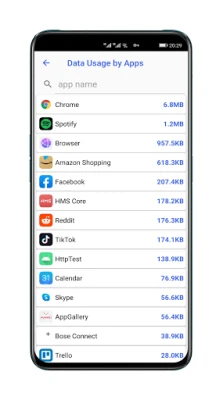
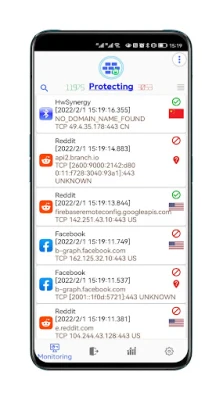
One of the standout features of Fiwalld is its real-time monitoring capability. Users can easily track which applications are accessing specific servers or active sessions. This transparency allows for better control over your device's network activity.
2. Default Rules for Enhanced Security
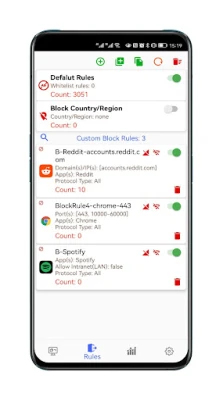
Fiwalld comes equipped with default rules that automatically block advertisements, malware, spam, spyware, trackers, and coin miners. This proactive approach prevents your system from connecting to potentially harmful entities, ensuring a safer browsing experience.
3. User-Friendly Interface
The application boasts an intuitive interface that simplifies the process of adding professional firewall rules. With just a few clicks, users can customize their security settings, making it accessible even for those who may not be tech-savvy.
4. Custom Firewall Rules for Advanced Users
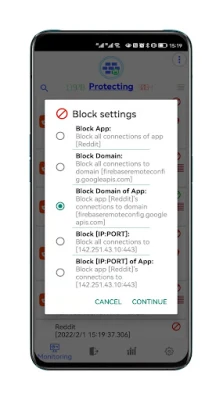
For those who require more control, Fiwalld allows users to add or batch provision custom firewall rules. This feature is particularly beneficial for advanced users who want to tailor their security settings to their specific needs.
5. Multi-Dimensional Statistical Analysis
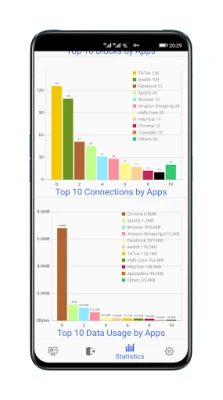
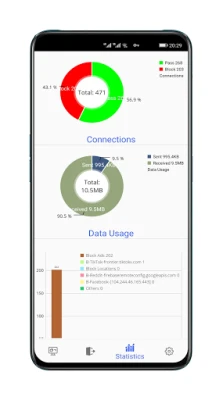
Fiwalld provides multi-dimensional statistical analysis, enabling users to quickly identify suspicious applications. This feature enhances your ability to monitor and respond to potential threats effectively.
6. Privacy Protection with DoH/DNSCrypt Servers
Fiwalld includes predefined non-logging DoH (DNS over HTTPS) and DNSCrypt servers, further safeguarding your privacy. Users also have the option to add custom DoH/DNSCrypt or UDP DNS servers for additional security.
7. Whitelist Rules and IP Location Details
The application supports batch provisioning of whitelist rules, allowing users to manage trusted applications easily. Additionally, Fiwalld enables users to check IP location details via an external map application by simply clicking on the country flag.
8. Default Block All Mode
Fiwalld features a Default Block All Mode, which enhances security by blocking all incoming and outgoing traffic unless explicitly allowed. This mode is particularly useful for users who want maximum control over their network activity.
9. IPv6 and IP Stack Mode Selection
With support for IPv6 and IP stack mode selection, Fiwalld ensures compatibility with modern networking standards, making it a versatile choice for users with varying network configurations.
10. Allow Rules Under Default Block Mode
Even in Default Block Mode, Fiwalld allows users to create "allow rules." This flexibility ensures that essential applications can function while maintaining a high level of security.
Addressing Common Concerns
Some users may receive a "Trojan report" from antivirus scanners regarding Fiwalld. It is important to note that this is often a “false positive.” The "2.txt" file within the Fiwalld APK contains a list of ads and Trojan domains that the application uses to block threats. This file is harmless and is essential for the app's functionality.
Additionally, if you encounter a system prompt indicating that Fiwalld is draining battery, there is no need to worry. Fiwalld manages connections efficiently, allowing other applications to conserve battery life, resulting in overall stable battery consumption.
It is also crucial to understand that Fiwalld cannot run simultaneously with other VPN clients due to Android system limitations. This restriction ensures that the firewall operates effectively without conflicts.
Conclusion
Fiwalld stands out as a comprehensive firewall solution that prioritizes user security and privacy. With its array of features, including real-time monitoring, customizable rules, and robust privacy protections, it is an essential tool for anyone looking to enhance their online safety. For more information on privacy policies, visit Fiwalld Privacy Policy. If you have further questions or concerns, feel free to reach out via email at fiwalldbean@gmail.com.
Rate the App
User Reviews















Popular Apps










Editor's Choice









