

Latest Version
April 21, 2026
Zanoshky
Tools
Android
0
Free
com.zanoshky.firewall
Report a Problem
More About Firewall - No Root Blocker
Understanding the Unique Features of Firewall: Your Ultimate Privacy Shield
In an age where digital privacy is paramount, understanding what sets a firewall apart is crucial. Unlike traditional security measures, a firewall operates on a default-blocking principle, allowing only trusted applications to access the internet. This article delves into the distinctive features of a firewall, its operational mechanics, and how it enhances your online security.
How Firewall Operates: A Local VPN Solution
The firewall establishes a local Virtual Private Network (VPN) on your device, ensuring that all network traffic is routed through it. This setup effectively blocks unauthorized applications while allowing trusted ones to connect seamlessly. The beauty of this system lies in its local nature; no data is transmitted through external servers, ensuring that your information remains secure and private.
Comprehensive Per-App Internet Control
One of the standout features of a firewall is its granular control over internet access for each application. Here’s how it works:
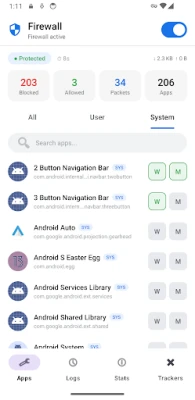
- Default Blocking: Every application is blocked by default, allowing you to whitelist only those you trust.
- Customizable Toggles: Separate toggles for Wi-Fi and mobile data enable you to manage each app's connectivity independently.
- System App Management: Easily block system applications and OEM bloatware from manufacturers like MIUI, Samsung, and Huawei.
- Quick Setup Options: Utilize bulk "Allow All" and "Block All" buttons for rapid configuration.
- Instant Search and Filtering: Filter applications by user or system status with an instant search feature.
- Immediate Changes: Any adjustments you make take effect instantly, without the need for a device restart.
Advanced Tracker, Ad, and Fingerprint Blocking
Firewalls excel at intercepting DNS queries, checking them against a comprehensive blocklist of known trackers, ads, and fingerprinting domains. Here’s what you can expect:
- Out-of-the-Box Protection: Over 130 tracker and ad domains are blocked by default.
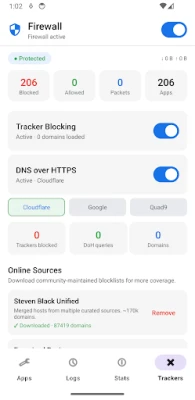
- Community Blocklists: Access and download community-maintained blocklists such as HaGeZi Light, OISD Small, and AdGuard DNS.
- Custom Domain Management: Add your own domains to the blocklist or whitelist specific domains to avoid false positives.
- Independent Tracker Blocking: Toggle tracker blocking on or off without affecting the firewall’s primary functions.
Enhanced Privacy with DNS Over HTTPS (DoH)
Your Internet Service Provider (ISP) can monitor your browsing habits through unencrypted DNS queries. The firewall addresses this vulnerability by implementing DNS Over HTTPS (DoH), which encrypts your DNS queries. Key features include:
- Provider Options: Choose from reputable providers like Cloudflare, Google, or Quad9.
- Easy Switching: Change your DNS provider with a single tap.
- Independent Functionality: Toggle DoH on or off without disrupting tracker blocking.
Always-On Protection for Maximum Security
With the firewall, you can enjoy peace of mind knowing that your device is always protected:
- Auto-Start Feature: The firewall automatically starts on boot, even before you unlock your device.
- Automatic Restarts: It restarts automatically after app updates, ensuring continuous protection.
- Direct Boot Awareness: This feature enhances reliability, ensuring that your firewall is always active.
- Quick Access: A Quick Settings tile allows you to toggle the firewall from the notification shade effortlessly.
Real-Time Connection Logs for Transparency
Stay informed about your device's network activity with real-time connection logs:
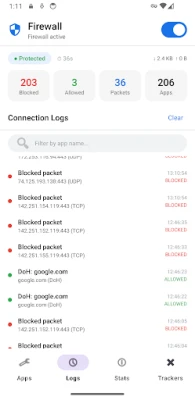
- Live Monitoring: View a live log of every connection attempt, including destination IP, port, protocol, and domain name.
- Color-Coded Alerts: Connections are color-coded for easy identification: green for allowed, red for blocked, and orange for tracker-blocked.
- Filtering Options: Filter logs by app name or domain for a more tailored view of your network activity.
Traffic Statistics for Insightful Analysis
Gain valuable insights into your network usage with comprehensive traffic statistics:
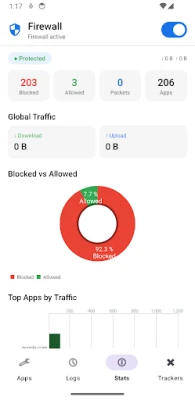
- Data Totals: Monitor download and upload totals to understand your data consumption.
- Connection Counts: Keep track of blocked, allowed, and total connection counts.
- Traffic Volume Ranking: Identify the top apps consuming your bandwidth.
Commitment to Privacy and Trust
In a world where data privacy is often compromised, the firewall stands out with its commitment to user trust:
- No Data Collection: The firewall collects zero data, ensuring no analytics, crash reporting, or telemetry.
- No Advertising SDKs: It operates without third-party services or user accounts, maintaining your privacy.
- Open Source Transparency: Being fully open source allows users to audit every line of code, fostering trust and accountability.
Compatibility Across Devices
The firewall is designed to be user-friendly and accessible:
- Wide Compatibility: It supports Android versions from 6.0 to 15.
- No Root Required: Users can enjoy its features without needing to root their devices.
- Device Versatility: Compatible with a range of devices, including Samsung, Xiaomi, Huawei, Pixel, OnePlus, and Motorola.
In conclusion, the firewall is a powerful tool for anyone looking to enhance their online privacy and security. With its unique features, user-friendly interface, and commitment to data protection, it stands as a reliable choice for safeguarding your digital life. Experience the peace of mind that comes with knowing your data is secure and your online activities are private.
Rate the App
User Reviews















Popular Apps










Editor's Choice









