

Latest Version
12.8.4
October 23, 2024
Fing Limited
Tools
Android
0
Free
com.overlook.android.fing
Report a Problem
More About Fing - Network Tools
Ultimate Guide to Securing Your WiFi Network and Enhancing Internet Performance
In today's digital age, ensuring the security of your WiFi network and optimizing your internet performance is more crucial than ever. With the rise of smart devices and the increasing number of users accessing the internet, questions about network security and performance are common. This article will address key concerns such as identifying unauthorized users, understanding your internet speed, and ensuring your network is secure from potential threats.
Who's on My WiFi? Identifying Connected Devices
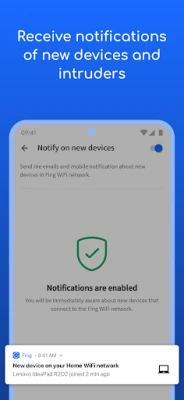
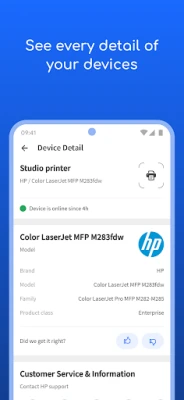
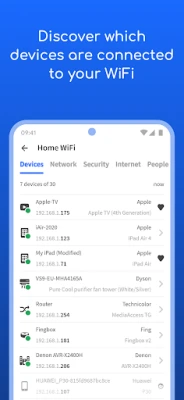
Have you ever wondered, "Who's on my WiFi?" It's essential to know which devices are connected to your network. Unauthorized access can lead to slow internet speeds and potential security risks. Using a reliable network scanner like Fing, you can easily discover all devices connected to your WiFi. Fing's patented technology provides accurate device recognition, allowing you to see the IP address, MAC address, device name, model, vendor, and manufacturer of each connected device.
Is Someone Stealing My WiFi? Signs of Unauthorized Access
If you suspect that someone is stealing your WiFi, there are several signs to look for. Unexplained slowdowns in your internet speed, unexpected devices appearing on your network, and unusual data usage can all indicate unauthorized access. Fing's network scanner can help you identify these devices and take action to secure your network.
Have I Been Hacked? Ensuring Network Security
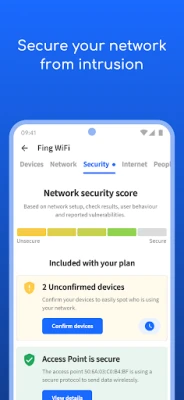
Concerns about hacking are valid in today's interconnected world. To determine if your network has been compromised, regularly check for unfamiliar devices and monitor your network activity. Fing provides alerts to your phone and email, notifying you of any suspicious activity. Additionally, implementing strong passwords and enabling network encryption can significantly enhance your security.
Are There Hidden Cameras in My Accommodation? Privacy Concerns
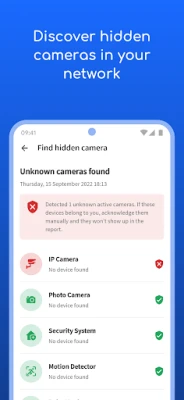
When staying in a B&B or rental property, privacy is a top concern. If you’re worried about hidden cameras, consider using a network scanner to identify any unfamiliar devices connected to the WiFi. This can help you ensure that your privacy is protected during your stay.
Why Is My Netflix Streaming Buffering? Troubleshooting Streaming Issues
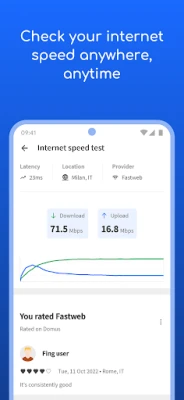
Buffering during Netflix streaming can be frustrating. This issue often arises from slow internet speeds or network congestion. To diagnose the problem, run a speed test using Fing's tools to analyze your download and upload speeds. If your speeds are lower than expected, it may be time to contact your internet service provider (ISP) for assistance.
Is My Internet Provider Delivering the Speed I Pay For? Understanding ISP Performance
Many users question whether their ISP is providing the promised internet speed. Fing allows you to automate network speed tests and generate reports to benchmark your ISP's performance. By regularly monitoring your internet speed, you can ensure that you are receiving the service you pay for and take action if discrepancies arise.
Unlock Advanced Network Protection with Fingbox
For those seeking enhanced security and troubleshooting features, Fingbox is an excellent addition to your network setup. Fingbox offers advanced capabilities such as:
- Digital Presence: Know who’s home while you’re away.
- Digital Fence: Monitor devices near your home.
- Intruder Blocking: Automatically block unknown devices before they join your network.
- Parental Controls: Schedule screen time and pause internet access for specific devices.
- Bandwidth Analysis: Understand bandwidth usage by device.
- WiFi Sweet Spot Finder: Optimize your WiFi coverage.
- Automated Speed Tests: Regularly benchmark your ISP performance.
- Network Vulnerability Analysis: Secure your home network with opened port detection.
Conclusion: Take Control of Your Network
In conclusion, understanding who is on your WiFi, ensuring your network security, and optimizing your internet performance are essential steps in today's digital landscape. With tools like Fing and Fingbox, you can take control of your network, protect your privacy, and enjoy seamless internet connectivity. For more information or assistance, visit fing.com or contact support at support@fing.com.
Rate the App
User Reviews















Popular Apps










Editor's Choice









