



Latest Version
April 04, 2026
České Appky
Finance
Android
0
Free
cz.ceskeappky.financni.zpravy
Report a Problem
More About Finanční zprávy - Kurzy měn
Ultimate Guide to a Simple Personal RSS News Reader for Finance and Business
In today's fast-paced world, staying updated with the latest news and information in finance and business is crucial. A personal RSS news reader can streamline this process, providing you with a customized experience tailored to your interests. This article explores the essential features, preset sources, and how to add your own news and podcast sources to enhance your reading experience.
Key Features of the RSS News Reader
The RSS news reader offers a variety of functionalities designed to keep you informed and engaged. Here are the standout features:
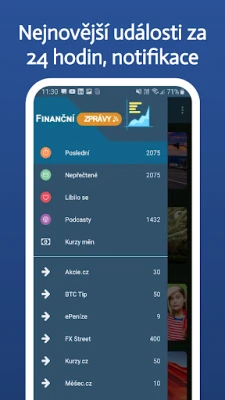
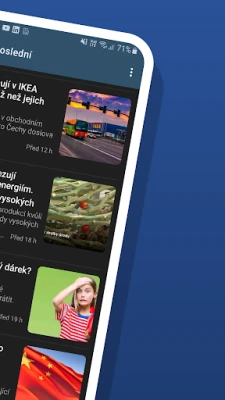
- Article Overview: Get a concise summary of articles published in the last 24 hours, ensuring you never miss important updates.
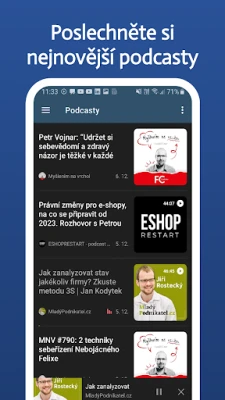
- Podcast Aggregation: Access a comprehensive list of podcasts from various sources, all in one place.
- Detailed News Insights: View detailed news articles with source attribution and direct links to the full content.
- Unread Articles Display: Easily track all unread news articles, helping you manage your reading efficiently.
- Favorites and Later List: Save articles to your favorites or mark them for later reading.
- Automatic Synchronization: Choose synchronization intervals ranging from 2 minutes to 24 hours for real-time updates.
- Startup Synchronization: Automatically sync your news feed upon launching the application.
- Wi-Fi Download Limitation: Restrict downloads to Wi-Fi only, saving your mobile data.
- Automatic Cleanup: The app automatically clears read and unread articles, keeping your feed organized.
- Notifications: Receive alerts for breaking news and updates.
- Variable News Display: Customize how news articles are displayed according to your preferences.
- Sharing Options: Easily share articles and podcasts with friends and colleagues.
Preset Sources for News and Podcasts
The RSS news reader comes with a selection of preset sources, ensuring you have access to high-quality content right from the start. Here are some of the included sources:
News Sources
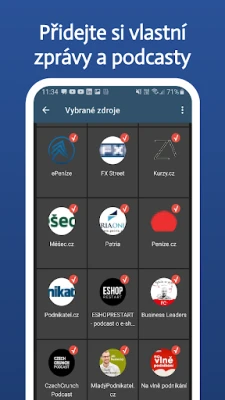
- Stocks (CZ)
- BTC Tip
- ePeníze
- FX Street
- Exchange Rates (CZ)
- Měšec
- Patria
- Money (CZ)
- Entrepreneur (CZ)
- Roklen24
Podcasts
- Eshop Restart
- Business Leaders
- CzechCrunch Podcast
- Young Entrepreneur
- On the Wave of Business
- Theory of Money
These preset sources can be easily managed. You can remove them from your overview in the app settings and add your own preferred sources as needed. If you wish to add or remove any preset news or podcast sources, feel free to contact us for assistance.
How to Add Additional News Sources
Enhancing your news feed is simple. Follow these steps to add more sources:
- In the left menu, locate the "Selected Sources" option.
- Here, you will see all available news sources, which you can enable or disable.
- Navigate to the "Channel" tab.
- Search for your favorite site, such as "Měšec."
- Select "Měšec.cz - News" from the list and check the corresponding option.
- Click on the "Source" tab.
- Your selected source is now added to your list.
By following these steps, you can easily expand your access to news and financial updates.
How to Add Podcasts
Adding podcasts to your RSS reader is just as straightforward. Here’s how:
- In the left menu, find the "Selected Sources" option.
- View all available news sources, which you can toggle on or off.
- Switch to the "Podcast" tab.
- Search for your favorite podcast, such as "Podnikatel," or enter the podcast URL directly.
- Select "Podnikatel.cz" from the list and check the corresponding option.
- Click on the "Source" tab.
- Your chosen podcast is now added to your list.
This simple process allows you to curate a personalized podcast library that suits your interests.
Conclusion
With a personal RSS news reader, you can effortlessly stay informed about the latest developments in finance and business. The combination of preset sources, customizable options, and user-friendly features makes it an invaluable tool for anyone looking to enhance their knowledge and keep up with industry trends. Start customizing your news and podcast sources today to create a tailored reading experience that fits your lifestyle.
Rate the App
User Reviews















Popular Apps










Editor's Choice









