





Latest Version
1.9.2
September 07, 2024
Defend the final line!
Games
iOS
1.1 GB
0
Free
Report a Problem
More About Final Survivor: Zombie Warfare
Survive the Apocalypse: Master Your Skills and Defeat the Undead!
Step into a thrilling universe where survival is your only goal! As the last hero standing, you possess the unique ability to fend off relentless waves of enemies. Prepare yourself to unleash a torrent of skills and strategies that will keep you alive in this unforgiving world.
Unleash Your Potential with Unique Skills
In this action-packed adventure, you have the opportunity to develop a myriad of unique skills tailored to enhance your combat effectiveness. Each skill you acquire can be combined in countless ways, allowing you to create a personalized fighting style that suits your gameplay. Whether you prefer brute force or strategic finesse, the choice is yours!
Key Features That Elevate Your Experience
- Dual Weapons & Drones: Equip yourself with an arsenal of dual weapons and deploy drones to gain the upper hand in battles.
- Randomized Skills: Discover a variety of random and unique skills that will aid you in your fight against formidable foes.
- Epic Boss Fights: Test your mettle against powerful bosses that will challenge your skills and strategies.
- Explore Beautiful Chapters: Journey through stunning environments as you build and fortify your base.
- Thrilling Zombie Encounters: Engage in heart-pounding battles against hordes of zombies that will keep you on your toes.
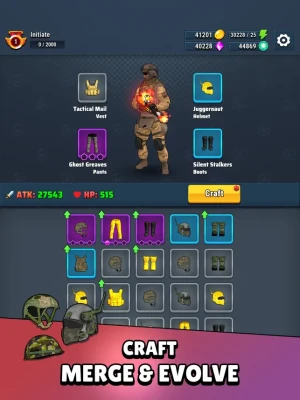
- Level-Up Your Gear: Enhance your character by leveling up and equipping powerful gear to boost your stats.
In-App Purchases (IAP) and Subscription Integration
To ensure a seamless gaming experience, understanding the integration of In-App Purchases (IAP) and subscriptions is crucial. Here are some essential guidelines to follow:
Part I - In-App Purchases (IAP)
Before diving into IAP integration, keep these three fundamental rules in mind:
- IAPs require time for App Store review.
- Always submit IAPs with a new build for review.
- The IAP bundle ID must remain consistent across platforms.
For a smooth integration process, refer to the comprehensive guide provided by Voodoo: In-App Purchases Documentation. This resource is up-to-date and straightforward, ensuring you have all the necessary information at your fingertips.
It’s important to note that IAPs are not subscriptions; they must be one-time purchases. Failing to adhere to this rule could result in permanent account bans.
Part II - Subscription Integration
Implementing subscriptions can be more complex than IAPs. To facilitate a successful integration with VoodooSauce, follow the guidelines outlined in the Voodoo documentation: Subscriptions Documentation.
Additionally, ensure you have the “App-Specific Shared Secret” set up on your App Store Connect game page. To locate this, navigate to App Information > App-Specific Shared Secret > Manage. If you lack the necessary permissions, reach out to the Publishing Ops team for assistance.
For iOS applications, it’s essential to link to the standard legal information: Apple Standard EULA.
Moreover, the App Store mandates that subscription details be included in your app’s description. If you’re unsure what to include, feel free to use the template below:
Subscription Pricing and Terms
Your subscription will be charged to your account upon confirmation of purchase. Subscriptions automatically renew unless auto-renew is disabled at least 24 hours before the end of the current period. Your account will be charged for renewal within 24 hours prior to the end of the current period, and you will be informed of the renewal cost.
Users can manage their subscriptions and turn off auto-renewal by accessing their account settings after purchase. Any unused portion of a free trial period, if offered, will be forfeited when the user purchases a subscription to that publication, where applicable.
To disable auto-renewal for your subscription, you can do so at any time through iTunes. For more information, visit Apple Support. Once your current trial or subscription period expires, you will be unsubscribed, and the current active subscription period cannot be canceled. After expiration, you will lose VIP membership benefits.
If you have any questions or comments, please reach out to us at Voodoo Support.
For privacy concerns, refer to our Privacy Policy and Terms of Use.
For any additional inquiries, contact us at studio-support@voodoo.io.
Prepare yourself for an exhilarating journey filled with challenges, skill mastery, and the fight for survival. The world awaits your command!
Rate the App
User Reviews














Popular Apps










Editor's Choice









