


Latest Version
V1-210601
August 17, 2024
Xiaomi Inc.
Tools
Android
0
Free
com.mi.android.globalFileexplorer
Report a Problem
More About File Manager
Unlocking the Power of File Management: Key Features You Need to Know
In today's digital age, efficient file management is crucial for both personal and professional use. Whether you're a student, a business professional, or simply someone who loves to stay organized, understanding the key features of a robust file management system can significantly enhance your productivity. This article delves into the essential features that can transform the way you handle your files.
Access Your Recent Files Instantly
One of the standout features of modern file management systems is the ability to view your recently accessed files. This functionality eliminates the hassle of searching through countless folders to find what you need. With just a few clicks, you can quickly access the documents, images, or videos you’ve worked on recently, saving you valuable time and effort.
Organized Categories for Easy Navigation
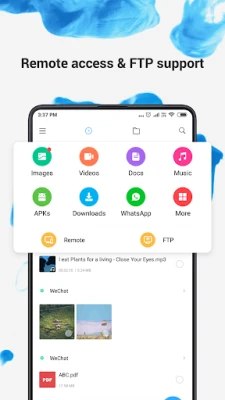
Efficient file management relies heavily on organization. Files are categorized by their formats, allowing users to navigate through their documents seamlessly. Whether you’re looking for images, videos, or documents, having a structured categorization system enables you to access frequently used applications quickly. This feature not only enhances user experience but also streamlines workflow.
Comprehensive Storage Management
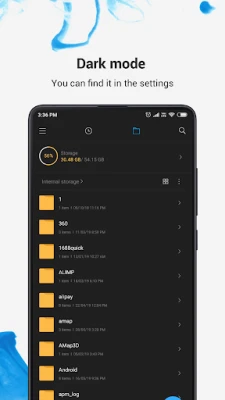
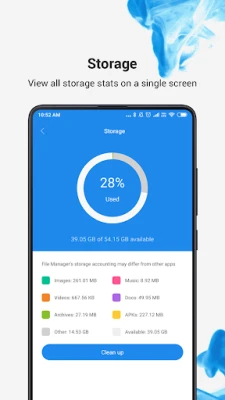
Understanding your storage capacity is vital for effective file management. With a comprehensive storage management feature, you can easily view your storage statistics and manage all folders on your device. This insight allows you to make informed decisions about what to keep and what to delete, ensuring that you never run out of space when you need it the most.
Optimize Storage with a Built-in Cleaner
Over time, devices accumulate cache and junk files that can take up valuable storage space. A built-in cleaner feature helps you free up storage by identifying and deleting these unnecessary files. Regularly using this feature can significantly enhance your device's performance, ensuring that it runs smoothly and efficiently.
Seamless File Sharing with Mi Drop
Sharing files with friends and colleagues has never been easier, thanks to the Mi Drop feature. This innovative tool allows you to share files with nearby users without the need for an internet connection. Whether you’re sharing large videos or important documents, Mi Drop ensures that your files are transferred quickly and securely, making collaboration effortless.
Global Search Functionality
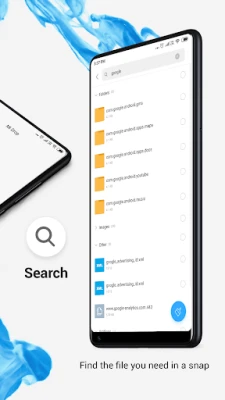
Finding specific files can often be a daunting task, especially if you have a large collection. The global search feature allows you to enter keywords to locate files instantly. This powerful tool enhances your efficiency by reducing the time spent searching for documents, enabling you to focus on what truly matters.
Support for Multiple File Formats
In a world where we handle various types of media, having a file management system that supports multiple formats is essential. With the ability to open videos, music, documents, APKs, and compressed files with just one tap, you can manage all your files in one place. This versatility simplifies your workflow and enhances your overall user experience.
Effortless File Compression and Decompression
Managing large files can be cumbersome, but with built-in file compression capabilities, you can easily compress and decompress ZIP and RAR archives. This feature not only saves storage space but also makes it easier to share large files without compromising quality. Enjoy the convenience of managing your files without the hassle of size limitations.
Manage Multiple Files with Ease
Efficiency is key when it comes to file management. The ability to select multiple files for the same operation streamlines your workflow, allowing you to perform actions such as moving, deleting, or sharing multiple files simultaneously. This feature saves time and enhances productivity, making it an essential tool for anyone who regularly handles large volumes of files.
Multilingual Support for Global Users
In our interconnected world, having a file management system that supports multiple languages is crucial. With support for languages such as Bahasa Indonesia, Bengali, Chinese, English, Español, Português, ру́сский язы́к, українська мова, and Tiếng Việt, users from diverse backgrounds can navigate the system with ease. This inclusivity ensures that everyone can benefit from the powerful features offered.
Conclusion: Elevate Your File Management Experience
In conclusion, the key features of a modern file management system can significantly enhance your productivity and organization. From accessing recent files and managing storage to seamless sharing and multilingual support, these functionalities are designed to meet the needs of today’s users. By leveraging these features, you can unlock the full potential of your file management experience, making your digital life more efficient and enjoyable.
Rate the App
User Reviews















Popular Apps










Editor's Choice









