


Latest Version
5.75.356
March 25, 2026
Fidelity Bank Plc.
Finance
Android
0
Free
com.interswitchng.www
Report a Problem
More About Fidelity Online Banking
Unlock Financial Freedom with the Upgraded Fidelity Online Banking App
The enhanced Fidelity Online Banking App empowers you to take charge of your finances like never before. With the ability to manage transactions, accounts, and cards securely from your mobile device, banking has never been easier. Experience seamless banking on the go, ensuring you have complete control over your financial activities anytime, anywhere.
Experience Convenient Banking Anytime, Anywhere
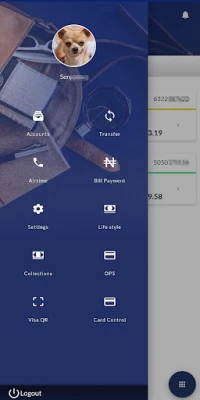
The redesigned Fidelity Online Banking App places a world of banking services at your fingertips. Whether you’re at home, at work, or on the move, you can effortlessly conduct your banking transactions. Here’s what you can do with the app:
- Transfer Funds: Easily transfer money to any bank in Nigeria.
- One-Click Transfers: Move funds between your accounts with just one click—no token required.
- Biometric Authentication: Log in effortlessly using fingerprint or biometric authentication.
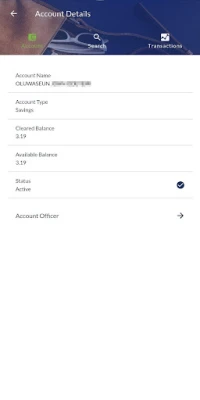
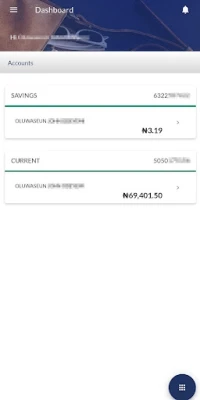
- Account Overview: View all your accounts, including Current, Savings, Fixed Deposit, Domiciliary, and Card accounts.
- Personalize Your Profile: Change your profile picture and make it uniquely yours.
- Manage Beneficiaries: Easily maintain and manage beneficiaries for fund transfers, bill payments, and airtime purchases.
- In-App Notifications: Receive messages about new features, quick tips, and promotional offers directly in the app.
- Mobile Top-Up: Recharge your mobile phone or those of your family and friends.
- Bill Payments: Pay bills such as DSTV, GoTV, PHCN, mobile post-paid bills, SWIFT, Smile, and more.
- Credit Card Repayments: Easily manage your Fidelity Credit Card repayments.
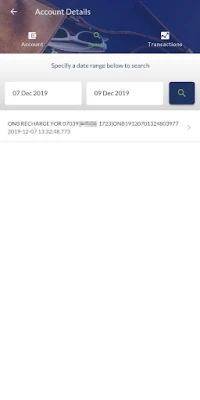
- Account Statements: Generate and view your account statements at any time.
- Flight Booking: Search, book, and pay for both international and local flights.
- Self-Service Options: Access a variety of self-service features.
- Locate Branches and ATMs: Find the nearest bank branches or ATM service points with ease.
How to Use the Fidelity Online Banking App
Getting started with the Fidelity Online Banking App is simple:
- Download and install the Fidelity Online Banking app from your device’s app store.
- Open the app and sign in using your existing credentials.
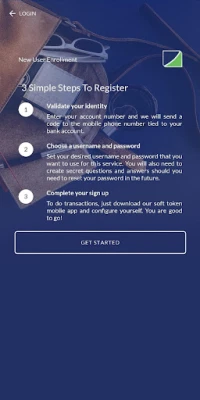
New User? Here’s How to Register
If you’re 16 years or older and have your mobile number registered for SMS alert services along with any of our Debit Cards, follow these steps:
- Click on “Sign Up Here” within the app.
- Follow the on-screen instructions.
- A verification code will be sent to your registered mobile number.
- Once you receive the verification code, follow the prompts to complete your registration.
- You will need to use your Fidelity Debit Card or visit the nearest bank branch to activate your online banking profile.
Once your profile is activated, you can start using your online banking account immediately. For enhanced security and functionality, consider downloading the Fidelity Soft Token app and signing in with your online banking credentials.
Business Accounts and App Usage
The Fidelity Online Banking App is available for sole signatory account holders only. Please note that registration with credit cards is not permitted.
Fidelity Instant Banking Services
For those who prefer a quick and easy banking solution, Fidelity offers Instant Banking Services via *770#. This service can be accessed from any mobile phone linked to your account for SMS alerts, and it does not require an internet connection.
Customer Support and Information
For further assistance or inquiries, please contact our True Serve at +234 1 448 5252 or email us at True.Serve@fidelitybank.ng. Our dedicated customer service team is here to help you with any questions or concerns you may have.
Copyright © Fidelity Bank Plc. 2017. All rights reserved. Fidelity Online Banking is a trademark of Fidelity Bank Plc.
Embrace the future of banking with the Fidelity Online Banking App and enjoy unparalleled convenience and control over your finances.
Rate the App
User Reviews















Popular Apps










Editor's Choice









