

Latest Version
24.2.74
December 21, 2025
The Fidelity Bank
Finance
Android
0
Free
com.fidelitybank.mobile
Report a Problem
More About Fidelity Bank NC/VA Mobile
Ultimate Guide to Managing Your Accounts with Fidelity Bank Mobile Banking
In today's fast-paced world, managing your finances on the go is essential. Fidelity Bank Mobile Banking offers a comprehensive suite of features that empower you to take control of your accounts anytime, anywhere. This guide will walk you through the key functionalities of the mobile banking app, ensuring you maximize its potential for your financial management.
Effortlessly Manage Your Accounts
With Fidelity Bank Mobile Banking, keeping track of your finances has never been easier. Here are some of the essential features that allow you to manage your accounts effectively:
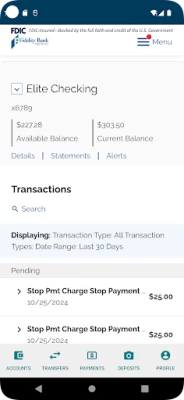
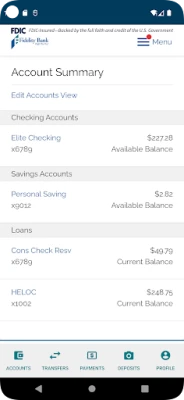
- Check Account Balances: Instantly view your account balances to stay informed about your financial status.
- Monitor Account Activity: Keep an eye on your transactions to ensure everything is in order and to spot any unauthorized activity.
- Make Deposits Using Your Phone: Deposit checks conveniently by taking a photo with your smartphone, eliminating the need for a trip to the bank.
- Set Account and Transaction Level Alerts: Customize alerts to notify you of important account activities, helping you stay on top of your finances.
Streamlined Payments and Transfers
Fidelity Bank Mobile Banking simplifies the process of making payments and transferring funds. Here’s how you can manage your transactions with ease:
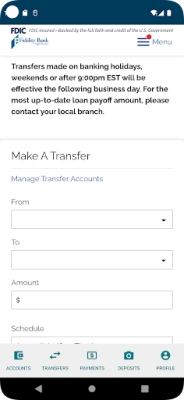
- Transfer Funds Between Linked Accounts: Move money seamlessly between your accounts to manage your finances more effectively.
- Move Money to/from Other Financial Institutions: Easily transfer funds to and from external banks, making it simple to manage all your finances in one place.
- Manage and Pay Bills: Set up bill payments directly through the app, ensuring you never miss a due date.
- Pay Family, Friends, and Businesses with Zelle®: Use Zelle® for quick and secure payments to anyone with an email or mobile number.
- Manage Debit and Credit Cards: Keep track of your cards, report lost or stolen cards, and manage your spending all in one app.
- Send Wires: Initiate wire transfers quickly and securely, making it easy to send money when you need to.
- Search for Branch Locations: Find the nearest Fidelity Bank branch or ATM with just a few taps on your phone.
Personal Enrollment Made Easy
Enrolling in Fidelity Bank Mobile Banking is straightforward. Personal enrollment is available directly through the mobile app, allowing you to get started quickly. For business enrollment, simply contact your local branch for assistance.
Robust Security Features
Your financial security is a top priority for Fidelity Bank. The mobile banking app incorporates a range of security features designed to protect your information from unauthorized access:
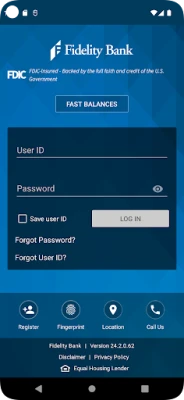
- Secure Logon: Access your account safely with a unique Customer ID, password, and multifactor authentication.
- Automatic Session Timeout: The app automatically logs you out after a period of inactivity, adding an extra layer of security.
Rest assured that your financial information is safeguarded while you manage your accounts on the go.
Important Considerations
While using Fidelity Bank Mobile Banking, keep in mind that message and data rates may apply. It’s advisable to check with your mobile carrier for more information regarding any potential charges.
Conclusion
Fidelity Bank Mobile Banking is a powerful tool that simplifies the way you manage your finances. With features designed for convenience, security, and efficiency, you can take control of your financial life from the palm of your hand. Whether you’re checking balances, making payments, or transferring funds, Fidelity Bank ensures that your banking experience is seamless and secure. Start leveraging these features today and enjoy the freedom of managing your finances anytime, anywhere.
Rate the App
User Reviews















Popular Apps










Editor's Choice









