Latest Version
5.0.0.22
August 27, 2025
Paragon Technologie GmbH
Tools
Android
0
Free
com.paragon.tcplugins_ntfs_ro
Report a Problem
More About exFAT/NTFS for USB by Paragon
Unlocking the Power of External Storage: Paragon File System Link for Android
In today's digital age, managing data efficiently is crucial. The Paragon File System Link app revolutionizes how users interact with external storage devices on Android, providing seamless access to various file systems. This article explores the app's features, benefits, and how it enhances your data management experience.
Comprehensive Integration with Storage Access Framework
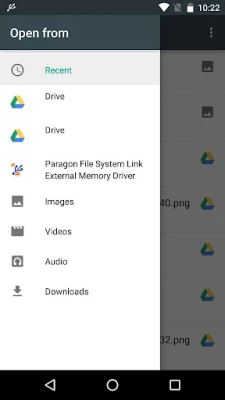
The Paragon File System Link app is fully integrated with the Storage Access Framework (SAF), allowing users to access device storage, cloud services, and USB storage effortlessly. This integration ensures that you can manage your files without the need for a PC, making it an essential tool for anyone who relies on external storage.
Key Features of Paragon File System Link
With the Paragon File System Link app, users can:
- Access External HDDs and USB Drives: Connect and manage your external hard drives or USB sticks directly from your Android device.
- Free Up Storage Space: Easily transfer files from your Android smartphone or tablet to a USB thumb drive, freeing up valuable internal storage.
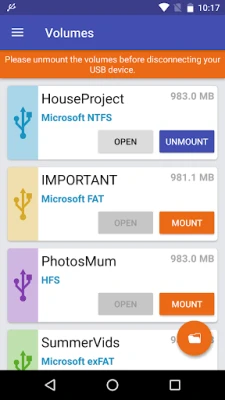
- Mount Popular File Systems: Support for HFS+ and Microsoft exFAT/NTFS file systems allows for versatile data management.
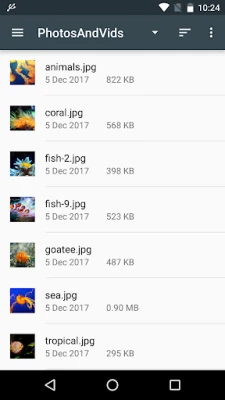
- Direct File Usage: View photos, listen to music, read eBooks, or watch videos directly from USB storage.
- File Management Capabilities: Copy, move, delete, and rename files on USB devices using various file managers.
- Stream Data to Cloud Services: Effortlessly stream data from external memory to Google Drive, Microsoft OneDrive, Dropbox, and more.
- Share Files Easily: Share files via popular messaging platforms like Gmail, Telegram, Skype, or WhatsApp.
Trial Mode and In-App Purchases
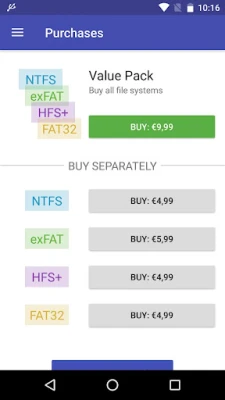
The app offers a trial mode, allowing users to evaluate its functionality before committing to a purchase. Supported USB file systems, including HFS+, Microsoft NTFS, and Microsoft exFAT, can be accessed through in-app purchases. Users can also enjoy a 50% discount on the complete file system support pack.
To activate the trial mode, simply authorize via Google+ or share a post on Facebook.
How to Use Paragon File System Link
Getting started with the Paragon File System Link app is straightforward. Follow these steps:
- Install the Microsoft exFAT/NTFS for USB app by Paragon Software on your Android device.
- Connect your USB flash drive using USB OTG and mount the desired file system.
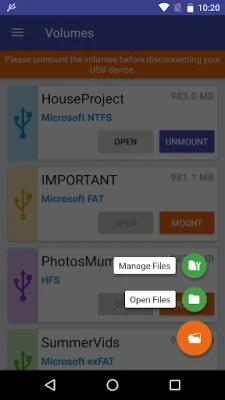
- Tap the Browse button to:
- Open Files: View media and documents from USB storage.
- Manage Files: Use the built-in Android file manager to copy, move, or delete files.
- Select your USB volume by tapping the hamburger menu and choosing Paragon File System Link.
Note: Some devices may have restrictions that affect the functionality of the "Browse" button.
File Management Options
The app provides varying file management capabilities based on your Android version:
- Android 7.x and 8.x: Full capabilities including copy, move, delete, and rename.
- Android 6.x: Limited to copy and delete functions.
- Android 4.x and 5.x: Not supported by the built-in Android file manager; use the app’s Plugin for Total Commander for functionality.
Integration with File Managers
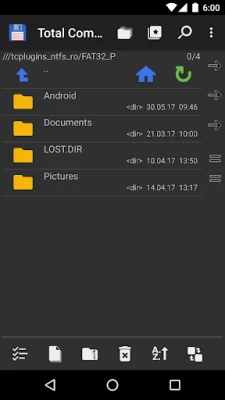
For enhanced functionality, the Paragon File System Link app integrates seamlessly with the X-plore File Manager. Users can download it from the Google Play Store to maximize their file management experience. Additionally, the app can function as a plugin for Total Commander, allowing users to manage mounted volumes of USB storage effortlessly.
Your Feedback Matters
Paragon Software values user feedback. If you encounter any issues while using the app, please report them through the Google Play page or by tapping the "Report a Problem" button within the app. For further assistance, you can also reach out via email at support@paragon-software.com.
If you have made a donation, contact support to gain free access to HFS+ and Microsoft NTFS by attaching your payment confirmation to your request.
About Paragon Software
Founded in 1994, Paragon Software has been at the forefront of delivering reliable software products and technology solutions. The company specializes in file systems, storage management, data protection, and disaster recovery for hybrid environments. With a global network of partners, including AJA, Asus, QNAP, and Western Digital, Paragon Software continues to innovate and provide solutions that keep data safe and accessible.
For more information, visit our Privacy Policy.
In conclusion, the Paragon File System Link app is an indispensable tool for Android users looking to enhance their data management capabilities. With its robust features and user-friendly interface, it simplifies the process of accessing and managing external storage, making it a must-have for anyone who values efficiency and convenience.
Rate the App
User Reviews















Popular Apps










Editor's Choice









