

Latest Version
22.4.0.30
October 18, 2024
MicroWorld Technologies Inc.
Tools
Android
0
Free
com.eScan.main
Report a Problem
More About eScan Mobile Security
Ultimate Protection for Your Mobile Device: eScan Mobile Security
In today's digital age, mobile devices are essential tools for communication, work, and entertainment. However, with the increasing prevalence of cyber threats, ensuring the security of your mobile device is more critical than ever. eScan Mobile Security offers comprehensive protection against evolving cyber threats, ensuring uninterrupted usage and safeguarding your personal data.
Why Choose eScan Mobile Security?
eScan Mobile Security is designed to protect your device from unauthorized access, especially in the unfortunate event of loss or theft. With a robust set of features, this application not only secures your data but also enhances your overall mobile experience.
30-Day Full Functionality
Upon installation, eScan Mobile Security provides a full range of features for 30 days. After this trial period, users can continue to benefit from the On-Demand Scan feature at no cost, ensuring ongoing protection without a financial commitment.
Key Features of eScan Mobile Security
1. Real-Time Antivirus Protection
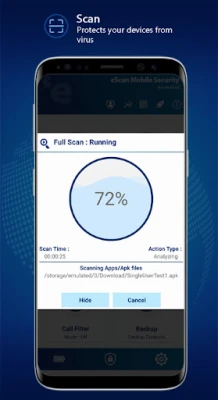
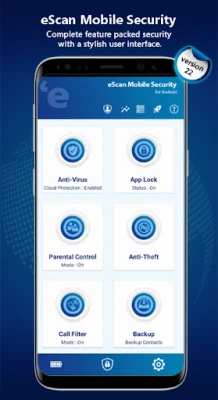
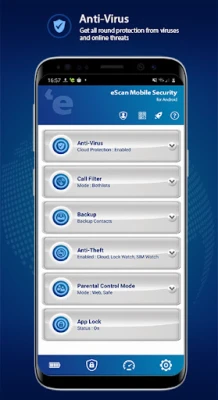
eScan Mobile Security offers real-time scanning capabilities that protect your device against viruses, malware, and other cyber threats. This proactive approach ensures that your device remains secure at all times.
2. Advanced Anti-Theft Features
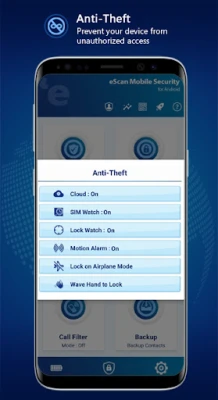
The Anti-Theft feature is a standout aspect of eScan Mobile Security. It allows users to lock and locate their devices if lost or stolen. Key functionalities include:
- Lock: Secure your device remotely.
- Data Wipe: Erase sensitive information to prevent unauthorized access.
- Locate: Track your device's location.
- Scream: Activate a loud alarm to help find your device.
- SIM Watch: Get alerts if the SIM card is changed.
- Lock Watch: Monitor unauthorized access attempts.
- Motion Alarm: Trigger an alarm if the device is moved.
These features can be accessed through eScan's Anti-Theft portal.
3. Call Filtering
With the Call Filter feature, users can manage incoming calls effectively. This functionality allows you to create a Whitelist and Blacklist, ensuring that only desired calls come through.
4. Backup and Restore
eScan Mobile Security simplifies the process of backing up and restoring contacts, whether on internal memory or cloud services like Google Drive. This feature ensures that your important contacts are always safe and accessible.
5. Parental Control
For parents, the Parental Control feature is invaluable. It allows you to block specific websites and applications, ensuring a safe browsing experience for your children.
6. App Lock
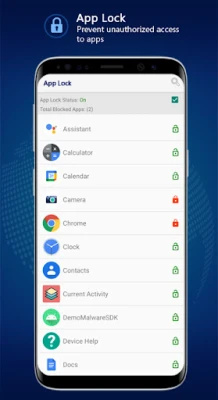
Protect your applications from unauthorized access with the App Lock feature. This adds an extra layer of security to sensitive apps, keeping your information safe.
7. Lock Watch
The Lock Watch feature captures a photo of anyone attempting to unlock your device after multiple failed attempts, providing an additional security measure against unauthorized access.
8. Privacy and Security Advisors
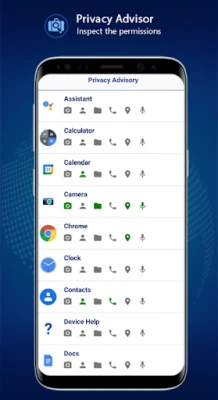
eScan Mobile Security includes a Privacy Advisor that lists all applications using device permissions, helping you manage your privacy settings. Additionally, the Security Advisor alerts you to any vulnerable settings, allowing you to fortify your device's defenses.
9. App Usage Tracking
Monitor your app usage with the App Usage feature, which tracks how often specific applications are used and the amount of data consumed. This insight can help you manage your device's performance and data usage effectively.
10. QR/Barcode Scanner
The built-in QR/Barcode Scanner verifies links embedded in QR codes, categorizing them as clean or malicious. This feature helps protect you from potential phishing attacks.
11. Easy Sharing
Share the eScan Mobile Security app effortlessly with friends and family via Bluetooth or email, ensuring that your loved ones can also benefit from enhanced mobile security.
12. Scheduled Scanning
With the Scheduled Scanning feature, you can set regular scans for your device, ensuring that it remains free from threats without manual intervention.
13. 24/7 Technical Support
eScan Mobile Security offers round-the-clock technical support through email, live chat, and forums, ensuring that help is always available when you need it.
14. Multilingual Support
The application is available in multiple languages, including English, German, French, Spanish, Turkish, Russian, Japanese, Romanian, Vietnamese, and Latin Spanish, making it accessible to a global audience.
Conclusion
In a world where cyber threats are constantly evolving, eScan Mobile Security stands out as a comprehensive solution for protecting your mobile device. With its extensive features, user-friendly interface, and commitment to customer support, eScan Mobile Security ensures that your device remains secure, allowing you to use it with confidence. Don't leave your mobile security to chance—choose eScan Mobile Security today and experience peace of mind.
Rate the App
User Reviews















Popular Apps










Editor's Choice









