
Latest Version
5.8.45
April 21, 2026
Peter Ho
Tools
Android
0
$1.99
com.peterhohsy.eecalculatorpro
Report a Problem
More About Electronics Toolbox Pro
The Ultimate Mobile Toolkit for Electronics Engineers and Hobbyists
Discover the all-in-one mobile toolkit designed specifically for electronics engineers, hobbyists, students, and professionals. With over 80 powerful tools and references, this app provides a clean, fast, and offline experience. Whether you are designing circuits on the go, debugging in the lab, or learning the intricacies of electronics, this app is your essential companion.
Essential Tools for Electronics
This toolkit includes a variety of basic tools that cater to the needs of both beginners and seasoned professionals. Here’s a glimpse of what you can expect:
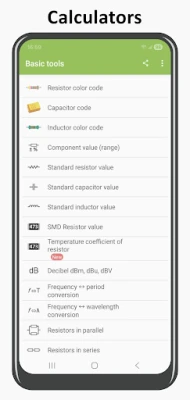
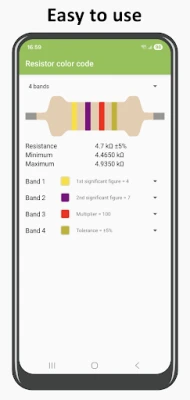
- Resistor Color Code: Quickly identify resistor values using color codes.
- Inductor Color Code: Easily decode inductor values.
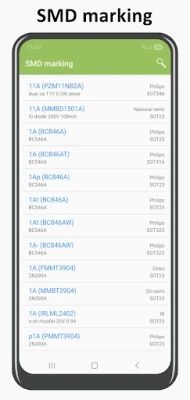
- Resistor SMD Marking & EIA-96: Understand surface-mount device markings.
- dBm, dBW, dBuV Converter: Convert between different power levels.
- Resistors in Series and Parallel: Calculate total resistance in various configurations.
- Voltage Divider: Determine output voltage in divider circuits.
- Ohm's Law: Apply Ohm's law for circuit analysis.
- Complex Number Operations: Perform calculations involving complex numbers.
- RC and RL Filters: Design and analyze filter circuits.
- 555 Timer Configurations: Utilize 555 timers in monostable and astable modes.
- Wheatstone Bridge: Measure unknown resistances accurately.
- Battery Capacity Calculator: Estimate battery life based on usage.
- LED Calculator: Calculate resistor values for LED circuits.
- Temperature Conversion: Convert between Celsius, Fahrenheit, and Kelvin.
Advanced Digital Tools
For those delving into digital electronics, the app offers a suite of advanced tools:
- Number Converter: Convert between binary, decimal, and hexadecimal systems.
- Logic Gates: Simulate and analyze logic gate operations.
- Analog-to-Digital Converter: Understand the principles of ADCs.
- Boolean Function Minimization: Simplify complex boolean expressions.
- Cyclic Redundancy Check (CRC): Ensure data integrity with CRC calculations.
Comprehensive Electronics Resources
The app also serves as a valuable resource hub, featuring:
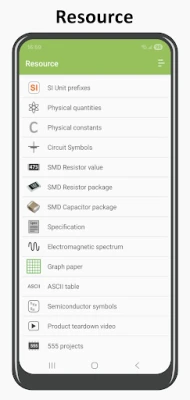
- SI Unit Prefixes: Familiarize yourself with standard unit prefixes.
- Circuit Symbols: Reference common circuit symbols for schematic design.
- Programming Languages: Access resources for C and Python programming.
- Resistivity, Permeability, and Permittivity Tables: Reference material properties for design.
- Standard Wire Gauge (SWG) Table: Understand wire sizes and their applications.
Unlock the PRO Version
For those seeking enhanced capabilities, the PRO version offers a one-time purchase option that unlocks:
- No Limitations on Component Values: Access a broader range of component values.
- Complex Matrix Calculations: Perform advanced matrix operations.
- Attenuator Designs: Design Pi-pad and T-pad attenuators.
- Poles & Zeros Calculator: Analyze system stability and frequency response.
Who Can Benefit from This App?
This toolkit is perfect for:
- Electronics Students and Teachers: A valuable educational resource for learning and teaching.
- Hardware Makers: Ideal for Arduino and Raspberry Pi enthusiasts.
- Professional Engineers: A reliable tool for fieldwork and design.
- Hobbyists: Perfect for building robots, amplifiers, and drones.
Offline Functionality and Regular Updates
Enjoy the convenience of a fully offline app that requires no internet connection. The toolkit is lightweight, super-fast, and regularly updated with new tools and features to enhance your electronics workflow.
Feedback and Support
Your suggestions matter! If you have a feature request or feedback, simply email us. We value every input and strive to improve your experience.
Download Now!
Supercharge your electronics projects and streamline your workflow with this ultimate mobile toolkit. Download now and take your electronics skills to the next level!
All trade names mentioned in this app or the accompanying documentation are trademarks or registered trademarks of their respective holders. This app is not affiliated with or endorsed by these companies.
Rate the App
User Reviews















Popular Apps










Editor's Choice









