

Latest Version
June 05, 2026
Xpert Fintech
Finance
Android
0
Free
com.xfltrade.ebs
Report a Problem
More About EBL Fast Trade
Unlocking the Power of Mobile and Desktop Trading Apps
In today's fast-paced financial landscape, having the right tools at your fingertips can make all the difference. Whether you're a seasoned trader or just starting, mobile and desktop trading applications offer a plethora of features designed to enhance your trading experience. This article delves into the essential functionalities of these platforms, ensuring you maximize your trading potential.
Mobile App Features for Efficient Trading
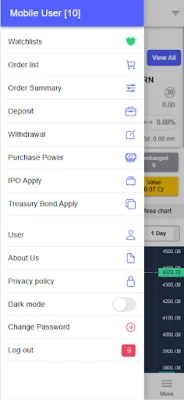
Mobile trading apps have revolutionized how traders interact with the market. Here are some standout features that can elevate your trading game:
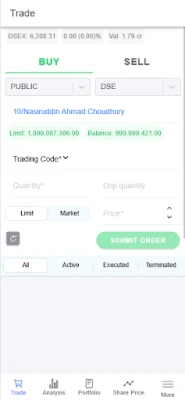
1. Advance Orders for Seamless Trading
Plan your trades ahead of time by placing advance orders for the next trading day. This feature allows you to strategize without the pressure of real-time decision-making.
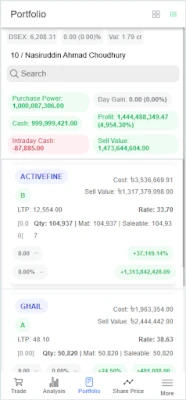
2. Manage Orders Directly from Your Portfolio
With a simple swipe right or left, you can place or manage orders directly from your portfolio. This intuitive design streamlines the trading process, making it easier to execute your strategies.
3. Effortless Order Management
Edit or cancel orders with just a swipe. This functionality ensures that you can quickly adapt to market changes without unnecessary delays.
4. Filter Orders by Status or Symbol
Stay organized by filtering your order list based on status or symbol. This feature helps you keep track of your trades and manage your portfolio effectively.
5. Real-Time Balance Summary
Monitor your financial health with a real-time balance summary and day gain/loss overview on your portfolio. This insight is crucial for making informed trading decisions.
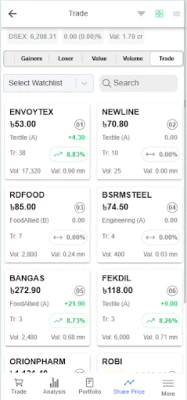
6. Create Your Favorite Watchlist
Stay focused on your preferred stocks by creating and managing a favorite watchlist. This feature allows you to track the performance of specific assets effortlessly.
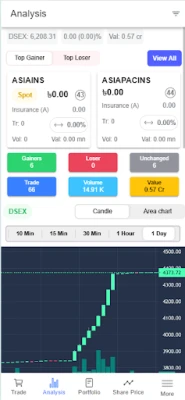
7. Interactive Charts for In-Depth Analysis
Utilize interactive candle and area charts to analyze market trends. These visual tools provide valuable insights into price movements and trading patterns.
8. Track Market Movers
Keep an eye on top gainers and losers to identify potential trading opportunities. This feature helps you stay ahead of market trends.
9. Stay Informed with Market News
Stay updated with the latest market news directly within the app. Timely information is key to making strategic trading decisions.
10. Comprehensive Market Depth View
Access a 10-level market depth view to understand the supply and demand dynamics of your chosen assets. This feature is essential for gauging market sentiment.
11. Historical Price and Volume Data
Analyze historical price and volume data to identify trends and make informed predictions about future movements.
12. Time & Sales for Trade Insights
View time and sales data to gain insights into trade activity. This information can help you refine your trading strategies.
13. Sector-wise Charts and Market Map
Utilize sector-wise charts and a market map to visualize market performance across different sectors. This feature aids in identifying sector trends and opportunities.
Desktop Mode: Advanced Trading Capabilities
For those who prefer a more robust trading experience, desktop applications offer advanced features that cater to serious traders:
1. Keyboard Shortcuts for Speed
Utilize keyboard shortcuts to execute trades faster. This feature is invaluable for traders who need to act quickly in volatile markets.
2. Search Historical Orders
Easily search historical orders within any date range. This capability allows for thorough analysis and record-keeping.
3. Customizable Dashboard
Create a personalized trading environment with a customizable dashboard featuring widgets that suit your trading style.
4. Quick Monitoring with Price Ticker
Keep track of market movements with a favorite price ticker for quick monitoring of your selected stocks.
5. Advanced Order Filters
Utilize advanced filters across orders, trades, and holdings to streamline your trading process and enhance decision-making.
6. Insights on Market Movers
View top gainers, losers, and most active stocks to identify potential trading opportunities and market trends.
7. Real-Time Portfolio Management
Place orders directly from your real-time portfolio, ensuring that you can act on opportunities as they arise.
8. Visualize Market Data
Use scoreboard and market map visualizations to gain a comprehensive view of market performance and trends.
9. Technical Charts with Indicators
Access technical charts equipped with multiple indicators to conduct in-depth analysis and refine your trading strategies.
10. Minute and Sector-wise Charts
Utilize minute charts and sector-wise charts for detailed analysis of market movements and sector performance.
11. Detailed Trade-Level Insights
Access a time and sales window for detailed trade-level insights, helping you understand market dynamics better.
12. Historical Volume Profile Analysis
Analyze historical volume profiles to identify key support and resistance levels, enhancing your trading strategy.
13. Direct Access to Company Information
Quickly access company information through direct links to the DSE website, ensuring you have all the data you need at your fingertips.
Conclusion: Elevate Your Trading Experience
Both mobile and desktop trading applications offer a wealth of features designed to enhance your trading experience. By leveraging these tools, you can make informed decisions, stay updated on market trends, and ultimately improve your trading outcomes. Whether you prefer the convenience of mobile trading or the advanced capabilities of desktop platforms, the right app can empower you to navigate the financial markets with confidence.
Rate the App
User Reviews















Popular Apps










Editor's Choice









