


Latest Version
April 16, 2026
Carmela
Tools
Android
0
Free
carmela.duplicate.file.finder
Report a Problem
More About Duplicate File Finder
Ultimate Guide to Efficient Duplicate File Scanning Methods
In today's digital age, managing files efficiently is crucial for maintaining an organized system. Duplicate files can clutter your storage, consume valuable space, and create confusion. This guide explores various scanning methods for identifying duplicate files, comprehensive file support, and effective file management techniques.
Choosing the Right Scanning Method
When it comes to detecting duplicate files, selecting the appropriate scanning method is essential. Here are three primary methods to consider:
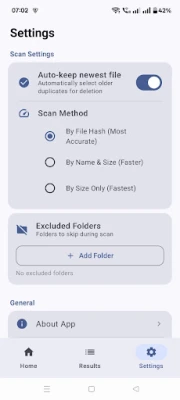
- Hash Comparison: This method is the most accurate, as it compares file content byte-by-byte. By generating a unique hash for each file, it ensures that even the slightest difference in content is detected, making it ideal for thorough scans.
- Name & Size: For a quicker solution, this method matches files based on their names and sizes. While it may not be as precise as hash comparison, it offers a fast way to identify potential duplicates.
- Size Only: If speed is your priority, the size-only method is the quickest option. It identifies files with identical sizes, allowing for rapid scanning, although it may miss duplicates with different content.
Comprehensive Support for Various File Types
Effective duplicate file scanning should support a wide range of file types. Here’s a breakdown of the major categories:
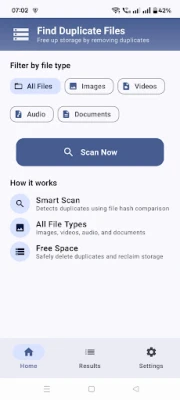
- Images: Scan for duplicates in formats such as JPG, PNG, GIF, BMP, WebP, and HEIC.
- Videos: Identify duplicate video files in formats like MP4, AVI, MKV, MOV, 3GP, FLV, and WMV.
- Audio: Find duplicate audio files across formats including MP3, WAV, FLAC, AAC, OGG, M4A, and WMA.
- Documents: Support for various document types such as PDF, DOC, DOCX, XLS, XLSX, PPT, TXT, and ZIP ensures comprehensive scanning.
Streamlined File Management for Easy Organization
Once duplicates are identified, effective file management becomes crucial. Here are some features that enhance your file organization:
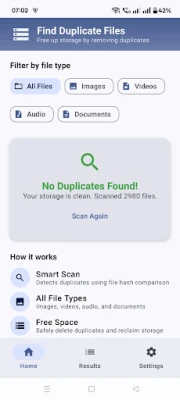
- Organized View: Duplicates are displayed in clear groups, making it easy to identify and manage them.
- Filtering Options: Filter results by file type, such as Images, Videos, Audio, and Documents, to streamline your search.
- Image Previews: Preview image thumbnails directly within the application, allowing for quick visual identification of duplicates.
- File Details: Access essential file information, including name, path, size, and date, to make informed decisions.
- Auto-Select Feature: This feature automatically keeps the newest copy of a file while marking older duplicates for deletion, simplifying the process.
- Deletion Options: Choose to delete individual files or bulk delete selected duplicates, providing flexibility in managing your files.
- Confirmation Dialogs: Built-in confirmation dialogs help prevent accidental deletions, ensuring that you maintain control over your files.
Conclusion
Managing duplicate files doesn't have to be a daunting task. By understanding the various scanning methods available, recognizing the comprehensive support for different file types, and utilizing effective file management features, you can maintain an organized digital environment. Choose the scanning method that best suits your needs and take control of your file storage today!
Rate the App
User Reviews















Popular Apps










Editor's Choice









