
Latest Version
Version
13.1.202310260
13.1.202310260
Update
September 19, 2024
September 19, 2024
Developer
Dr.Web
Dr.Web
Categories
Tools
Tools
Platforms
Android
Android
Downloads
0
0
License
Free
Free
Package Name
com.drweb.mcc
com.drweb.mcc
Report
Report a Problem
Report a Problem
More About Dr.Web Mobile Control Center
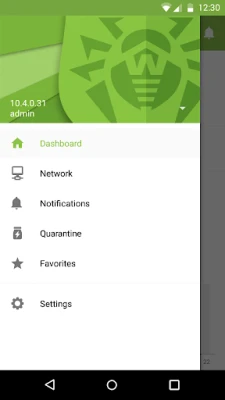
Dr.Web Mobile Control Center is an easy tool for administrating the anti-virus network based on Dr.Web Enterprise Security Suite, Dr.Web Industrial or Dr.Web AV-Desk. It is designed for installation and operation on mobile devices.
Maximize Your Cybersecurity with Dr.Web Mobile Control Center
In today's digital landscape, robust cybersecurity measures are essential for protecting sensitive information. The Dr.Web Mobile Control Center offers a comprehensive solution for managing your anti-virus network efficiently. This article delves into the key functionalities of the Dr.Web Mobile Control Center, highlighting how it can enhance your organization's cybersecurity posture.Seamless Connection to Dr.Web Server
The Dr.Web Mobile Control Center connects to the Dr.Web Server using the credentials of the anti-virus network administrator. This connection is established through an encrypted protocol, ensuring that your data remains secure during transmission. This secure connection is vital for maintaining the integrity of your anti-virus management system.Comprehensive Repository Management
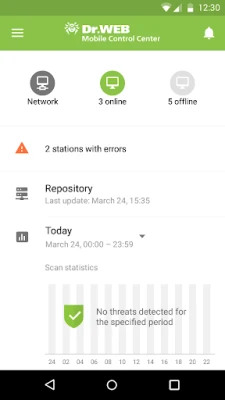
One of the standout features of the Dr.Web Mobile Control Center is its ability to manage the Dr.Web Server repository effectively. Here are the key functions:- View Product Status: Administrators can easily monitor the state of products within the repository, ensuring that all components are up to date.
- Launch Repository Updates: The system allows for seamless updates from the Dr.Web Global Update System, keeping your anti-virus software current and effective against emerging threats.
Efficient Management of Update Failures
The control center provides tools to manage stations where anti-virus software updates have failed. This includes:- Display Failed Stations: Quickly identify which stations are experiencing update issues.
- Update Components: Administrators can initiate updates on these failed stations, ensuring that all devices remain protected.
Real-Time Statistics and Monitoring
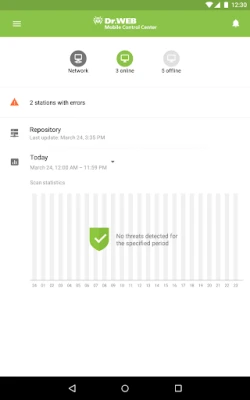
Understanding the state of your anti-virus network is crucial for effective management. The Dr.Web Mobile Control Center offers:- Station Registration Overview: View the number of stations registered with the Dr.Web Server and their current online or offline status.
- Viral Statistics: Access detailed statistics regarding the viral threats detected on protected stations, enabling proactive measures.
Managing New Connections
The control center simplifies the process of managing new stations waiting to connect to the Dr.Web Server. Administrators can:- Approve or Reject Access: Control which new stations gain access to the network, enhancing security protocols.
Advanced Anti-Virus Component Management
Managing the anti-virus components installed on network stations is crucial for maintaining security. The Dr.Web Mobile Control Center allows administrators to:- Launch Scans: Initiate fast or full scans on selected stations or entire groups, ensuring comprehensive threat detection.
- Configure Scanner Reactions: Set up how the Dr.Web Scanner responds to malware detection, tailoring responses to your organization's needs.
- Quarantine Management: View and manage files in Quarantine for selected stations or groups, allowing for efficient handling of potential threats.
Station and Group Management
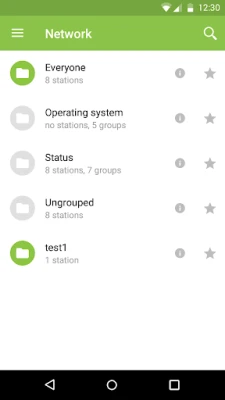
The control center provides robust tools for managing stations and groups within the anti-virus network:- View Properties: Access detailed information about each station and group.
- Manage Anti-Virus Package Composition: Adjust the components of the anti-virus package as needed.
- Delete Stations: Remove stations that are no longer part of the network.
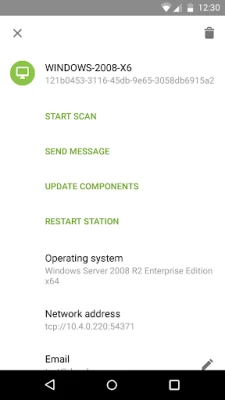
- Send Custom Messages: Communicate directly with stations through custom messages.
- Reboot Stations: Restart Windows OS stations remotely for maintenance or troubleshooting.
- Add to Favorites: Create a favorites list for quick access to frequently managed stations.
Efficient Search Capabilities
Finding specific stations and groups within the anti-virus network is made easy with the Dr.Web Mobile Control Center. Administrators can search by various parameters, including:- Name
- Address
- ID
Interactive Push Notifications for Major Events
Stay informed about critical events in your anti-virus network with the interactive Push notifications feature. This functionality includes:- Display Notifications: View all notifications generated by the Dr.Web Server.
- Set Reactions: Define how the system should respond to specific notification events.
- Search Notifications: Use filters to find notifications based on specified parameters.
- Manage Notifications: Delete or exclude notifications from automatic deletion, ensuring important alerts are retained.
Conclusion
The Dr.Web Mobile Control Center is an indispensable tool for organizations looking to enhance their cybersecurity management. With its comprehensive features, including repository management, update failure resolution, real-time statistics, and interactive notifications, it empowers administrators to maintain a secure and efficient anti-virus network. By leveraging these capabilities, businesses can stay ahead of potential threats and ensure the safety of their digital assets.Rate the App
Add Comment & Review
User Reviews
Based on 0 reviews
No reviews added yet.
Comments will not be approved to be posted if they are SPAM, abusive, off-topic, use profanity, contain a personal attack, or promote hate of any kind.















More »

Popular Apps

Nova BrowserJef Studios

Throne WishlistThrone.com

Dark Web Browser : OrNETStronger Apps

LINE: Calls & MessagesLINE (LY Corporation)

XENO; Plan, AutoSave & InvestXENO Investment

Rogue SlimeQuest Seeker Games

Дядя Ваня VPNKONDAKOV

PrivacyWallPrivacyWall

Robinhood WalletRobinhood

Roman empire games - AoD RomeRoboBot Studio
More »
Editor's Choice

Grim Soul: Dark Survival RPGBrickworks Games Ltd

Craft of Survival - Gladiators101XP LIMITED

Last Shelter: SurvivalLong Tech Network Limited

Dawn of Zombies: Survival GameRoyal Ark

Merge Survival : WastelandStickyHands Inc.

AoD Vikings: Valhalla GameRoboBot Studio

Viking Clan: RagnarokKano Games

Vikings: War of ClansPlarium LLC

Asphalt 9: LegendsGameloft SE

Modern Tanks: War Tank GamesXDEVS LTD