

Latest Version
26.2.2809
July 15, 2026
DR-ONLINE
Tools
Android
0
Free
pl.dronline.nettools
Report a Problem
More About DR-NetTools
Unlock Your Network's Potential with DR-NetTools: The Ultimate Network Management Solution
In today's digital age, whether you're a network engineer, IT administrator, student, or a tech-savvy home user, having the right tools to understand, monitor, and troubleshoot your network is essential. DR-NetTools provides you with clear, real-time information to optimize your network experience.
Comprehensive Overview with the Current Status Screen
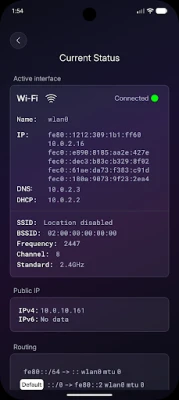
Start your journey with the Current Status screen, which offers a quick and comprehensive overview of your device's connectivity. This intuitive dashboard displays:
- Active interfaces
- IP addresses
- DNS and DHCP configurations
- Default gateways
- Your public IP address
With all this information presented in a single, readable format, you can easily monitor how your device connects to the network.
Wi-Fi Scan Tool: Optimize Your Wireless Connection
The Wi-Fi Scan tool is an invaluable feature that allows you to discover nearby wireless networks. You can check signal strength and gather essential details to determine which access point will provide the most stable connection. Additionally, the Wi-Fi Channels feature enables you to visualize how networks are distributed across channels, helping you identify interference or overcrowded bands. This insight allows you to optimize your router settings for better performance.
Powerful Diagnostics at Your Fingertips
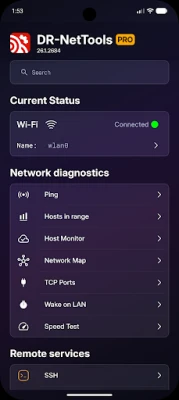
When network issues arise, DR-NetTools equips you with powerful diagnostic tools that are just a tap away:
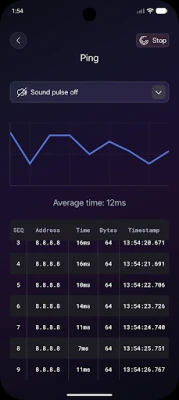
- Ping: Check basic connectivity and latency to any host.
- Traceroute: Visualize every hop on the way to your destination, pinpointing where delays or outages occur.
- MTR (My Traceroute): This combines ping and traceroute into a continuous test, providing a live view of latency and packet loss over time.
Network Mapping and Device Discovery
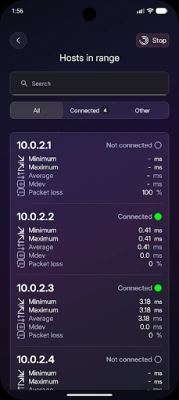
Utilize the Hosts in Range and Network Map features to scan your local network, list active devices, and visualize your network topology. This functionality allows you to see exactly what is online and how devices are interconnected. The TCP Ports scanner is another essential tool that helps you discover open ports and running services, which is crucial for troubleshooting and security assessments.
Advanced Address and Domain Tools
DR-NetTools also offers a rich set of tools for managing addresses and domains:
- DNS Lookup: Resolve hostnames to IP addresses.
- Reverse DNS (rDNS): Find the associated hostname starting from an IP address.
- Whois: Access detailed registration data for domains and IP ranges.
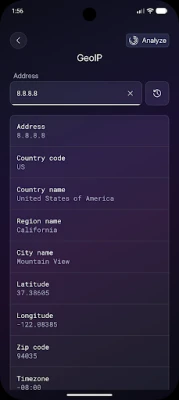
- GeoIP: Estimate the geographical location of IP addresses, providing insights into your traffic sources.
Discover Local Devices with mDNS / Bonjour
The mDNS / Bonjour discovery tool scans your local network for devices and services that advertise themselves, such as printers, smart TVs, or media servers. This feature simplifies the process of locating devices without the need to guess their IP addresses.
Security Checks with SSL Certificate Viewer
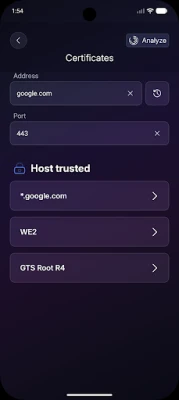
For security-related assessments, the SSL certificate viewer allows you to inspect certificates used by remote servers. You can verify validity periods, issuers, and hostnames to ensure that HTTPS connections are correctly configured and trustworthy.
Secure Remote Management with Built-in SSH Client
The built-in SSH client enables you to securely connect to remote machines, open terminals, and manage servers directly from your device over encrypted connections. Additionally, the Wake-on-LAN feature allows you to remotely power on compatible computers in your network by sending a magic packet to their network interface, making it perfect for remote maintenance and off-hours access.
Advanced Calculators for Network Engineers
Network engineers and learners will find the advanced calculators particularly useful:
- IPv4 Calculator: Simplifies working with addresses, subnet masks, network and broadcast addresses, and host ranges, making subnet planning much easier.
- IPv6 Calculator: Eases the handling of long IPv6 addresses, including compression/expansion and prefix calculations.
- IPv6 Subnet Divider: Allows you to split a larger IPv6 block into smaller, organized subnets, ideal for structured network design and growth.
A User-Friendly Interface for All Skill Levels
With its clean interface, logical grouping of tools, and clear explanations for each function, DR-NetTools serves as both an everyday utility and an educational companion for those learning about networking.
Conclusion: Your Complete Network Toolbox
Install DR-NetTools to have a comprehensive network toolbox at your fingertips. From basic checks to advanced analysis, this all-in-one app is designed to meet the needs of both novice users and seasoned professionals. Empower yourself with the tools to manage and optimize your network effectively.
Rate the App
User Reviews















Popular Apps










Editor's Choice









