

Latest Version
April 30, 2026
BrightCodeDev
Tools
Android
0
Free
io.bright.deviceinfo
Report a Problem
More About Device Info-View phone info
Unlocking Your Android Device's Potential: A Comprehensive Guide to Key Features
In today's digital age, understanding your Android device's capabilities is essential for optimizing performance and enhancing user experience. This article delves into the key features of device information applications, providing insights into how you can leverage these tools to manage your device effectively.
1. Comprehensive Device Identification
One of the standout features of device information applications is their ability to provide detailed identification of your Android device. This includes:
- Device ID: Unique identifiers that help in recognizing your device.
- Phone ID: Information specific to your mobile device.
- Advertising ID: A unique ID used for advertising purposes.
- Carrier ID: Information about your mobile carrier.
With this information at your fingertips, you can easily manage your device settings and troubleshoot issues related to connectivity and performance.
2. Efficient Storage Analysis
Storage management is crucial for maintaining optimal device performance. The storage analysis feature allows users to:
- Identify redundant files that take up unnecessary space.
- Locate duplicate files that clutter your storage.
- Find large files that may be consuming significant storage capacity.
By utilizing these tools, you can free up valuable storage space, ensuring your device runs smoothly and efficiently.
3. In-Depth Apps Analysis
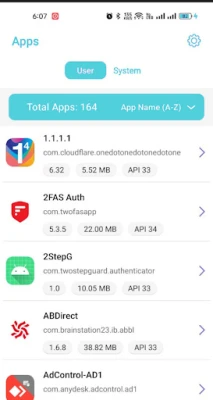
Understanding the applications installed on your device is vital for security and performance. The apps analysis feature provides a thorough examination of:
- Installed applications and their functionalities.
- Native libraries that support app operations.
- Sensitive permissions that apps require, helping you assess security risks.
This comprehensive analysis empowers users to make informed decisions about app management and security.
4. Device Test Benchmarking
To ensure your device operates at its best, conducting regular tests is essential. The device test benchmarking feature includes:
- Screen Test: Evaluates display functionality.
- Button Test: Checks the responsiveness of physical buttons.
- Sensor Test: Assesses the performance of various sensors.
- Hardware Test: Verifies the overall hardware functionality.
These tests help identify any potential issues, allowing for timely repairs or adjustments.
5. Detailed Device Benchmarking
Device benchmarking goes beyond basic testing, providing insights into:
- Hardware performance metrics.
- Sensor data for real-time monitoring.
This feature is particularly useful for tech enthusiasts who want to push their devices to the limit and ensure optimal performance.
6. Comprehensive App Details
Understanding the intricacies of each application is crucial for effective management. The app detail feature allows users to view:
- Activities and services associated with each app.
- Broadcast receivers that facilitate communication between apps.
- Permissions granted to each app, ensuring transparency and security.
This level of detail helps users maintain control over their device's security and functionality.
7. Real-Time Floating Monitor
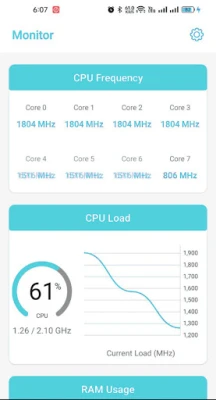
The floating monitor feature provides real-time insights into your device's performance, displaying critical data such as:
- Real-time FPS (Frames Per Second) for gaming and video playback.
- Battery current and voltage for monitoring battery health.
- Mobile phone signal strength for connectivity assessment.
- CPU and GPU status for performance tracking.
This feature is invaluable for users who want to keep a close eye on their device's performance metrics.
8. Comprehensive Device Information Overview
Device information applications provide a wealth of data, including:
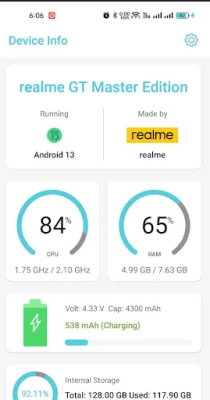
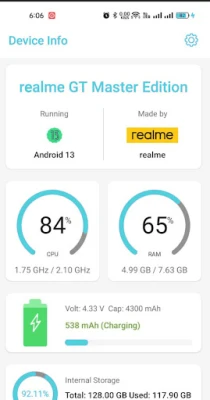
- Device Information: General details about your Android device.
- System Information: Insights into the operating system and its version.
- Hardware Information: Specifications of the device's hardware components.
- Device Benchmark: Performance metrics for comparison.
- Device Test & Hardware Test: Comprehensive testing results.
- SIM Information: Details about your SIM card and carrier.
- Real-Time Sensor Information: Live data from device sensors.
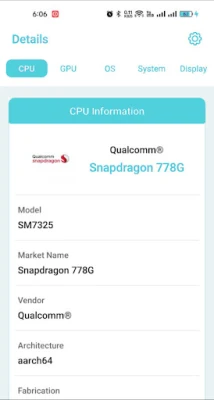
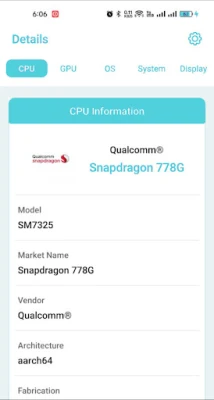
- CPU & Processor Details: Information about processing capabilities.
- Battery Health: Status and longevity of your battery.
- Hardware Temperature: Monitoring device temperature to prevent overheating.
- Network Information: Details about WiFi and mobile network connectivity.
- Camera Information: Specifications and capabilities of your device's camera.
- Storage Information: Insights into internal, system, and external storage.
- Display Information: Details about screen resolution and quality.
- GPU & RAM Information: Insights into graphics processing and memory usage.
- App Details: Comprehensive information about installed applications.
By harnessing the power of these features, users can optimize their Android devices, ensuring they operate at peak performance while maintaining security and efficiency.
In conclusion, understanding and utilizing the key features of device information applications can significantly enhance your Android experience. From storage management to real-time monitoring, these tools empower users to take control of their devices, ensuring they remain efficient and secure.
Rate the App
User Reviews















Popular Apps










Editor's Choice









