


Latest Version
1.3.6
January 12, 2026
Pony Tools
Tools
Android
0
Free
com.sunfire.deviceinfo
Report a Problem
More About Device Info: System & CPU Info
Unlock Your Device's Potential: Comprehensive Monitoring with Device Info
In today's fast-paced digital world, understanding the intricate details of your device is essential for optimal performance. Device Info offers a powerful solution by monitoring real-time data on various components of your device, including CPU, GPU, RAM, operating system, sensors, storage, battery, Wi-Fi, Bluetooth, network, applications, display, camera, and thermal performance. This article delves into the key features of Device Info, showcasing how it can enhance your device management experience.
Real-Time Dashboard Overview
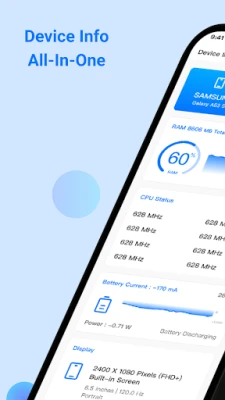
The Dashboard Info feature provides a comprehensive overview of your device's software and hardware specifications. Users can easily access critical information such as:
- RAM usage
- Internal and external storage capacity
- Battery status and health
- CPU performance metrics
- Available sensors and installed applications
This centralized view allows users to quickly assess their device's performance and make informed decisions about resource management.
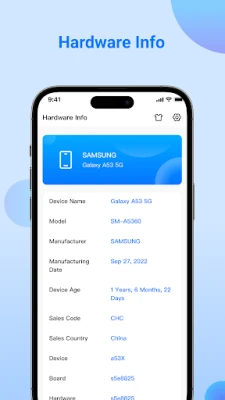
Detailed Device Information
With the Device Info feature, users can gain insights into their device's identity, including:
- Brand and model
- Manufacturer details
- Manufactured date and device age
- Device board and hardware specifications
This information is crucial for troubleshooting and ensuring compatibility with software updates and applications.
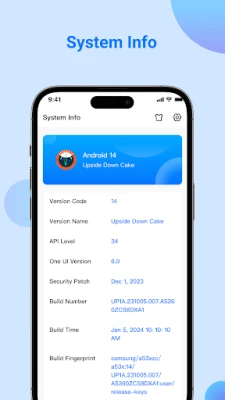
In-Depth System Information
The System Info section provides essential details about your operating system, including:
- OS version and code name
- API level and security patch level
- Bootloader and build number
- Baseband and Java VM specifications
- Kernel version and language settings
Understanding these elements helps users maintain their device's security and performance.
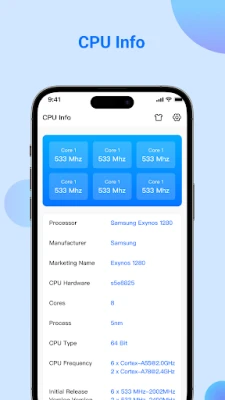
Comprehensive CPU Insights
The CPU Info feature displays detailed information about your device's processing capabilities, including:
- System on Chip (SoC) specifications
- Processor architecture and supported ABIs
- CPU governor settings and number of cores
- CPU frequency and GPU details
This data is invaluable for users looking to optimize their device's performance for gaming or resource-intensive applications.
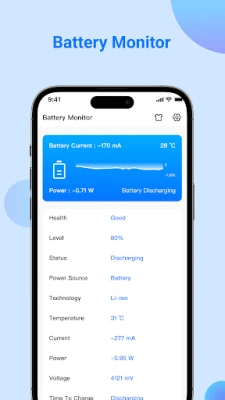
Battery Health Monitoring
Keeping track of your battery's health is crucial for longevity. The Battery Info feature allows users to monitor:
- Battery health and level
- Status and technology used
- Temperature and voltage readings
- Power consumption (watts) and current (mA)
- Overall capacity in real-time
This information helps users manage their charging habits and extend battery life.
Display Specifications
The Display Info section provides insights into your device's screen capabilities, including:
- Resolution and density
- Font scale and physical size
- Refresh rates and HDR capabilities
- Brightness levels and screen timeout settings
- Orientation and other display features
Understanding these specifications can enhance your viewing experience and help you adjust settings for optimal performance.
Memory and Storage Insights
With the Memory Info feature, users can easily track:
- RAM and ROM usage
Additionally, the Storage Info section provides details on:
- Internal and external storage capacities
This information is essential for managing space and ensuring your device runs smoothly.
Network Performance Monitoring
The Network Info feature displays critical information about your connectivity, including:
- IP address and gateway
- Subnet mask and DNS settings
- Lease duration and interface details
- Frequency and Wi-Fi standards
Monitoring these aspects helps users troubleshoot connectivity issues and optimize their network settings.
Camera Capabilities
For photography enthusiasts, the Camera Info feature reveals:
- Aperture and focal length
- ISO range and focus modes
- Crop factor and RAW capability
- Resolution and flash modes
- Available face detection modes
This detailed information empowers users to make the most of their device's camera features.
Sensor Information
The Sensor Info section provides a comprehensive overview of all sensors available on your device, including:
- Sensor name and vendor
- Type and power consumption
- Wake-up or dynamic sensor capabilities
- Maximum range of each sensor
Understanding your device's sensors can enhance app functionality and user experience.
Application Insights
The App Info feature allows users to explore:
- Activities and services
- Broadcast receivers and permissions
- Details from the AndroidManifest.xml file
This information is vital for managing app permissions and ensuring security.
Device Benchmarking
Finally, the Test Device feature enables users to benchmark their device's performance through various tests, including:
- Display and multi-touch responsiveness
- Audio tests for loudspeaker and microphone
- Sensor tests for accelerometer and proximity
- Charging and vibration tests
- Bluetooth and fingerprint sensor performance
These benchmarks
Rate the App
User Reviews















Popular Apps










Editor's Choice









