

Latest Version
5.25.0
December 15, 2025
Andrey Efremov
Tools
Android
0
$4.59
ru.andr7e.deviceinfohw.pro
Report a Problem
More About Device Info HW+
Unlocking Your Device's Potential: A Comprehensive Guide to Hardware Detection Apps
In today's tech-savvy world, understanding the intricate details of your smartphone's hardware can significantly enhance your user experience. However, for developers and enthusiasts alike, accessing this information can sometimes be a challenge, especially when sales of essential apps are paused in certain regions. This article delves into a powerful hardware detection app that provides comprehensive insights into your device's components, making it an invaluable tool for both users and developers.
What is a Hardware Detection App?
A hardware detection app is designed to analyze and report on the various components of your smartphone. By identifying hardware specifications, it helps users understand their device's capabilities and limitations. This is particularly useful for developers who are building custom kernels or working on Android modifications.
Key Features of the App
This app boasts a user-friendly interface and quick navigation, making it easy to access detailed information about your device. Here are some of its standout features:
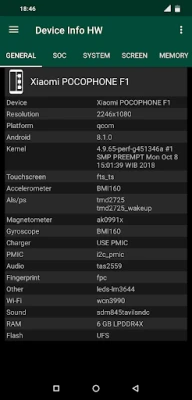
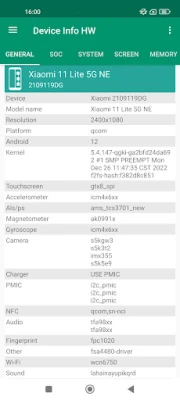
- Comprehensive Component Detection: The app can identify various hardware components, including the LCD, touchscreen, cameras, sensors, memory, flash storage, audio systems, NFC, chargers, Wi-Fi, and battery status.
- Dark Mode Support: Users can enjoy a fresh design with a dark or black theme available in the PRO version or for a two-week trial in the free version.
- Clickable Navigation: The app allows users to switch between tabs or use a navigation panel, with many items being clickable for easy access to additional information.
Detailed Component Analysis
The app provides in-depth information about various components of your device:
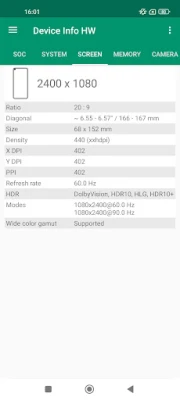
LCD and Touchscreen
For recent Android devices, LCD detection may require root access. Users can also perform a color test to evaluate the display quality. The touchscreen feature displays the model and supports a multi-touch test to determine how many fingers can be recognized simultaneously.
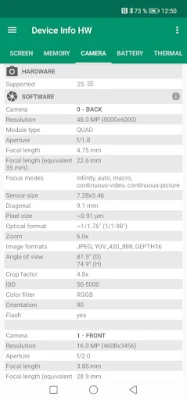
Camera Specifications
The app reveals detailed hardware information about the camera, including model, vendor, and resolution. If the camera model cannot be detected, a list of supported cameras may be provided.
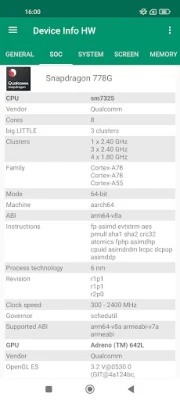
System on Chip (SoC) Information
Users can access detailed information about the SoC, including:
- CPU: Model, cores, clusters, family, ABI, governor, and frequency.
- GPU: Model, vendor, OpenGL support, frequency, and a list of extensions.
Clicking on the clock speed opens a CPU monitor for real-time performance tracking.
Memory and Storage Insights
The app provides information about memory types (LPDDR) and operating frequencies for some devices. Users can also view flash storage details, including chip type and vendor (eMMC or UFS), along with memory and storage usage statistics.
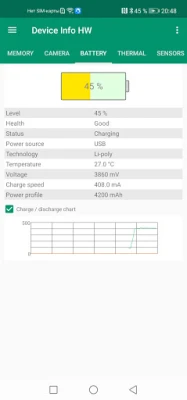
Battery Information
Battery details include:
- Discharging speed (current consumption)
- Charging speed (charge current minus current consumption)
- Power profile encoded by the manufacturer for consumption calculations
Thermal and Sensor Data
The app displays temperature readings from thermal sensors and checks the availability of basic sensors, along with tests for their functionality.
Application and Driver Insights
Users can quickly find installed applications and view system app information. The app also lists other chips used in the device, providing a comprehensive overview of the hardware ecosystem.
Advanced Features in the PRO Version
The PRO version of the app unlocks additional features that enhance user experience:
- Custom Themes: Choose from light, dark, or black themes to personalize your app experience.
- Device Reporting: Generate detailed reports about your device, which can be saved in HTML or PDF format and shared via email.
- Battery Tab Redesign: A new design for the battery tab includes charge and discharge charts for better visualization.
- Device List: Access a list of I2C and SPI devices, which is particularly useful for devices with multiple chips.
Device Database and Community Support
The app features a device database where users can find information on other devices, compare specifications, and check for similar drivers. Users are encouraged to upload their device information to contribute to the community. For those interested in translating the app or providing feedback, there are options to reach out via email or forums.
Requirements and Permissions
The app requires Android version 4.0.3 or higher. Permissions needed include:
- Internet: Required for uploading device information (used only for manual uploads).
- Camera: Necessary for retrieving camera software characteristics for older camera APIs.
- Access Wi-Fi State: Needed to gather information about Wi-Fi connections.
Conclusion
This hardware detection app is a powerful tool for anyone looking to unlock the full potential of their smartphone. With its comprehensive features and user-friendly design, it serves as an essential resource for both casual users and developers. Whether you're interested in understanding your device's capabilities or developing custom software, this app provides the insights you need to enhance your experience.
Rate the App
User Reviews















Popular Apps










Editor's Choice









