

Latest Version
September 16, 2024
Samsung Electronics Co., Ltd.
Tools
Android
0
Free
com.samsung.android.lool
Report a Problem
More About Device Care
Maximize Your Galaxy Device's Performance: Essential Features and Permissions
In the ever-evolving world of technology, ensuring your Galaxy device operates at peak performance is crucial. While some features may not be available on all Galaxy devices, understanding the main functionalities can significantly enhance your smartphone experience. This article delves into the key features of a performance optimization app designed specifically for Galaxy devices, along with the necessary permissions for optimal use.
Comprehensive Smartphone Health Reports
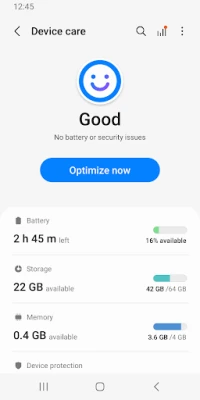
One of the standout features of this app is its ability to report the current condition of your smartphone on a 100-point scale. This comprehensive assessment provides users with valuable insights into their device's performance, allowing for informed decisions regarding maintenance and optimization.
One-Click Optimization for Effortless Performance
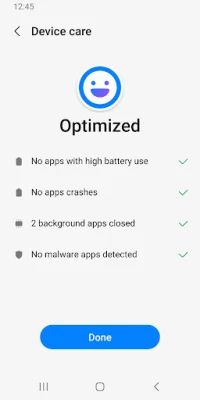
With just a single click, users can optimize their smartphones, streamlining processes and enhancing overall functionality. This feature simplifies the often complex task of device management, making it accessible to all users, regardless of their technical expertise.
In-Depth Battery Usage Analysis
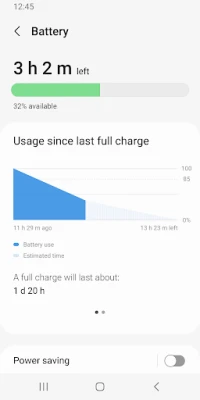
Understanding how your apps consume battery power is essential for maximizing your device's longevity. This app analyzes battery usage on a per-app basis, identifying which applications are draining your battery the most. By utilizing the App Power Monitor, users can easily check for unused apps and take action to conserve battery life.
Identifying Battery-Draining Applications
In addition to monitoring battery usage, the app excels at identifying specific applications that contribute to battery drain. By pinpointing these culprits, users can make informed choices about which apps to keep or uninstall, ultimately leading to a more efficient device.
Power Saving Modes for Extended Usage
To ensure that users can enjoy their smartphones for longer periods, the app provides two distinct power-saving modes: Power Saving Mode and Maximum Power Saving Mode. These features allow users to customize their device settings to extend battery life, making it easier to stay connected throughout the day.
Efficient Memory Management
Memory management is crucial for maintaining a smooth user experience. This app efficiently manages and frees up memory, ensuring that your device runs smoothly and without unnecessary lag. By optimizing memory usage, users can enjoy faster app launches and improved overall performance.
Real-Time Malware Detection and Protection
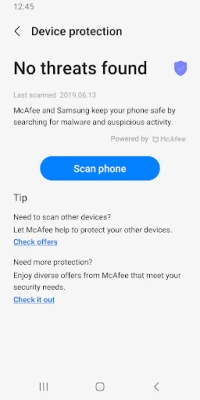
In today's digital landscape, security is paramount. The app offers robust malware detection capabilities, identifying viruses and spyware in real-time. This feature provides users with peace of mind, knowing that their smartphones are protected from potential threats.
Convenient Widget Options
For added convenience, the app offers two types of widgets. These widgets allow users to access essential features quickly and easily, enhancing the overall user experience. With customizable options, users can tailor their home screens to suit their preferences.
Understanding App Permissions
To fully utilize the app's features, certain permissions are required. However, it's important to note that users can still access basic functions without granting optional permissions. Below are the permissions associated with the app:
Optional Permissions
- Notifications: This permission is used to notify users about updates and events, ensuring they stay informed about the app's performance and new features.
In conclusion, while some Galaxy devices may not support all the features outlined, the optimization app provides a wealth of functionalities designed to enhance your smartphone experience. From comprehensive health reports to real-time malware protection, this app is an essential tool for any Galaxy user looking to maximize their device's performance. By understanding the key features and necessary permissions, users can take full advantage of what this app has to offer, ensuring their smartphones remain efficient and secure.
Rate the App
User Reviews















Popular Apps










Editor's Choice









