



Latest Version
1.2
December 10, 2025
WEBGEHEUER OÜ
Entertainment
Android
0
Free
com.decksettings.app
Report a Problem
More About DeckSettings
Unlocking the Ultimate Steam Deck Experience: Your Guide to DeckSettings
In the ever-evolving world of gaming, finding the perfect configuration for your Steam Deck can be a daunting task. Fortunately, DeckSettings brings together community-favorite, trusted sources to streamline the process of discovering the right settings for your gaming needs. This comprehensive guide will explore how DeckSettings enhances your gaming experience by providing quick access to essential tuning guides and resources.
Discover New Tuning Guides Effortlessly
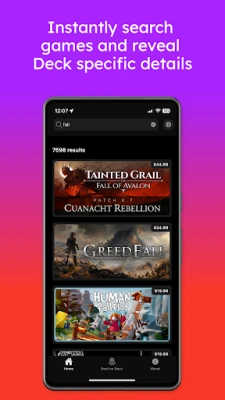
The Home Screen of DeckSettings serves as your gateway to discovering new tuning guides swiftly. With a user-friendly interface, it allows gamers to navigate through a wealth of information with ease. The Latest Settings Feed prominently displays recent reports from reputable sources such as SteamDeckHQ, ShareDeck, and DeckVerifiedGames. This feature ensures that you stay updated with the latest configurations and optimizations available for your Steam Deck.
Comprehensive Game Details View
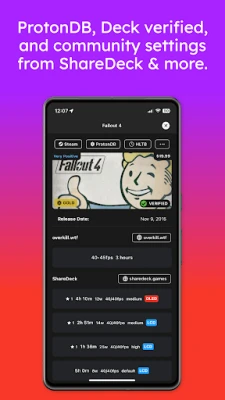
One of the standout features of DeckSettings is the Game Details View. This section consolidates valuable data from multiple sources, including ProtonDB, Deck Verified status, and user reviews from Steam. By aggregating this information, DeckSettings provides a holistic view of each game, allowing you to make informed decisions about your gaming experience.
Quick-Action Buttons for Seamless Navigation
DeckSettings enhances usability with quick-action buttons that offer direct links to essential resources such as Steam, ProtonDB, and HowLongToBeat. This feature allows you to access critical information without the hassle of searching through multiple platforms. Additionally, the Game Settings Section collects presets from various sources, including ShareDeck, SteamDeckHQ, DeckVerifiedGames, and Overkill.wtf, ensuring you have the best configurations at your fingertips.
Effortless Browsing with the Best on Deck Tab
The Best on Deck tab is a treasure trove for gamers seeking top-rated titles. Featuring a continuous scrolling format, this section allows for effortless browsing of the highest-rated games on SteamDeckHQ. Each game card opens into a detailed view, making it easy to compare settings and choose your next gaming adventure.
Optimize Your Gaming Experience
Whether you aim to fine-tune performance, extend battery life, or research new releases, DeckSettings keeps reliable knowledge within reach. The platform is specifically optimized for the Steam Deck experience, ensuring that you can maximize your gaming potential with minimal effort.
Disclaimer: Understanding the Affiliation
It is essential to note that DeckSettings is not affiliated with, endorsed by, or sponsored by Valve Corporation, Steam, or Steam Deck. All trademarks, logos, and images related to Steam Deck are the property of Valve. Additionally, game titles, images, and logos belong to their respective owners.
Conclusion: Elevate Your Steam Deck Experience
In conclusion, DeckSettings is an invaluable resource for any Steam Deck user looking to enhance their gaming experience. By consolidating information from trusted sources and providing easy access to essential tools, it empowers gamers to make informed decisions and optimize their settings. Dive into the world of DeckSettings today and unlock the full potential of your Steam Deck!
Rate the App
User Reviews















Popular Apps










Editor's Choice









