Latest Version
May 27, 2026
Rishu Kumar
Tools
Android
0
Free
com.rishukumarcodes.DataUsageManager
Report a Problem
More About Data Usage Monitor &Speed Test
Maximize Your Connectivity with Real-Time Data Tracking
In today's digital age, managing your data usage is more crucial than ever. With the increasing reliance on mobile devices for everything from streaming to browsing, understanding your data consumption can save you money and enhance your online experience. This article explores the essential features of a top-tier data usage monitoring app that empowers you to take control of your internet connectivity.
Comprehensive Real-Time Data Tracking
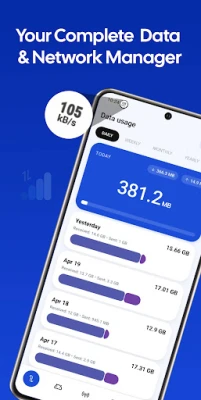
Stay informed about your data consumption with precise tracking of daily, weekly, and monthly usage. This app categorizes your Mobile Data and Wi-Fi usage into visually appealing charts, providing you with a clear overview of your internet activity. With this feature, you can effortlessly monitor your data limits and avoid unexpected overage charges from your internet provider.
In-Depth Per-App Usage Analysis
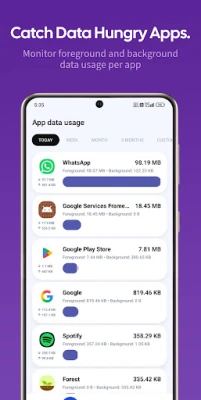
Are you noticing that your data is depleting faster than expected? The app offers a detailed analysis of data consumption on a per-app basis. You can identify which applications are the biggest culprits, whether they are running in the foreground or background. This insight allows you to take action against data-hungry apps, ensuring you maintain control over your data usage.
Hotspot and Tethering Monitoring
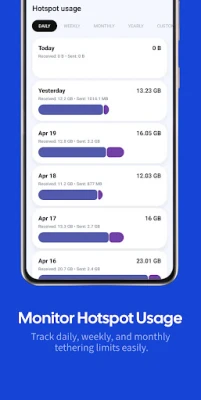
If you frequently share your internet connection with friends or other devices, the dedicated Hotspot Usage tracker is a game-changer. It enables you to monitor the amount of data being transmitted and received through your mobile hotspot. By keeping an eye on your tethering limits, you can avoid exceeding your data plan and incurring additional charges.
Integrated Internet Speed Test
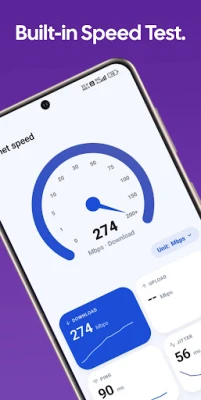
No need for a separate application to check your internet speed! This app features a built-in network tester that provides instant results. With just a single tap, you can view your Download speed, Upload speed, Ping, and Jitter. This functionality ensures you are always aware of your connection quality, allowing for a seamless online experience.
Convenient Home Screen Widgets and Notification Stats
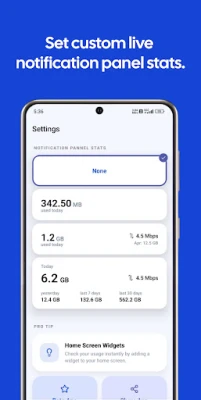
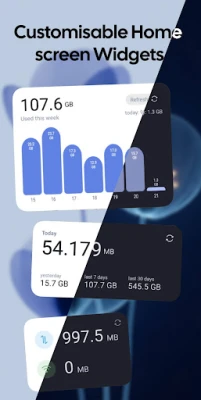
Keep your data statistics at your fingertips with customizable home screen widgets. These beautifully designed widgets allow for quick glances at your daily or weekly usage without opening the app. Additionally, you can enable live data tracking directly in your notification panel, ensuring you stay updated on your data consumption while maintaining your device's aesthetic.
Privacy-Centric and Minimalist Design
In an era where privacy is paramount, this app prioritizes your data security. With a sleek, intuitive, and modern user interface, it operates solely on your device. Your data usage metrics and network history are stored locally, ensuring that no personal information is tracked, collected, or shared. This commitment to privacy allows you to use the app with confidence.
Key Features at a Glance
- Track Mobile Data, Wi-Fi, and Roaming usage.
- Monitor daily, weekly, monthly, and custom date ranges.
- Detailed app-by-app data consumption (Foreground/Background).
- Dedicated Mobile Hotspot/Tethering tracker.
- Accurate Internet Speed Test (Ping, Jitter, Down/Up Mbps).
- Customizable Home Screen Widgets.
- Live Notification Panel data monitor.
- Clean, minimalist, and modern user interface.
- Privacy-focused: No remote tracking or data harvesting.
Why Choose the Data Usage Monitor?
Choosing the right data usage monitoring app can significantly impact your digital experience. Here are compelling reasons to opt for this app:
- Save Money: Prevent costly overage charges by setting alerts and closely monitoring your data limits.
- Privacy Driven: Your data remains yours. All tracking occurs locally on your device, ensuring that no usage data is shared with third parties.
- Lightweight and Fast: Designed for efficiency, the app consumes minimal battery and system resources, allowing for smooth operation.
- Modern UI: Enjoy a premium interface with Material 3 design, compatible with both Light and Dark modes for a personalized experience.
Take Control of Your Data Usage Today!
Eliminate the uncertainty surrounding your mobile bill and network performance. Download the Data Usage Monitor & Speed Test app today and discover the smartest way to manage your digital connectivity. Start saving data and enhancing your online experience now!
Download now and take charge of your data usage!
Rate the App
User Reviews













Popular Apps










Editor's Choice









