

Latest Version
April 01, 2026
Parmar Studios
Tools
Android
0
Free
com.parmarstudios.datapulse
Report a Problem
More About Data Pulse: Data Usage Monitor
Maximize Your Network Efficiency with Data Pulse: The Ultimate Speed Monitoring Tool
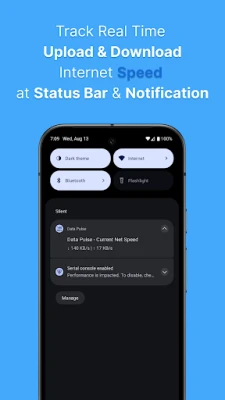
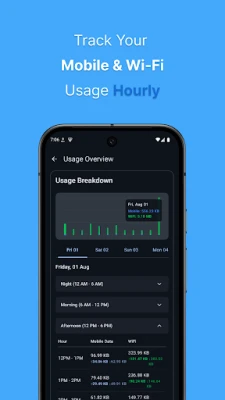
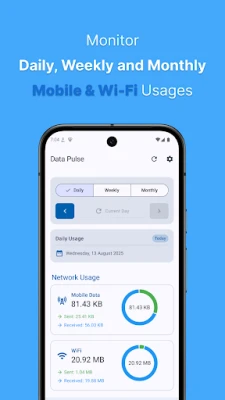
In today's fast-paced digital world, staying informed about your internet speed and data usage is crucial. Data Pulse emerges as a simple yet powerful tool designed to provide real-time insights into your upload and download speeds directly from your notification shade and status bar. This lightweight application not only tracks your mobile and Wi-Fi data usage over time but also offers detailed visibility into your network activity, including app-specific data consumption. Whether you're browsing, gaming, streaming, or downloading, Data Pulse ensures you remain informed at a glance.
Key Features of Data Pulse
- Real-time Speed Monitoring: Instantly view your upload and download speeds, allowing you to gauge your network performance effortlessly.
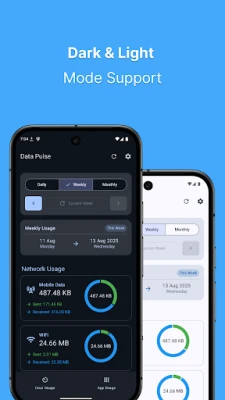
- Comprehensive Data Usage Tracking: Monitor your data consumption daily, weekly, and monthly to stay within your limits.
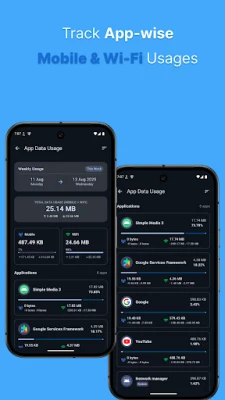
- App-wise Data Statistics: Identify which applications are consuming the most bandwidth, enabling you to manage your data usage effectively.
- Compatibility with All Networks: Data Pulse works seamlessly with both Wi-Fi and mobile networks, ensuring consistent performance.
- Persistent Notification: Enjoy a live speed display in your notification area, keeping you updated without needing to open the app.
Why Choose Data Pulse?
Data Pulse stands out in a crowded market of network monitoring tools for several compelling reasons:
- User-Friendly Interface: The app is designed for simplicity, requiring no complex setup. Just install and start monitoring your network.
- Accurate and Reliable Monitoring: With its always-on feature, Data Pulse provides precise network monitoring, ensuring you have the most up-to-date information.
- Lightweight and Efficient: The application is designed to be battery-friendly, ensuring it won’t drain your device’s power while you stay connected.
- Privacy-First Approach: Data Pulse prioritizes your privacy by collecting no personal data and utilizing no trackers, giving you peace of mind.
- Minimalistic Design: The clean and uncluttered user interface focuses solely on delivering essential information without distractions.
- Essential Permissions: The app requests only the necessary permissions to function, ensuring your device remains secure.
How Data Pulse Enhances Your Internet Experience
In an era where internet connectivity is paramount, understanding your network's performance can significantly enhance your online experience. Data Pulse empowers users by providing critical insights into their internet usage patterns. By tracking your data consumption, you can make informed decisions about your online activities, whether it’s streaming your favorite shows, engaging in online gaming, or simply browsing the web.
Getting Started with Data Pulse
Getting started with Data Pulse is a breeze. Follow these simple steps to begin monitoring your network:
- Download and Install: Visit your device’s app store, search for Data Pulse, and install the application.
- Grant Necessary Permissions: Allow the app to access essential features for optimal performance.
- Customize Settings: Adjust the settings according to your preferences, such as notification styles and data tracking intervals.
- Monitor Your Network: Start using your device as usual, and keep an eye on the notification shade for real-time updates.
Conclusion: Stay Informed with Data Pulse
In conclusion, Data Pulse is an indispensable tool for anyone looking to optimize their internet experience. With its real-time monitoring capabilities, comprehensive data tracking, and user-friendly design, it provides everything you need to stay informed about your network activity. Whether you’re a casual user or a heavy data consumer, Data Pulse equips you with the insights necessary to manage your bandwidth effectively. Download Data Pulse today and take control of your internet usage like never before!
Rate the App
User Reviews















Popular Apps










Editor's Choice









