
Latest Version
7.1.4
May 05, 2026
enoiu
Education
Android
0
Free
com.enoiu.cursive
Report a Problem
More About Cursive: Learn Cursive
Mastering Cursive Writing: A Comprehensive Guide
Cursive writing is an elegant and fluid form of handwriting that connects letters in a flowing manner. Whether you are a student, a professional, or simply someone looking to enhance your writing skills, mastering cursive can be a rewarding endeavor. This guide will explore various aspects of cursive writing, including practice techniques, language support, customization options, and more.
Effective Cursive Practice Techniques
To become proficient in cursive writing, consistent practice is essential. Here are some effective techniques to help you improve:
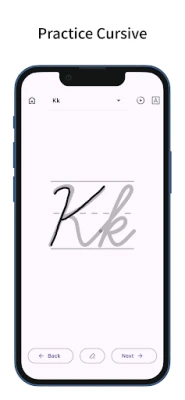
- Trace to Enhance Skills: Begin by tracing letters to familiarize yourself with their shapes and strokes. This foundational step is crucial for developing muscle memory.
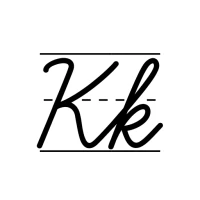
- Uppercase and Lowercase Mastery: Practice both uppercase and lowercase letters to ensure a well-rounded skill set. Each letter has its unique flow, and mastering both is vital.
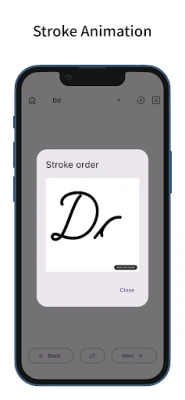
- Animated Stroke Order: Utilize resources that provide animated stroke orders for each letter. Visual aids can significantly enhance your understanding of the writing process.
- Special Characters Support: If you are learning languages like German or Spanish, practice writing special characters such as ä, ö, ß, ü, and ñ to broaden your cursive skills.
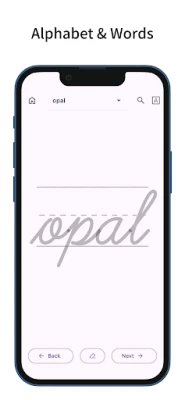
- Multilingual Word Practice: Expand your vocabulary by practicing over 100 words in multiple languages. This not only improves your cursive writing but also enhances your language skills.
- Accent Marks Awareness: Familiarize yourself with words that include accent marks, as they are common in many languages and essential for proper pronunciation.
Exploring Cursive Languages
One of the unique features of cursive writing is its adaptability across different languages. Here’s how you can explore various cursive languages:
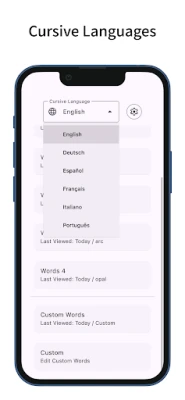
- Language Switching: Easily switch between cursive languages such as English, German, Spanish, French, Italian, and Portuguese. This flexibility allows for a diverse learning experience.
- Linked Display Language: The app’s display language can be linked to the selected cursive language, providing a seamless learning environment.
- Word Meaning Search: Use the integrated search button to look up word meanings, which opens in an external browser for convenience.
- Share Functionality: The search button can also be switched to a share button, allowing you to share your progress or favorite words with others.
Custom Words for Personalized Practice
Personalization is key to effective learning. Here’s how you can incorporate custom words into your cursive practice:
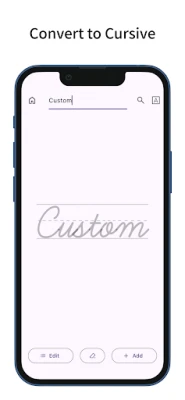
- Custom Text Display: In the “Custom” section, you can display any typed text in cursive, making it easier to practice specific phrases or names.
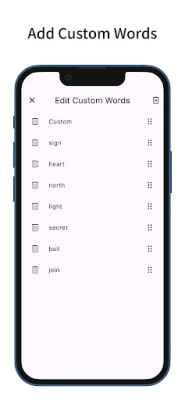
- Adding Custom Words: Add your own words to the "Custom Words" list for targeted practice. This feature allows you to focus on vocabulary that is relevant to you.
- Sorting and Deleting Options: Custom Words can be easily sorted and deleted, ensuring that your practice list remains organized and relevant.
- Cross-Language Sharing: Custom Words are shared across all cursive languages, allowing for a cohesive learning experience regardless of the language you choose.
Adjustable Cursive Settings
To enhance your cursive writing experience, various settings can be adjusted to suit your preferences:
- Font Customization: Change the font of the example text to find a style that resonates with you.
- Font Size Adjustment: Adjust the font size of the example text for better visibility and comfort during practice.
- Example Styles: Choose between different example styles, such as with a line, without a line, or none, to suit your practice needs.
- Pen and Eraser Toggle: Switch between pen and eraser modes to practice writing and correcting mistakes effectively.
- Pen Thickness and Color: Customize the pen’s thickness and color to make your writing experience more enjoyable.
- Zoom Functionality: Enable or disable zooming to focus on specific areas of your writing.
Customization Options for Enhanced Experience
To make your cursive writing practice more enjoyable, consider the following customization options:
- Dark Mode Support: For those who prefer a darker interface, dark mode can reduce eye strain during long practice sessions.
- Theme Color Changes: Change the theme color to personalize your writing environment and make it more visually appealing.
- Material Design Aesthetics: Enjoy a simple and intuitive design based on Material Design principles, ensuring a user-friendly experience.
Conclusion
Mastering cursive writing is a journey that requires dedication and practice. By utilizing effective techniques, exploring various languages, and customizing your practice experience, you can enhance your cursive skills significantly. Whether for personal enjoyment or professional use, cursive writing remains a valuable skill that adds elegance to your communication. Start your cursive writing journey today and unlock the beauty of this timeless art form!
Rate the App
User Reviews















Popular Apps










Editor's Choice









