Latest Version
3.0.16
March 20, 2026
CrookCatcher
Tools
Android
0
Free
com.harteg.crookcatcher
Report a Problem
More About CrookCatcher: Intruder Selfie
Protect Your Phone with CrookCatcher: The Ultimate Anti-Theft Security App
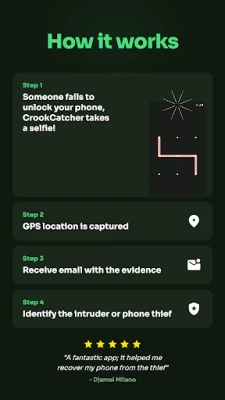
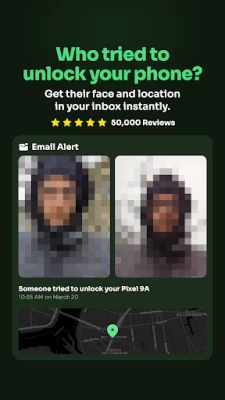
In an age where smartphones are an integral part of our lives, ensuring their security is paramount. CrookCatcher emerges as a leading anti-theft security application designed to safeguard your device from unauthorized access. This innovative app captures an intruder's selfie when someone inputs the wrong PIN, password, or pattern, providing you with crucial evidence of any attempted theft. With CrookCatcher, you can instantly identify who tried to unlock your phone and receive photos, videos, GPS locations, and estimated addresses directly to your inbox. Whether you're concerned about phone thieves or simply want to keep nosy individuals at bay, CrookCatcher is your go-to solution.
🌟 Trusted by Millions Worldwide
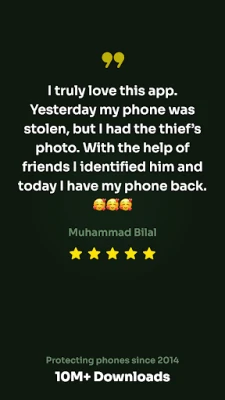
- Over 10 million downloads
- More than 500 million intruder photos captured across 190+ countries since 2014
🥳 Free Phone Security Features
CrookCatcher offers a range of free features that enhance your phone's security:
- Intruder Selfie: Automatically captures a photo of anyone who enters the wrong PIN or password.
- Identify Intruders: Detects and records who attempted to unlock your device.
- GPS Location Tracking: Captures the GPS location of anyone trying to snoop on your phone.
- Instant Alert Emails: Sends immediate notifications with intruder photos to your email.
🚀 Upgrade to PRO for Enhanced Security
For users seeking advanced security features, upgrading to the PRO version of CrookCatcher unlocks a suite of powerful tools:
🔍 Detailed Intruder Recording
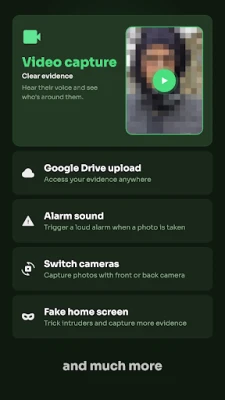
- Video Capture: Record videos with sound to provide clear evidence of intruders.
- Back-Facing Camera: Utilize the back camera to capture environmental details during an intrusion.
- Auto-Upload: Automatically upload photos and videos to Google Drive for easy access from any device.
🎭 Outsmart Thieves
- Fake Home Screen: Display a deceptive home screen to mislead intruders.
- Custom Lock Screen Message: Show a personalized warning message to deter thieves.
🚨 Advanced App Security Features
- Disguised App Icon: Hide the app with a disguised icon and name for added security.
- Custom Alert Emails: Personalize email subjects and conceal notifications for privacy.
- Pattern Code Lock: Secure access to CrookCatcher with a unique pattern code.
🔐 Capture Evidence Even After Unlock
CrookCatcher's break-in detection feature captures a photo if an intruder successfully guesses your password after multiple failed attempts, ensuring you have evidence even if they gain access.
😵 Protection Against Shutdown Attempts
Worried about thieves trying to disable your phone? CrookCatcher can block the power menu, quick settings, and notification shade, capturing evidence when someone attempts to turn off your device or enable airplane mode. This feature utilizes accessibility permissions to monitor these elements on the lock screen, although it may not work on all devices.
🔋 Battery-Friendly Operation
CrookCatcher is designed to be battery-efficient, remaining inactive until someone enters the wrong PIN, ensuring minimal battery consumption.
❗ Important Notes for Users
- Unlock your phone once after rebooting to re-enable CrookCatcher.
- Not compatible with pop-up cameras or fingerprint errors.
- On Android 13 and above, a system notification will appear when the camera is in use.
- Utilizes Device Administrator permissions to securely monitor unlock attempts.
🛠 Help & Privacy
For assistance and frequently asked questions, visit www.crookcatcher.app. Your privacy is important; learn more about our policies at www.crookcatcher.app/privacy.
🚀 Download CrookCatcher Today!
Don’t wait until it’s too late. Download CrookCatcher today and take the first step in protecting your phone from snoopers and thieves. With its advanced features and user-friendly interface, you can rest assured that your device is secure.
Rate the App
User Reviews















Popular Apps










Editor's Choice









