

Latest Version
3.2.1
July 01, 2026
Snow Technology
Communication
Android
0
Free
jp.com.snow.contactsx
Report a Problem
More About ContactsX - Dialer & Contact
Unlocking the Power of Efficient Contact Management: A Comprehensive Guide
In today's fast-paced digital world, managing contacts efficiently is crucial for both personal and professional communication. This article delves into the features of a specialized contact management application designed to streamline your communication processes, particularly for users who require Japanese language support. Discover how this app can enhance your connectivity and organization.
Quick Access to Contact Information
With a focus on Japanese contacts, this app allows users to swiftly locate desired contact information. Whether you need to call, email, or send an SMS, you can do so with just a single click from the list screen. The app also supports selecting multiple phone numbers and email addresses, making it easier to reach out to several contacts simultaneously.
Comprehensive Call Management Features
Stay organized with the app's robust call management capabilities. Users can:
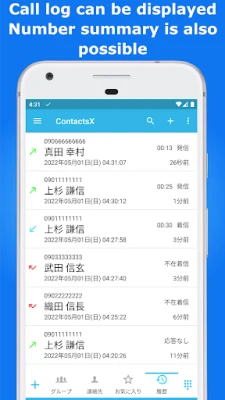
- View call history with a convenient filter function.
- Utilize backup and restore options for call history.
- Access a dedicated contact backup feature.
- Monitor call durations with a built-in call timer.
- Reject unwanted calls effortlessly.
Personalized Calling Experience
Enhance your calling experience by displaying your company name and affiliation on both outgoing and incoming call screens. The app is compatible with various MVNO prefixes, ensuring seamless connectivity without affecting emergency or toll-free calls.
Efficient Group Communication
Sending group emails and SMS has never been easier. The app allows users to:
- Send messages to multiple recipients with just a few taps.
- Utilize a fixed email function for consistent communication.
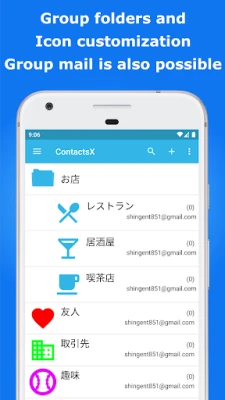
- Organize contacts into group folders, enabling easy access and communication with all group members.
Advanced Search Capabilities
Finding contacts is a breeze with the app's advanced search features. Users can:
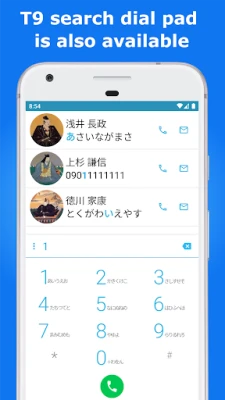
- Search for contacts in Japanese using T9 search directly from the dial pad.
- Switch to an English dial pad for added convenience.
Customizable User Interface
Personalization is key to enhancing user experience. The app offers:
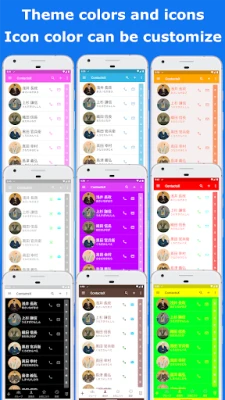
- A variety of theme colors to choose from.
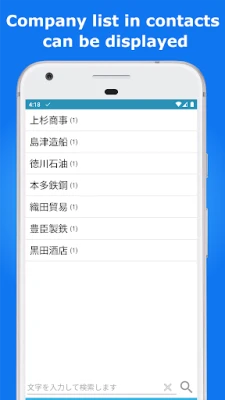
- Options to display a list of companies with a long press on the dial pad activation button.
- Customizable icons for group folders, allowing users to select from 100 different types.
Innovative Contact Sharing Options
Sharing contacts has never been simpler. Users can create QR codes to share their contact information easily. Additionally, the app allows for contact registration by scanning QR codes, streamlining the process of adding new contacts.
Enhanced Profile Management
Manage your profile effortlessly with options to view and edit personal information. Users can select initial display items, such as furigana, nickname, organization, phone number, email, and memo, ensuring that the most relevant information is always at hand.
Flexible Communication Settings
Customize your communication preferences with various settings, including:
- Options for long-pressing tabs to access specific features quickly.
- Settings to display the "Move to Other Groups" tab on the group member list screen.
- International phone number settings that automatically remove the first zero when adding a prefix.
Streamlined Contact Shortcuts and Default Functions
Create shortcuts for your most frequently contacted individuals, enhancing accessibility. The app also includes a default phone handler function, ensuring that your calling experience is as seamless as possible.
Understanding App Permissions
To ensure optimal functionality, the app requires specific permissions:
- Access to Contacts: Necessary for viewing and editing contact information.
- Access to Call History: Required for viewing call logs and utilizing the default phone handler feature.
- Making and Managing Calls: Essential for making outgoing calls and managing call functions.
- Access to Photos and Media Files: Needed for viewing and editing contact photos.
Get in Touch for Support
If you have any questions or requests, please reach out via email at support@snowtechapp.com or visit our help page. We encourage users to avoid posting inquiries in the review section, as it may hinder our ability to assist you effectively.
Note: Advertisements will be displayed after three days of usage.
In conclusion, this contact management app offers a plethora of features designed to enhance your communication experience. From quick access to contact information to advanced search capabilities and customizable settings, it is an invaluable tool for anyone looking to streamline their connectivity.
Rate the App
User Reviews















Popular Apps










Editor's Choice









