

Latest Version
5.16.9
June 02, 2026
Comcast Business
Communication
Android
1
Free
com.comcast.business.voiceedge
Report a Problem
More About Comcast Business
Unlock the Power of Your Business with the Comcast Business App
In today's fast-paced business environment, having the ability to manage your operations on the go is essential. The Comcast Business App is a revolutionary tool designed specifically for business owners, providing a comprehensive solution to manage your account anytime, anywhere. With its user-friendly interface and streamlined navigation, this app empowers you to take control of your business communications and services directly from your mobile device.
Key Features of the Comcast Business App
The Comcast Business App is packed with features that cater to the diverse needs of business owners. Here’s what you can do:
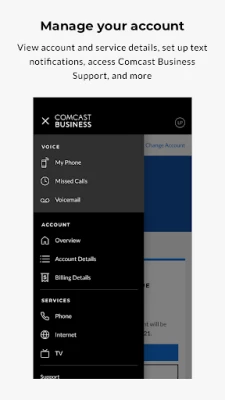
- Manage Your Account Details: Access and update your account information effortlessly.
- View Upcoming Service Appointments: Stay informed about your scheduled services and appointments.
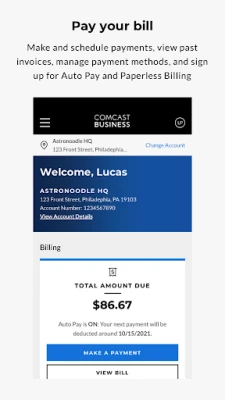
- Pay Your Bill: Easily pay your bills, view past invoices, and manage your payment methods.
- Enroll in Auto Pay and Paperless Billing: Simplify your billing process by opting for automatic payments and digital invoices.
- Manage WiFi Networks and Hotspots: Control your WiFi settings and monitor hotspot usage.
- Set Up Notifications: Receive alerts for billing updates and service requests.
- Stay Updated on Service Status: Get real-time updates on your service performance.
- View Your TV Channel Lineup: Access your TV channels and programming information.
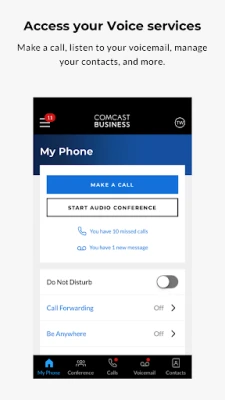
- Call Forwarding: Forward calls to your home, mobile phone, or colleagues seamlessly.
- Troubleshoot Technical Issues: Resolve common technical problems with easy-to-follow steps.
- Access Comcast Business Support: Get help whenever you need it with direct access to customer support.
These features are available to customers using Business Internet, Business TV, Business Voice, Business Voice Mobility, Business VoiceEdge™, and Business VoiceEdge Select™. Availability may vary based on your specific services.
Advanced Features for Voice Mobility Customers
If you are a customer of Comcast Business Voice Mobility, Business VoiceEdge®, or Business VoiceEdge Select™, you can take advantage of additional features that enhance your communication capabilities:
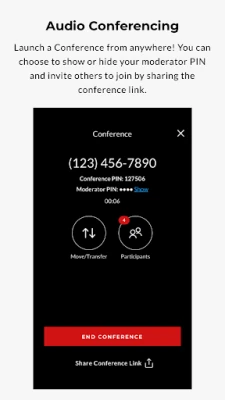
- Host Conference Calls: Easily organize conference calls for up to 50 participants (available for Business VoiceEdge® customers).
- Manage Voicemail: View recent calls, listen to voicemail, and customize your greetings.
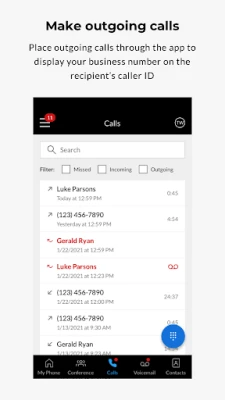
- Outgoing Calls with Business ID: Make calls through the app that display your business phone number on caller IDs.
- Quick Call Transfers: Transfer calls to colleagues or third parties with ease.
- Be Anywhere Devices: Move active calls to your Be Anywhere devices and desk phones effortlessly.
- Manage Inbound Call Settings: Select which phones will ring for incoming calls by managing your Be Anywhere devices.
- Security Settings Management: Easily adjust your security settings to protect your business communications.
These advanced features provide a robust communication platform that adapts to your business needs, ensuring you stay connected and productive.
Why Choose the Comcast Business App?
The Comcast Business App stands out as an essential tool for modern businesses. Here are a few reasons why you should consider integrating it into your daily operations:
- Convenience: Manage your business from anywhere, at any time, directly from your smartphone.
- Efficiency: Streamlined processes save you time, allowing you to focus on what matters most—growing your business.
- Real-Time Updates: Stay informed about your services and account status, enabling proactive management.
- Enhanced Communication: With features like call forwarding and conference calling, you can maintain seamless communication with your team and clients.
Getting Started with the Comcast Business App
To start leveraging the power of the Comcast Business App, follow these simple steps:
- Download the App: Available on both iOS and Android platforms, download the app from the App Store or Google Play.
- Create an Account: Sign in using your Comcast Business credentials or create a new account if you’re a first-time user.
- Explore Features: Familiarize yourself with the app’s features and customize your settings to suit your business needs.
- Stay Connected: Use the app regularly to manage your account and stay updated on your services.
Conclusion
The Comcast Business App is more than just a management tool; it’s a comprehensive solution that empowers business owners to take control of their operations. With its extensive features and user-friendly design, you can manage your account, communicate effectively, and stay informed—all from the convenience of your mobile device. Embrace the future of business management and download the Comcast Business App today!
Rate the App
User Reviews















Popular Apps










Editor's Choice









