
Latest Version
24.0.0
October 21, 2024
Devsig Technologies Private Limited
Tools
Android
0
Free
com.devsig.cloudauthenticator
Report a Problem
More About Cloud Authenticator: 2FA | MFA
Unlocking Enhanced Security Features for Your Digital Life
In today's digital landscape, safeguarding your online presence is more crucial than ever. With cyber threats on the rise, implementing robust security measures is essential. This article delves into the enhanced security features that can protect your accounts and sensitive information, ensuring peace of mind in an increasingly connected world.
Multi-Factor Authentication (MFA): A Fortress for Your Accounts
Multi-Factor Authentication (MFA) serves as a powerful barrier against unauthorized access. By requiring multiple forms of verification, such as a password and a one-time code sent to your mobile device, MFA significantly strengthens your account security. This method includes:
- Two-Factor Authentication (2FA): A widely adopted form of MFA that adds an extra layer of protection.
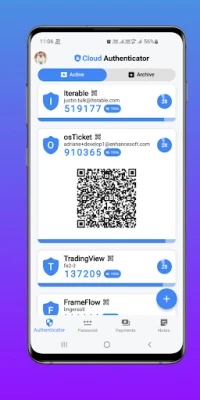
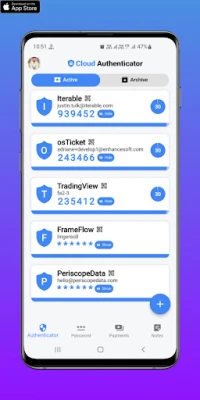
- Time-based One-Time Password (TOTP): Generates a unique code that changes every 30 seconds, ensuring that even if someone obtains your password, they cannot access your account without the current code.
- Push Notifications: Receive instant alerts on your mobile device for any login attempts, allowing you to respond quickly to unauthorized access.
Effortless Password Management
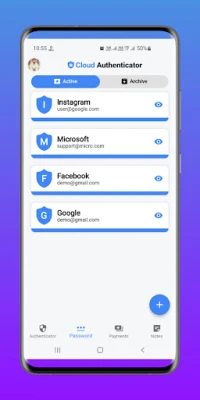
Managing passwords can be a daunting task, but with advanced password management tools, you can securely store and organize your passwords without the need to memorize them. These tools offer:
- Secure Storage: Keep your passwords encrypted and easily accessible.
- Password Auto-Fill: Streamline your login process by automatically filling in your credentials, saving you time and effort.
Secure Transactions: Confidence in Every Payment
Conducting transactions online should be a secure experience. With enhanced security features, you can make payments confidently, knowing your financial information is protected. Key aspects include:
- Flexible Payment Options: Support for various payment methods, including credit cards, debit cards, and mobile wallets, ensures convenience without compromising security.
- Encrypted Transactions: Advanced encryption technology safeguards your financial data during transactions, protecting it from cyber threats.
Advanced Encryption for Your Sensitive Data
Protecting your sensitive information is paramount. Utilizing robust encryption methods, such as AES-256, ensures that your data remains secure from unauthorized access. This level of encryption is essential for:
- Encrypted Notes: Safeguard important notes, passwords, and confidential information with advanced encryption technology.
- Data Protection: Prevent unauthorized access and cyber threats, keeping your information safe and secure.
Biometric Authentication: Convenience Meets Security
Biometric authentication offers a seamless way to access your accounts. By using fingerprint or facial recognition technology, you can enjoy:
- Quick Access: Easily log in to your accounts without the need for passwords.
- Enhanced Security: Biometric data is unique to each individual, making it difficult for unauthorized users to gain access.
Customizable Organization for Efficient Management
Organizing your data effectively is crucial for productivity. With customizable organization features, you can:
- Tailor Categories and Labels: Create a system that suits your preferences, allowing for efficient management of your data.
- Streamline Access: Quickly find and access the information you need without unnecessary hassle.
Seamless Integration with Leading Authentication Technologies
Cloud Authenticator is designed to work harmoniously with various authentication methods, ensuring a comprehensive security solution. Key integrations include:
- SAML: Secure authentication and authorization through Security Assertion Markup Language.
- OAuth: Enables secure authorization for third-party services, enhancing your account's security.
- Microsoft Authenticator and Google Authenticator: Compatibility with these popular apps provides additional layers of security.
- YubiKey and FIDO U2F Security Key: Support for hardware-based authentication methods ensures robust protection against unauthorized access.
Continuous Evolution to Combat Emerging Threats
As cyber threats evolve, so does Cloud Authenticator. The platform continuously adapts to new security challenges, offering support for:
- Duo Mobile: Adds an extra layer of security through multi-factor authentication.
- Okta Verify: Ensures secure authentication and authorization for your accounts.
- PhoneFactor: Provides additional authentication security, enhancing your protection.
Download Cloud Authenticator Today
Take control of your digital security by downloading Cloud Authenticator from the Google Play Store. Experience the peace of mind that comes with knowing your online accounts and sensitive data are protected by cutting-edge security technology and protocols. Don't leave your security to chance—empower yourself with the tools you need to stay safe in the digital world.
Rate the App
User Reviews















Popular Apps










Editor's Choice









