
Latest Version
August 28, 2024
Samsung Electronics Co., Ltd.
Tools
Android
0
Free
com.sec.android.app.clockpackage
Report a Problem
More About Clock
Maximize Your Time Management with Advanced Alarm, World Clock, Stopwatch, and Timer Features
In today's fast-paced world, effective time management is crucial. Whether you're a busy professional, a student, or someone juggling multiple responsibilities, having the right tools can make all the difference. This article explores the powerful features of a time management app, including alarms, world clocks, stopwatches, and timers, designed to enhance your productivity and keep you organized.
Smart Alarm Features for Enhanced Productivity
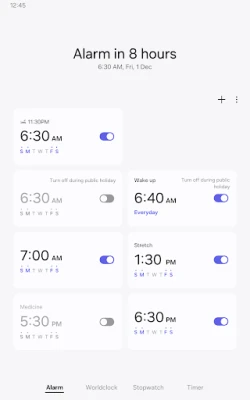
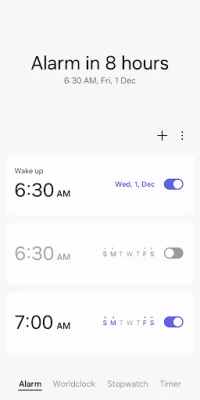
The alarm feature in this app is not just about waking you up; it’s a sophisticated tool that allows you to assign specific dates to alarms. You can set alarms to repeat on certain days, and if you need a break, the option to skip a day is available. This flexibility ensures that you can customize your reminders according to your schedule.
Additionally, the Snooze feature is a game-changer. It mimics the effect of setting multiple alarms, allowing you to catch a few extra minutes of sleep without the worry of oversleeping. With just a tap, you can extend your rest while still ensuring you wake up on time.
World Clock: Stay Connected Globally
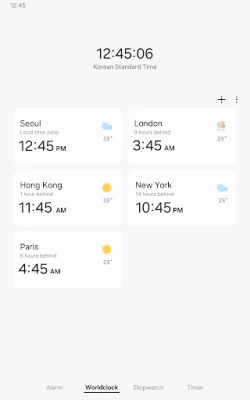
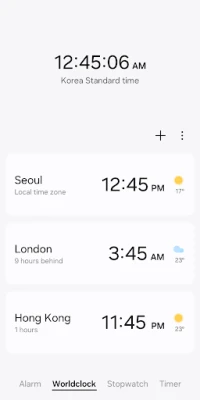
In an increasingly globalized world, knowing the time in different locations is essential. The World Clock feature allows you to check the current time and weather conditions in various cities around the globe. This is particularly useful for professionals working with international clients or friends and family living abroad.
With a simple interface, you can quickly confirm the time in a specific city using an interactive globe. This feature not only helps you plan calls or meetings but also keeps you informed about weather conditions, making it easier to coordinate travel or events.
Stopwatch: Precision Timing for Every Activity
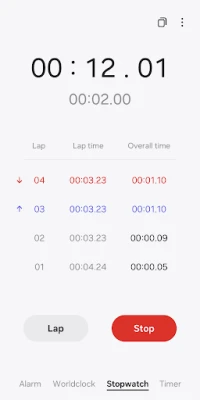
The Stopwatch feature is perfect for those who need to track elapsed time accurately. Whether you’re timing a workout, cooking, or conducting experiments, this tool allows you to record the elapsed time for each section. You can easily copy the recorded values for further analysis or sharing.
This feature is designed for precision, ensuring that you can focus on your activity without worrying about time management. With a user-friendly interface, starting and stopping the stopwatch is seamless, allowing you to concentrate on what matters most.
Timer: Customizable and Efficient
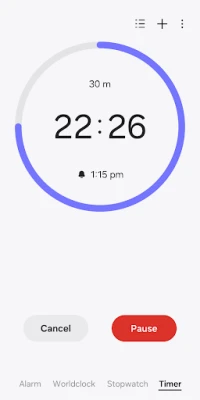
The Timer feature is another essential tool for effective time management. It allows you to save frequently used timer settings as presets, making it easy to access them whenever needed. Whether you’re cooking, exercising, or managing tasks, having preset timers can save you valuable time.
Moreover, the ability to run multiple timers simultaneously is a standout feature. This is particularly beneficial for multitaskers who need to keep track of various activities at once. You can set different timers for different tasks, ensuring that nothing falls through the cracks.
Permissions for Enhanced Functionality
To fully utilize the app's features, certain permissions are required. However, you can still access basic functionalities without granting these permissions. Here’s a breakdown of the optional permissions:
- Music and Audio: This permission allows you to open sounds saved on your device for alarms and timer alerts, adding a personal touch to your notifications.
- Notifications: Enabling this permission ensures you receive updates about ongoing timers and alerts for upcoming or missed alarms, keeping you informed at all times.
- Photos and Videos: For users on Android 14 and higher, this permission lets you select images and videos for alarm backgrounds, making your alarms more visually appealing.
Conclusion: Elevate Your Time Management Skills
In conclusion, the combination of advanced alarm features, a world clock, stopwatch, and timer makes this app an indispensable tool for anyone looking to enhance their time management skills. By leveraging these features, you can stay organized, meet deadlines, and maintain a balanced lifestyle. Embrace the power of effective time management and take control of your day with this comprehensive app.
Rate the App
User Reviews















Popular Apps










Editor's Choice









